


Gone are the days where people thought of “servers” as big, bulky machines installed in data centers. Now, “servers” more often mean cloud instances or VPSs.
All that being said, dedicated servers are still a favorite choice for many. Research shows that dedicated server market grows by $237 million each year [1]. So, the question is, what’s the better choice between virtual and physical servers?

Dedicated Server Hosting is still alive and thriving
As a company that provides Server Management Services, we are often asked what’s better – Virtual or Physical servers. We help digital marketers, web/app developers and other online businesses maintain their server infrastructure – and over time, we’ve learned that there’s no one-size-fit-all solution for all businesses.
See how our server support staff helps you!
There are several factors such as Security, Performance, High availability, and more, that determines which server infrastructure is ideal for a given business. Today, we’ll go through the top 7 factors, that we found as important.
1. Performance – Physical servers have the edge
Let’s get one thing clear first. If you take two dedicated servers of identical capabilities, virtualize one of them, and run the same application in both servers, the dedicated server will always show better performance. Why? Because virtualization always inflicts a performance penalty.
That being said, the difference in performance is noticeable only in applications that run thousands of transactions per minute (like busy eCommerce sites for example).
So, if performance improvement is your sole concern for a server upgrade, go ahead and choose a physical server.
But, before you make that move, know this – Most servers run at a snail’s pace because they’re not optimized. We’ve helped many customers avoid needless investment by tweaking their services, and implementing efficient resource usage.
How Bobcares helps avoid performance bottlenecks
We have a simple principle to keep a server super fast – Catch performance bottlenecks early and Nip it at the bud.
For this, we do 2 things:
- Detect performance anomalies within minutes
- Implement a permanent fix then and there
Quickly detect performance issues
For this, our experts keep a close eye on customer servers 24/7, and as soon as we detect an anomaly in performance metrics (such as server load), we login to the server, kill abusive processes, and prevent a server crash.
[ Making your servers stable and secure doesn’t have to be hard, or costly. Our Server Management specialists are here to keep your servers rock solid. ]
Permanently fix performance bottlenecks
We then go one step ahead and trace the source of the high load. It could be anything, like an un-optimized query, a fragmented database table, or an abusive connection. Once the source is identified, we optimize & harden the services then and there, so that a similar load spike won’t happen again.
By making these small incremental, and timely tweaks, we keep customer servers running very fast all the time, and more importantly, prevent a complete server failure later on, that could cost hundreds of dollars to fix, and more than that in lost sales.
2. Cost savings – It’s a volume game
The most popular reason to virtualize is to save money, and it holds true for a vast majority of cases – but there are exceptions.
Virtualization is beneficial only if you have a large number of servers, or if you’re using an open source virtualization solution such as oVirt. The software licensing costs can be too heavy for smaller installations.
Let’s explore this point with a 5 server infrastructure, as shown here.

A mid-size business infrastructure with load-balanced web and database services.
Now, let’s see what the cost would be to implement this infrastructure using dedicated servers, public cloud and a server virtualization software.
Dedicated servers Vs Public cloud
A 5-server infrastructure as the one shown above is typically used for large websites that attracts thousands of hits per hour. For the sake of calculation, let’s say such a website attracts 7000 hits/hour.
[ Do not waste your money over unnecessary server upgrades. Click here to maintain your servers lightning fast with our 24/7 expert intervention.]
Cost of dedicated server infrastructure
To implement this system, we’ll need 5 dedicated servers. The standard cost of dedicated servers is $140/server/mo, which includes bandwidth cost and software license costs. That takes the cost to $8400/year.
Cost of public cloud infrastructure
If we were to use a public cloud solution like AWS, the per server cost would be $110/month (including the bandwidth and data costs of 7000 hits/hour). This translates to $6600/year. That’s a saving of $1800/year.
But, if the traffic and data usage grows to double the site (which could happen to a growing company), the costs could easily touch $10,000/year or more.
So, while the public cloud solution could work in the short term, it might get costlier in the long run.

Virtualized servers Vs Dedicated servers
We’ve seen in the earlier example that setting up a 5-server infrastructure using dedicated servers will cost $8400/year. Now, let’s see compare it with the cost of implementing a virtualization software.
Virtualizing dedicated servers
To implement a 5-server infrastructure using a virtualization solution, we’ll only need 2 powerful physical servers, as shown below:
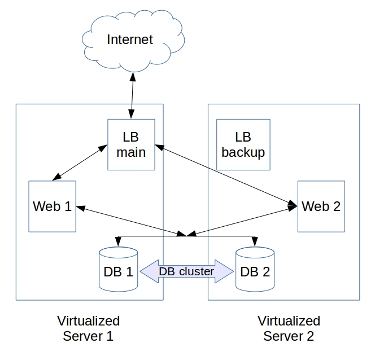
The 5-server infrastructure could be consolidated into 2 higher capacity servers with a virtualization system.
High-end servers can cost $170/server/mo. So, the yearly costs could be $4080 for hardware and application licenses. A commercial virtualization solution (like VMWare) for 2 servers could have a one time cost of $9300, and a recurring cost of $1900/year.
So, if a virutalization solution is used, there’s a one time cost of $9300, and a recurring cost of $6000/year. That means, a virtualized infrastructure can give a savings of $2400/year when compared to a dedicated server solution.
The flip side is that, many businesses will find the huge upfront cost of $9300 (almost double the annual cost) a bit too steep for a relative savings of 28%.
[ Are your servers configured for maximum efficiency? Click here to keep your servers lean and mean, by our specialist engineers who’d manage them real-time. ]
Virtualization is profitable for large number of servers
Now, virtualization could save money if it can replace close to 10 physical servers. For eg., if the number of servers in the original infrastructure was 10, the annual dedicated server costs would be $16800 ($140 x 10).
With virtualization, the costs could be limited to $6700/year, reducing the costs to almost half (including virtualization costs). Almost similar calculations work out for co-located servers or on-premises servers.
So, implementing server virtualization on your current infrastructure gives you a cost benefit only if you have a large number of servers or if you choose an open source virtualization technology such as oVirt to offset the licensing costs.
Here’s a quick comparison of costs for the different infrastructure:
| Dedicated Servers | Public Cloud | Virtualization on Dedicated Servers |
|
| Cost per Year | $8400 | $6600 | $6000 |
| One time cost | – | – | $9300 |
| Savings (compared to Ded servers) |
– | $1800 | $2400 |
How Bobcares helps reduce costs
When switching to a new infrastructure, it’s natural for business owners to consider only the popular brands that are familiar to them. But, brand recognition comes with a high price tag.
For eg. AWS is many times more costly than running a server with Xen virtualization, but the funny thing is that AWS itself is based on Xen virtualization.
Now, regardless of whether a business uses branded virtualization or open source, the servers will still need to be maintained, and that involves a server management expense (by the data center or a server administrator).
At Bobcares, we help businesses save cost by implementing and maintaining virtualized infrastructure using open source solutions. The expenses for server administration remain the same as a branded solution, but the business owners save money on licensing costs.
[ Are your customers leaving over poor quality support? Our 24/7 engineers provide you with world-class server management solutions that help you grow your business.]
3. Disaster recovery – Easier in virtualized servers
Despite the best precautions, servers do fail from time to time. It can be due to electrical issues, hardware failures, security breaches, or anything else.
In such situations, time is of essence, and a new server should be brought online with data recovered from the latest backups.
Virtual servers have a clear edge in Disaster Recovery, because an entire server image can be quickly restored in another physical node in a matter of minutes.
Whereas, it would take several hours to setup new physical servers, install operating system, configure applications, and restore data from backups.
Disaster recovery is not fool-proof, unless it’s made so
Virtualization gives the option for a one-touch recovery, but it comes with a rider – There should be a reliable backup to recover the data from.
In reality, backups fail frequently due to disk space issues, network errors, etc. That results in a nasty surprise when you need the data the most.
So, if Disaster Recovery is an important criterion for you to make the switch, we recommend that you make your backups super reliable.
How Bobcares delivers fool-proof disaster recovery
Reliable backups are the heart of a robust disaster recovery solution. It doesn’t matter if you use physical or virtual servers, unless your backups are double and triple checked to be working, disaster recovery is sure to fail.
Bobcares helps businesses maintain a reliable backup system. Our experts monitor daily backup process, audit backup logs for failure notifications, and fix failed backups.
In addition, restore tests are done periodically on the backups to make sure the whole restore process will work flawlessly in case of an emergency.
[ Are your servers insured adequately against failures? Bobcares engineers provide your with reliable backups and protect your business from a catastrophe. ]
4. High Availability – Default feature in virtualization solutions
In almost all popular virtualization solutions, High Availability is a built-in feature. When one physical server in the cluster goes down, the virtual servers in that server is seamlessly transferred to other servers.
It is possible to setup the same level of reliability with physical servers using open source solutions such as DRBD, GlusterFS, Galera, Heart Beat, KeepAliveD, etc.
But these solutions are not as tightly integrated as the built-in features of virtualization solutions, and as such have a higher probability of failure.
It is not to say that high availability systems in virtualization solutions are fool-proof. Just like any other system, high availability works only when it is properly maintained.
How Bobcares helps maintain reliable high availability systems
High availability systems depend on a lot of factors like free resources, good connectivity, high speed storage, etc. for proper functioning. If any of these doesn’t work, high availability fails.
Bobcares experts monitor critical system parameters 24/7 and take corrective action if something goes wrong.
For eg., the oVirt open virtualization system has 3 pre-conditions for high availability to work – power management should be online, shared storage should be available & fast, and each server should have surplus resources.
So, in the oVirt systems we maintain, we do three things:
- Monitor these functions 24/7 and fix any issues immediately
- Audit server logs for server health errors, and take corrections if needed
- Simulate virtual server failures periodically and test if HA works as intended
All these steps taken together makes sure that high availability systems works when needed.
5. Security – Better in dedicated servers
Setting up a security plan for a virtual server environment is easier because you can focus on a universal security model. A more focused approach for overall security across fewer dedicated machines is easier than security for more hardware, right?
Your virtual server might be on the same physical server of another company. This is especially true if you use a hosting company with a cloud environment.
For example, when leasing cloud space from a hosting provider, the method they use to protect your data from the thousands of other people on the cloud should be fool proof. The security of your virtual server depends on many factors and could complicate a few items when dealing with industry regulations.
6. Infrastructure Scaling – Easier with virtualized solutions
Adding a new server or increasing RAM, CPU, or hard disk is as easy as pressing a few buttons using Virtualization. The ease of deploying new servers can decrease the time it takes to launch new products and services.
When you have to add a new physical server to your environment it takes some planning. You have to purchase equipment and then load the OS, security patches, and plan out physically connecting the server to your network.
Using virtualization you can usually bring up another server within minutes. If you are a company adding 10 servers per month then virtualization will be the perfect choice. The virtualization of servers does equal less hardware which can help reducing our net power usage with virtualization.
[ Do not lose your sleep over your servers. Bobcares’ Server management services make server deployments and maintenance a stress-free task for you. ]
7. Management Time – Lower in virtualized solutions
Many of the virtualization products have advanced management tools that help you to monitor and review information quicker across more servers. This can reduce the human resource needed and less 3rd party software that you have to learn along with less errors.
When you have more items to manage, the risk of making mistakes also increases. Dedicated hosting solutions are more complex due to their hardware separation. Hardware management requires more time.
For virtualization, many of these items are built into the software package. Everyone loves a successful solution. When so many businesses opt for virtualization, it is natural to feel that it is the right choice.
However, different businesses have different priorities, and a solution that worked well for one company may not work well for others. So, before you invest money into virtualization technology, it is advisable to do a top-down analysis of your business goals and business priorities to build a system (physical or virtual) that is customized for your needs.
Ultimately, a successful system is one that enables you to meet all your business goals, is reliable and delivers consistent performance. We help businesses like your’s to design, build, maintain and scale up server infrastructure that’s optimized for their unique business needs.
If you’d like to know more about how to build and maintain a server infrastructure, we’d be happy to talk to you.


Thank you Sajan, Great explanation.
Excellent post!! in order to understand the advantages between virtualized and physical environment.
Thank you Edwin. 🙂
Hello Admin,
I wanna start own web hosting company like Godaddy, bluehost and Hostgetor, suggest which kind of physical or Virtual Server I need to have and what server configuration should have? which company is best for server installation like Dell, HP, IBM, Sun, and Oracle? plz also suggest me how much server space should have in the beginning?
Thanks for visiting our site Bhoopendra. The choice of server and technology depends a lot on how you plan to build your business. How about we talk this over mail?
Hi Blessen,
thanks to reply me, you can reach me through my email bhoopendragauta(at)gmail . com .
In the comparation used by you 5 physical servers are compared with one server that will hold 5 virtual servers? In this case, when you said about the hardware failure “Despite the best precautions, catastrophic server failures do happen due to electrical issues, hardware failures, fire, etc. In dedicated servers, disaster recovery in such instances involve a long-winded process of setting up new servers..” what will happen if this failure will occur to the physical server that is hosting the virtual machines?
Please add a section on software licensing. dB licensing costs play a critical role especially when considering server consolidation.