


Cloud-native applications continuously generate large volumes of logs, images, user activity, metrics, and events. Processing this data manually or relying on long-running servers increases infrastructure costs, operational effort, and scalability challenges. At Bobcares, we help businesses implement AWS serverless solutions that automate data pipelines and support scalable cloud applications.
Modern applications rely on automated, event-driven workflows that respond as data arrives. AWS supports this approach through serverless services that execute code only when needed and charge only for actual usage.
One common implementation is an event-driven ETL (Extract, Transform, Load) pipeline built with Amazon S3 and AWS Lambda.
Today, we will take a look at how to build that pipeline using AWS Lambda and Amazon S3. Although the real-world inspiration is an image watermarking system, this example uses JSON files to demonstrate the workflow. The ETL process remains the same regardless of the data format, making JSON suitable for testing and validation.
Understanding the Use Case
Many file processing workflows follow a simple pattern:
Whenever a file is uploaded, automatically process it and store the result.
AWS naturally supports this workflow through an S3-triggered Lambda architecture.
A user uploads an image or JSON file to an Amazon S3 bucket. Amazon S3 immediately generates an event notification, which triggers an AWS Lambda function. The function processes the uploaded file, such as enriching a JSON document or adding a watermark to an image. After processing, the output is stored in a separate S3 bucket.
This event-driven approach removes the need for polling, background servers, or manual processing workflows.
Why Serverless?
A serverless architecture provides several advantages:
- Automatic scalability: Lambda automatically scales from a single upload to thousands of files.
- Cost efficiency: You pay only for execution time instead of idle infrastructure.
- Operational simplicity: No server provisioning, patching, or maintenance is required.
- Event-driven processing: Functions run only when new data arrives.
ETL Pipeline Using AWS Lambda and S3
This solution follows the standard ETL (Extract, Transform, Load) pattern commonly used in data engineering, analytics, and automation workflows.
1. Extract: Data Ingestion
The pipeline starts when a file is uploaded to a source Amazon S3 bucket.
The following steps occur automatically:
- Amazon S3 generates an event notification.
- The event triggers an AWS Lambda function.
- Lambda downloads the uploaded file to its temporary /tmp directory.
In this demonstration, a JSON file containing an IP address is uploaded. Lambda reads the file using the AWS SDK (boto3). This stage represents the ingestion phase, where raw data enters the pipeline.
2. Transform: Business Logic Execution
The transformation stage contains the business logic.
In this example:
- The uploaded JSON file contains an
field.ip - Lambda calls an external IP geolocation API.
- A new
field is added to the JSON document.country
This workflow is conceptually similar to image watermarking. Instead of updating JSON fields, the function would modify image pixels and apply a text or logo watermark while preserving the original file.
Using JSON makes debugging, testing, and validating the ETL workflow much easier. After validating the process, the same architecture can be applied to images, CSV files, or binary data.
3. Load: Persisting the Output
After transformation, Lambda uploads the modified JSON file to a destination Amazon S3 bucket while leaving the source file unchanged.
Keeping the source and processed files separate provides:
- Data lineage
- Easier rollback
- Better auditability
This completes the ETL cycle.
Python AWS Lambda Implementation
The Lambda function powers the complete ETL pipeline.
The function:
- Responds to Amazon S3 events
- Downloads the uploaded file
- Enriches the data
- Uploads the processed output to another S3 bucket
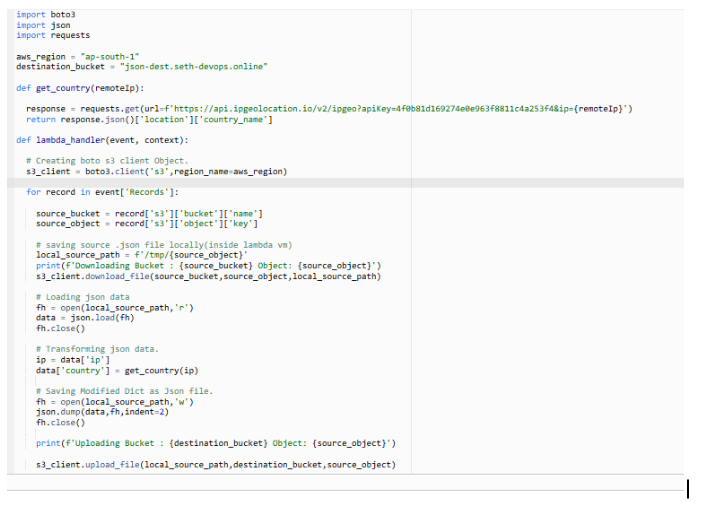
When triggered, the function processes each event record and identifies the source bucket and object key. It downloads the JSON file to the Lambda /tmp directory, which is the only writable location available during execution.
The function reads and parses the JSON data, extracts the IP address, and calls an external IP geolocation API using the requests library. After retrieving the country information, it adds the new field to the JSON document.
Next, the updated file is written back to the local directory and uploaded to the destination S3 bucket. AWS Lambda, Amazon S3 event notifications, and external APIs work together to automate data enrichment without requiring persistent infrastructure.
Mapping Code to ETL Stages
| ETL Stage | Responsibility |
|---|---|
| Extract | Download the JSON file from the source S3 bucket |
| Transform | Enrich the JSON using an external API |
| Load | Upload the processed file to the destination S3 bucket |
This modular design can also support:
- Image watermarking
- Log enrichment
- CSV normalization
- Data validation pipelines
Managing AWS Lambda Dependency Limitations
AWS Lambda runs inside Firecracker microVMs, which introduces an important limitation. Lambda functions cannot install packages during execution.
External libraries such as requests, Pillow, or OpenCV must be packaged before deployment.
A common approach is to create a deployment package by creating a local directory, installing the required dependencies using pip install -t ., adding the lambda_function.py file, and compressing the directory into a ZIP archive.
Uploading this deployment package to AWS Lambda ensures that all required dependencies are available during execution and that the function behaves consistently across environments.
IAM Roles and Security Best Practices
Security is managed through IAM roles instead of hardcoded credentials.
The Lambda function requires:
- Read access to the source S3 bucket
- Write access to the destination S3 bucket
- CloudWatch logging permissions
This approach follows the principle of least privilege while improving security, auditability, and compliance.
Why Choose This Serverless ETL Architecture?
This architecture provides several practical benefits:
- No servers to manage
- Elastic scaling by default
- Low operational overhead
- Easy extensibility
- Production-ready security model
These characteristics make it suitable for modern cloud workloads that require agility and cost efficiency.
Conclusion
AWS Lambda and Amazon S3 provide a practical way to automate ETL workflows without managing infrastructure. Using JSON files simplifies validation before extending the same architecture to image watermarking, data enrichment, analytics preprocessing, and similar workloads. This event-driven approach reduces operational effort while supporting scalable and efficient data processing. If you’re planning to automate cloud workloads, Bobcares’ AWS Managed Services can help you design, deploy, and manage scalable serverless ETL architectures.

