


Proactive monitoring detects issues early to reduce downtime, improve performance, and ensure a smooth, reliable user experience.
Proactive monitoring focuses on identifying and resolving issues before they impact users, helping maintain system performance and reliability. This includes practices like proactive IT monitoring and proactive network monitoring, which ensure complete visibility across systems and infrastructure.
Key benefits, real-world use cases, best practices, common challenges, and future trends are also highlighted to provide a complete understanding of the topic. Explore this article to learn how proactive monitoring supports stable, efficient systems.
An Overview
- What is Proactive Monitoring
- Why Proactive Monitoring Matters
- Proactive vs Reactive Monitoring That Impact Performance
- How Proactive Monitoring Works
- Proactive Monitoring Tools and Techniques
- Key Benefits of Proactive Monitoring
- Real World Use Cases of Proactive Monitoring
- Best Practices for Proactive Monitoring
- Challenges and Limitations of Proactive Monitoring
- The Future of Proactive Monitoring
- FAQs
What is Proactive Monitoring
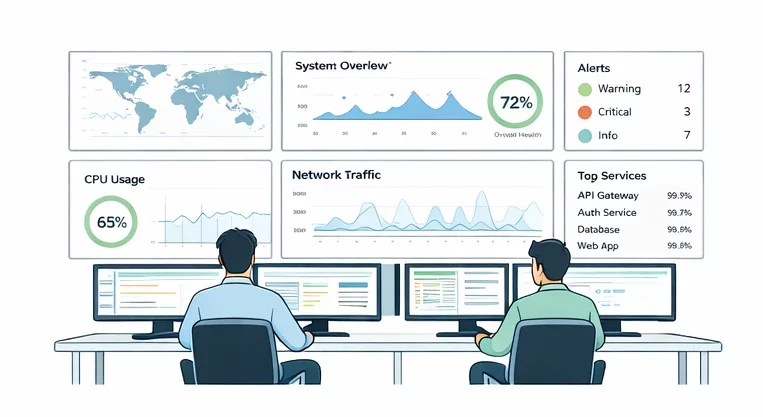
Proactive monitoring means keeping a constant watch on your systems so you can find and fix issues before they affect your users. In many environments, this includes proactive IT monitoring and proactive network monitoring to ensure both applications and networks remain stable. Instead of waiting for something to break, you track performance, usage, and behavior in real time and act early.
In simple terms, you stay ahead of problems rather than chasing them later. For example, when a system shows higher resource usage than usual, you step in early and adjust it before it slows down or crashes.
To make this easier to understand, think about regular health checkups. When you visit a doctor for routine tests, you catch problems early and avoid serious illness. In the same way, proactive monitoring keeps your systems healthy and stable.
What this means for you
| Situation | Without proactive monitoring | With proactive monitoring |
|---|---|---|
| System load increases | System slows down or crashes | Issue detected early and fixed |
| Application errors | Users report problems first | Alerts notify your team instantly |
| Resource usage | Wasted or overloaded systems | Balanced and optimized usage |
Why Proactive Monitoring Matters
Now that you understand what proactive monitoring is, the next question is why it matters for your business or project.
Modern systems run all the time, and users expect everything to work without delays. Because of this, even a small issue can quickly turn into a bigger problem. Proactive monitoring helps you stay in control by spotting risks early and taking action at the right time. Whether through proactive network monitoring or proactive IT monitoring, this approach ensures systems remain reliable under all conditions.
Here is how it helps you in real situations
- Downtime is reduced because issues are resolved before users notice them
- User experience improves as systems remain fast and reliable
- Costs are managed more effectively through efficient resource utilization
- Planning becomes easier with a clear understanding of system behavior and future needs
- Security is strengthened by detecting unusual activity at an early stage
When you rely on proactive monitoring, you move from reacting under pressure to making informed decisions with confidence. This approach not only keeps your systems running smoothly but also helps you build trust with your users and grow without unexpected disruptions.
Proactive vs Reactive Monitoring That Impact Performance
When you search for ways to keep your systems stable, you usually face two choices. You either fix issues after they happen, or you prevent them before they begin. This is where proactive and reactive monitoring come into play.
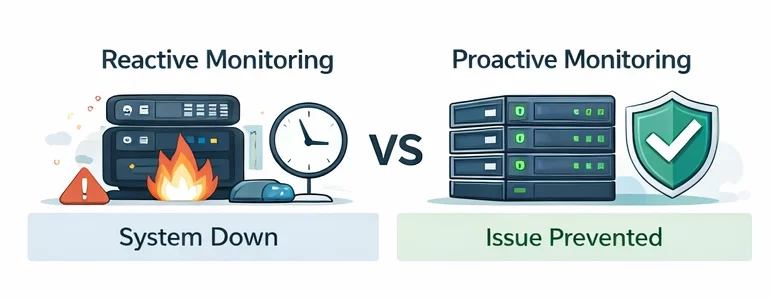
Reactive monitoring focuses on fixing problems after a failure. Proactive monitoring focuses on stopping those problems before they affect your users. This is especially true in setups that rely on proactive IT monitoring and proactive network monitoring to maintain continuous performance. As a result, the approach you choose directly shapes your downtime, costs, and overall user experience.
| What matters to you | Reactive monitoring | Proactive monitoring |
|---|---|---|
| How it works | Fix after failure | Prevent failure early |
| Downtime | Higher and often sudden | Lower and predictable |
| Costs | Expensive due to urgent fixes | Controlled and optimized |
| User experience | Users face issues first | Users enjoy smooth performance |
| Team effort | Constant firefighting | Planned and efficient work |
Why this difference matters for your business
If you rely only on reactive monitoring, your team spends time responding to alerts after something breaks. This often leads to longer outages, stressed teams, and unhappy users. Over time, these issues increase operational costs and reduce trust in your system.
On the other hand, proactive monitoring helps you stay ahead. By combining proactive network monitoring with proactive IT monitoring, you can detect unusual patterns early and avoid major disruptions. Because of this, your systems run smoothly, your team works with less pressure, and your users get a consistent experience.
How Proactive Monitoring Works
If you want to keep your systems stable and avoid last-minute failures, you need a clear process. This is where proactive IT monitoring and proactive network monitoring work together to provide complete system visibility.
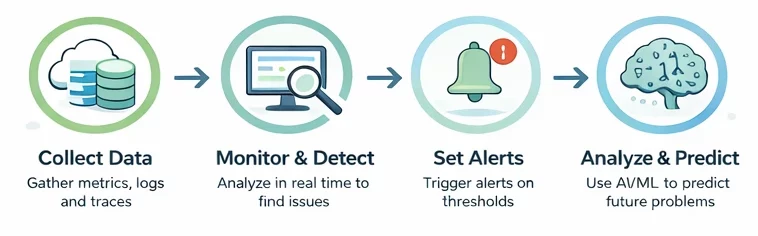
Below is a step-by-step breakdown that shows exactly how this works in your environment.
Step 1. Collect the right data
You start by gathering data from every important part of your system. This includes metrics like CPU and memory, logs that record events, and traces that show how requests move across services.
Because of this, you get full visibility instead of working with partial information. When something starts to change, you can see it early.
Step 2. Monitor in real time
Once data starts flowing, you track it continuously through dashboards and monitoring tools. You do not wait for reports or user complaints. You see system activity as it happens.
As a result, you stay aware of performance changes at all times and can respond without delay.
Step 3. Set thresholds and trigger alerts
Next, you define what normal performance looks like. For example, you decide how much CPU or memory usage is acceptable.
When values move beyond these limits, your system sends alerts. These alerts act as early warning signals, so you can take action before users experience slowdowns or failures.
Step 4. Detect unusual patterns
After setting alerts, you go one step further by identifying patterns in your data. Instead of relying only on fixed limits, your system looks for behavior that does not match normal activity.
This process uses pattern recognition to find small but important changes. For example, a steady rise in response time may not trigger an alert yet, but it can still signal a future issue.
Step 5. Use predictive insights to stay ahead
Finally, you analyze trends over time to understand what might happen next. This is where predictive diagnostics comes in.
By studying past data, your system can forecast risks such as storage running out or performance gradually dropping. Because of this, you can fix issues in advance instead of reacting under pressure.
How this workflow helps you
When you follow these steps, everything connects into one smooth process
- You see problems forming early
- You receive clear signals before failure
- You act before users are affected
This means fewer outages, better performance, and less stress for your team.
Proactive Monitoring Tools and Techniques
To make proactive monitoring work effectively, you need the right mix of tools and practical techniques. These help you track system behavior, detect risks early, and take action before users face any disruption.
Core tools you should use
| Tool type | What it does for you | Why it matters |
|---|---|---|
| Performance monitoring | Tracks application speed and system metrics | Helps you identify slowdowns early |
| Infrastructure monitoring | Observes servers, networks, and resources | Keeps systems stable and balanced |
| Synthetic monitoring | Simulates real user actions across locations | Detects issues before real users face them |
| AIOps tools | Uses AI for pattern recognition and automation | Reduces manual effort and speeds up response |
Key techniques that drive better results
Using tools alone is not enough. You need the right techniques to get real value from them.
-
Synthetic monitoring
Synthetic monitoring simulates real user behavior such as logging in, browsing pages, or completing transactions. As a result, it reveals performance gaps, broken features, or connectivity issues early, even before real users encounter them.
-
Predictive analytics and AI insights
Predictive analytics relies on historical data to forecast potential risks. With the help of AI, systems can identify patterns and generate predictive diagnostics, allowing teams to address issues before they turn into failures.
-
Unified observability
Unified observability brings metrics, logs, and traces together in one place. This combined view makes it easier to understand overall system health and quickly connect issues across different components.
-
Automated detection and response
Automated systems track performance continuously and trigger alerts when unusual behavior appears. In many cases, predefined actions can resolve minor issues instantly, which reduces manual effort and response time.
-
Log analysis
Log analysis involves continuously reviewing system logs to detect errors, crashes, or suspicious activity. This early visibility helps prevent small issues from escalating into larger disruptions.
-
Dependency mapping
Dependency mapping shows how different parts of a system interact with each other. When a problem occurs, this visibility helps identify which components are affected and how the issue might spread.
-
Performance baselines
Performance baselines define what normal system behavior looks like. Once these baselines are set, any deviation becomes easier to detect, making early intervention possible.
How does this help you in real scenarios?
When you apply these tools and techniques together
- You catch issues early through pattern recognition
- You receive early warning signals instead of reacting late
- You reduce downtime and improve system reliability
- You create a smoother experience for your users
Key Benefits of Proactive Monitoring
After understanding how proactive monitoring works, the next step is to see what it delivers. Businesses using proactive IT monitoring and proactive network monitoring benefit from improved reliability and reduced downtime.
| Benefit | What it means for your operations |
|---|---|
| Reduced downtime | Issues are resolved before they interrupt services |
| Better performance | Systems run smoothly without unexpected slowdowns |
| Lower costs | Fewer emergency fixes and less unplanned spending |
| Stronger security | Threats are identified early and handled quickly |
| Improved user experience | Users face fewer disruptions and delays |
Why these benefits matter in practice
-
Business continuity stays intact
Since systems are monitored continuously, potential issues get resolved early. This ensures that operations continue without interruption, even during high demand or unexpected changes.
-
Faster issue resolution
With clear visibility into system behavior, identifying the root cause becomes easier. Instead of spending hours troubleshooting, teams can quickly locate and fix the problem.
-
Better decision-making
Real-time insights provide a clear picture of system usage and performance. This helps in planning upgrades, managing capacity, and making informed decisions based on actual data.
-
Improved system performance
Continuous tracking highlights bottlenecks and inefficiencies. Once identified, these can be optimized to keep systems running at their best.
-
Cost savings over time
Fixing issues early prevents expensive outages and emergency repairs. As a result, overall operational costs remain controlled and predictable.
-
Stronger security posture
Constant monitoring helps detect unusual activity, unauthorized access attempts, and vulnerabilities. Early detection reduces the risk of major security incidents.
-
Longer system lifespan
Regularly monitoring system health enables timely maintenance. This prevents wear and tear from turning into major failures, extending the life of your infrastructure.
-
Better connectivity and reliability
By monitoring network health, systems maintain smooth communication among applications, services, and users.
Real World Use Cases of Proactive Monitoring
After understanding the benefits, it helps to see how proactive monitoring works in real environments. These examples show how different industries use it to prevent issues, maintain performance, and deliver a better user experience.
Where proactive monitoring makes a real impact
| Industry or use case | What is monitored | What outcome do you get |
|---|---|---|
| E-commerce platforms | Traffic spikes, checkout speed, API response | Smooth shopping experience during peak sales |
| Manufacturing | Machine health, temperature, vibration | Fewer breakdowns and uninterrupted production |
| Financial services | Transactions and user behavior | Fraud detected and blocked instantly |
| Healthcare systems | Medical devices and data access | Reliable equipment and secure patient data |
| IT and DevOps | Infrastructure, apps, configurations | Stable systems and fewer unexpected failures |
| Telecom networks | Traffic flow and capacity | Consistent connectivity and fewer disruptions |
How this looks in real situations
-
E-commerce and digital platforms
Online platforms track traffic surges, page load times, and checkout performance. During peak events like flash sales, systems scale resources automatically. Because of this, users can browse and complete purchases without delays or crashes.
-
Predictive maintenance in manufacturing
Machines are equipped with sensors that monitor temperature, vibration, and performance. When early signs of wear appear, maintenance teams act before a breakdown occurs. This prevents costly production stops and improves efficiency.
-
Financial fraud detection
Financial systems analyze transaction data in real time. When unusual patterns appear, such as transactions from unexpected locations, the system flags or blocks them immediately. This reduces fraud and protects customer accounts.
-
Healthcare systems and security
Hospitals monitor connected medical devices to ensure they function properly. At the same time, systems track access to sensitive data. Any unusual activity is detected early, which helps prevent failures and data breaches.
-
IT infrastructure and DevOps
Teams monitor applications, servers, and configurations continuously. This helps detect issues like misconfigurations or performance drops before they affect users. As a result, services remain stable and reliable.
-
Telecom network performance
Telecom providers analyze network traffic and usage trends. When capacity limits are approached, they adjust resources or reroute traffic. This ensures users experience smooth calls and stable internet connections.
Best Practices for Proactive Monitoring
To make proactive monitoring effective, organizations should adopt proactive IT monitoring alongside proactive network monitoring for full-stack visibility. A well-structured setup helps you detect issues early, reduce noise, and maintain stable performance without constant manual effort.
Quick checklist for effective monitoring
| Practice | What it improves |
|---|---|
| Define KPIs and SLAs | Clear performance expectations |
| Monitor the right metrics | Better visibility into system health |
| Intelligent alerts | Fewer unnecessary notifications |
| Automation | Faster issue resolution |
| Continuous monitoring | Early detection at all times |
Step-by-step best practices
-
Define KPIs and SLAs
Start by setting clear performance goals. KPIs help track system health, while SLAs define the level of service users expect. With these in place, it becomes easier to measure performance and identify when something goes wrong.
-
Monitor the right metrics
Focus on the metrics that truly matter. CPU usage, latency, error rates, memory, and network activity give a clear picture of system performance. Tracking the right data helps avoid confusion and ensures faster decision-making.
-
Set intelligent alerts
Alerts should highlight real problems, not temporary spikes. Well-tuned alerts reduce noise and prevent alert fatigue. This allows teams to focus on critical issues instead of reacting to every minor fluctuation.
-
Automate responses
Many issues follow predictable patterns. Automating responses such as restarting services or scaling resources helps resolve problems quickly. This reduces manual work and improves response time during critical situations.
-
Use centralized monitoring tools
A centralized view brings all your metrics, logs, and traces into one place. This improves visibility and helps teams understand system behavior without switching between multiple tools.
-
Use synthetic monitoring for user experience
Simulating user actions like login or transactions helps detect issues before real users encounter them. This ensures that customer-facing systems remain smooth and reliable.
-
Continuously monitor and improve
Monitoring should run at all times, not just during incidents. Continuous monitoring combined with automation creates a system that can detect, respond, and adapt without delays. Regular reviews and updates further improve accuracy and efficiency.
Why continuous monitoring and automation matter
When monitoring runs continuously, and automation handles routine tasks, systems become more resilient. Issues are detected early, responses are faster, and teams can focus on improvement instead of constant troubleshooting.
Challenges and Limitations of Proactive Monitoring
While proactive monitoring improves system stability, it is important to understand what to watch out for before fully relying on it. Being aware of these challenges helps you avoid common mistakes and build a more reliable setup.
| Challenge | Potential Issues to Consider |
|---|---|
| Setup complexity | Initial configuration can take time and effort |
| Tool overload | Too many tools can create confusion |
| False positives | Unnecessary alerts can distract your team |
| Skill requirements | Advanced tools need experienced teams |
| Data noise and scale | Large data volumes can become hard to manage |
Common Pitfalls You Should Avoid
-
High initial setup complexity
Setting up proactive monitoring is not always simple. It requires proper planning, configuration, and alignment with your existing systems. Without a clear structure, the setup phase can become time-consuming.
-
Tool overload
Using multiple tools without a clear strategy can create more problems than solutions. Instead of gaining clarity, teams may struggle with scattered data and overlapping insights.
-
False positives
Not every alert indicates a real problem. Poorly tuned systems often generate false alarms, which can lead to alert fatigue. Over time, this increases the risk of missing critical issues.
-
Requires skilled teams
Effective monitoring depends on the ability to interpret data, identify patterns, and take the right action. Without skilled professionals, even the best tools may not deliver expected results.
-
Data noise and scalability issues
As systems grow, the amount of monitoring data increases rapidly. Without proper filtering and scaling strategies, this data can become overwhelming and difficult to manage.
The Future of Proactive Monitoring
Proactive monitoring is moving beyond basic tracking and alerting. It is evolving into a system that predicts, prevents, and even fixes issues with minimal human effort. As technology advances, the focus is shifting toward smarter insights, automation, and better alignment with real user needs.
Key trends shaping the future
- Artificial intelligence and machine learning are becoming central to monitoring. These technologies analyze historical data, identify patterns, and enable predictive diagnostics. As a result, issues can be detected much earlier, allowing teams to act before performance is affected
- Self-healing systems are gaining adoption. Instead of only detecting problems, systems can now resolve routine issues automatically. This reduces downtime and removes the need for constant manual intervention
- User experience is becoming a priority. Monitoring now tracks real-time user interactions, which helps identify performance gaps that directly impact satisfaction and engagement
- Monitoring is expanding to connected devices and edge environments. With the rise of distributed systems and IoT, visibility across these areas helps prevent failures closer to where they occur
- Security is becoming more proactive. Systems analyze behavior patterns to detect unusual activity early, which helps prevent breaches and protect sensitive data
- Monitoring is aligning more closely with business outcomes. Instead of focusing only on technical metrics, it now connects system performance with factors like service reliability, efficiency, and customer experience
FAQs
1. What is proactive monitoring?
Proactive monitoring is the practice of continuously tracking system performance and behavior to detect and resolve issues before they affect users.
2. How is proactive monitoring different from reactive monitoring?
Proactive monitoring prevents issues early, while reactive monitoring focuses on fixing problems after they occur.
3. What types of data are used in proactive monitoring?
It typically uses metrics, logs, and traces to provide a complete view of system performance and activity.
4. What are the main benefits of proactive monitoring?
It reduces downtime, improves system performance, enhances user experience, and helps control operational costs.
5. What challenges can arise when implementing proactive monitoring?
Common challenges include setup complexity, managing large volumes of data, avoiding false alerts, and requiring skilled teams.
Conclusion
Proactive monitoring brings clarity and control to system operations by enabling early action and reducing unexpected disruptions. It supports consistent performance while helping teams work more efficiently.
Start applying these practices to strengthen your systems and improve overall reliability.

