


Every manual business has a hidden cost. Find out what it is and how process automation helps you finally break free.
A Practical Guide for Manual Businesses Ready to Modernize
Running a manual business is turning into more of a liability in today’s hyper-connected and data-driven economy.
Manual operations like reconciling spreadsheets, routine maintenance, or routing hundreds of daily tickets can erode your organization’s ability to compete, innovate, and grow. This is why many businesses that rely solely on manual operations find themselves stuck with an operations bottleneck.
Fortunately, digital transformation offers a clear path forward. In fact, organizations that modernize manual workflows get access to speed, accuracy, and agility, which cannot be achieved through human effort alone.
Let’s explore how manual processes operational inefficiency compounds over time, what process automation truly means in the context of modernization, and how your organization can take confident, measured steps toward a smarter future, one bottleneck at a time.
An Overview
- What Is a Manual Business?
- The Real Cost of Manual Operations
- Why Process Automation Is the Heart of Digital Transformation
- Common Myths About Process Automation
- Key Areas Where Automation Delivers Maximum ROI
- Real-World Industry Examples
- How to Identify Automation Opportunities
- Building an Automation Roadmap
- The Human Side of Automation
- Measuring Success
What Is a Manual Business?
A business where core operational tasks, data entry, approvals, reporting, communications, and compliance checks are performed by people rather than automated systems is considered a manual business. The size of the organization does not play a role. Even large enterprises can be deeply manual in their operations, relying on email chains for approvals, spreadsheets for data management, and human judgment for tasks that are entirely rule-based.
The signs of a manual business are often hiding in plain sight:
- Sales teams spend the majority of their working hours on administrative tasks rather than selling.
- Data professionals devote most of their time to cleaning and preparing data instead of analysing it.
- IT departments use up to 80% of resources for maintaining existing systems rather than innovating.
- Finance teams manually match invoices, process payments, and generate reports.
- Customer service agents copy-paste responses and manually route queries.
Although these tasks seem manageable individually, collectively, they represent an enormous and unnecessary drain on your organization’s time. Manual processes operational inefficiency does not just slow things down, it adds up over time. Every delay and every error builds up, creating a drag that limits your growth and ability to serve customers better.
The Real Cost of Manual Operations
Many organizations make the mistake of assuming that manual operations consist only of overtime hours, re-work, and occasional errors. In reality, the impact runs much deeper, affecting every part of the business in ways that aren’t always easy to quantify.

Operational Costs That Compound
Labor-intensive manual workflows are expensive to maintain and scale. As business volumes grow, so does the headcount. This creates a model where growth directly increases operational cost.
Compliance and Risk Exposure
In regulated industries like financial services, healthcare, insurance, and telecommunications, manually managed processes create audit gaps and documentation risks. Inconsistent record-keeping or a missed approval step can quickly escalate into costly compliance failures.
Customer Experience Consequences
The effects of manual inefficiency are not confined to internal operations. For instance, when a health insurance company processes claims manually, a customer waiting on a critical decision experiences real, personal consequences. Or, when a business unit waits weeks instead of hours for a data request to be fulfilled, product launches stall and competitive opportunities are lost. Manual operations cause friction at every customer touchpoint.
The Strategic Opportunity Cost
The highest cost is the strategic work that never gets done. When high-value talent spends its time on low-value tasks, innovation comes to a halt. Digital transformation gets pushed to the side, AI integration suffers, and the gap between your organization and competitors widens.
The table below illustrates the difference between manual and automated workflows across key business dimensions.
Table 1: Manual vs. Automated Workflows — Cost & Impact Comparison
| Criteria | Manual Workflows | Automated Workflows |
|---|---|---|
| Speed | Slow; depends on human availability and hand-offs | Instant; tasks execute in real time 24/7 |
| Error Rate | High; prone to data entry and processing errors | Low; rule-based execution reduces human error |
| Scalability | Limited; bottlenecks worsen as volume grows | High; scales seamlessly with business growth |
| Cost | High operational cost due to labor-intensive tasks | Lower long-term cost; upfront investment pays off |
| Compliance | Inconsistent; manual tracking creates audit gaps | Consistent; automated logs support regulatory needs |
| Visibility | Low; data is siloed across spreadsheets and emails | High; real-time dashboards and unified data flows |
| Customer Experience | Slow responses; errors damage customer trust | Faster, accurate service builds loyalty |
| AI Readiness | Not ready; poor data quality limits AI use | Ready; clean, structured data enables AI insights |
Why Process Automation Is the Heart of Digital Transformation
Digital transformation is not a one-time technology upgrade. It is a continuous evolution of how your business operates, delivers value, and responds to change. Process automation is the core of this transformation.
Process automation creates the foundation on which every other transformation initiative depends. Clean, automated data flows enable AI and machine learning. Streamlined workflows unlock real-time decision-making. Consistent process execution builds the trust and reliability that customers and regulators expect.
Imagine process automation as the infrastructure layer of digital transformation. Just as a building requires a solid foundation before floors and walls can be added, your organization needs automated and reliable processes to deploy advanced analytics, AI, or intelligent decision-making systems.

You can see how process automation supports digital transformation when you look at the outcomes each one drives.
- Operational efficiency:
Automated validation, reconciliation, and data enrichment reduce manual effort and human error across the board.
- Customer experience:
Unified, high-quality data supports faster, more personalized, and more consistent interactions.
- AI readiness:
Intelligent automation powered by agentic AI and machine learning ensures data accuracy and accelerates insights.
- Cost savings:
Streamlined workflows and reduced legacy infrastructure dependency lower operating expenses and improve overall ROI.
- Scalability:
Automated systems grow with your business without requiring proportional increases in headcount.
In other words, process automation is not a side initiative. It plays a key role in digital transformation.
Turn your bottlenecks into breakthroughs.

Common Myths About Process Automation
Despite its many advantages, process automation still carries misconceptions that slow organizational adoption. Here are some of the common myths.
Myth 1 – Automation Delivers Instant, Organization-Wide ROI
In reality, the value of automation builds up. Time savings can be seen immediately, especially when large teams are freed from repetitive work, but strategic outcomes take time to cascade through complex systems. Automation influences downstream processes, data flows, and decision-making in ways that add up over months.
Myth 2 – Automation Is Only for Large Enterprises
Small and mid-sized businesses often assume process automation requires enterprise-level budgets and dedicated IT teams. In truth, modern automation tools are increasingly accessible, affordable, and designed for organizations of all sizes. A small business can easily automate invoice processing, customer follow-ups, and onboarding workflows with relatively modest investment.
Myth 3 – Automation Will Replace Our People
This is perhaps the most persistent fear. However, automation does not eliminate the need for people. It eliminates the need for people to do work that machines do better. The real goal is redirecting human talent toward higher-value work like creative problem-solving, strategic planning, customer relationships, and innovation.
Myth 4 – Processes Are Too Complex to Automate
Automation brings structure and visibility to complex workflows by identifying hidden dependencies and inefficiencies that were previously invisible. It starts with a well-defined process and then iterating from there towards a viable path.
Key Areas Where Automation Delivers Maximum ROI
The highest-impact opportunities are often repetitive, rule-based, high-volume, and prone to human error. Here are the core areas where organizations can benefit most when they choose to modernize manual workflows.
Data Management and Workflow Orchestration
Data professionals in many organizations spend the bulk of their time on preparation tasks such as cleaning, validating, and formatting data rather than analysing it. Automating data extraction, normalization, and enrichment not only frees these professionals for higher-value analysis but also dramatically improves the quality and consistency of insights across the business.
Finance and Accounts Payable
Invoice intake, payment matching, reconciliation, and financial reporting are among the most manually intensive processes in any organization. Automation in this area reduces processing times from days to hours, minimizes errors, and improves cash flow visibility.
Customer Onboarding and Service
Manual onboarding workflows create friction at the worst possible time: when a new customer is forming their first impressions. Automating document collection, verification, and account setup accelerates the process, reduces errors, and delivers a more consistent experience. Similarly, automating ticket routing and initial query responses in customer service improves response times and agent productivity.
IT Operations and Infrastructure
IT teams in many organizations spend a lot of their time and resources on keeping existing systems operational rather than building new capabilities. Automating routine monitoring, patch management, access provisioning, and incident response liberates IT talent to focus on innovation and strategic projects.
Compliance and Audit Readiness
Automated audit trails, policy enforcement, and documentation management reduce the likelihood of compliance failures and make regulatory reviews significantly less resource-intensive.
Real-World Industry Examples
The following examples illustrate how organizations across different industries have used automation to turn manual bottlenecks into measurable modernization wins.

Financial Services
A financial institution struggling with a slow and manually intensive data provisioning process worked to automate the end-to-end workflow. The result was a reduction in cycle time from several weeks to a single day. This acceleration did not just save time. It empowered business units to make faster, data-driven decisions, leading to better risk management and more competitive product offerings.
Healthcare
A large health insurance provider processing millions of claims each month found that manual intervention in exception cases was creating costly delays and inconsistencies. By automating the identification and routing of exception claims while maintaining human oversight for genuinely complex cases, the organization reduced processing delays, improved accuracy, and delivered faster decisions to patients at critical moments.
Retail
A medium-sized retailer replaced manual stock tracking and reorder processes with automated inventory management. Real-time alerts, automated purchase orders, and integrated supplier communications reduced stockouts, decreased inventory holding costs, and eliminated the need for manual reconciliation between sales and inventory systems.
Consulting and Professional Services
A consulting firm that replaced spreadsheets and paper-based project notes with automated project management workflows saw a significant reduction in project delays and improved cross-team communication. Automated task assignments, deadline reminders, and progress reporting gave managers real-time visibility without the overhead of manual status updates.
How to Identify Automation Opportunities
One of the most common mistakes organizations make when beginning their automation journey is jumping straight to tools without first understanding their processes. Before you can modernize manual workflows, you need to know exactly where the manual work lives, why it exists, and what it costs.
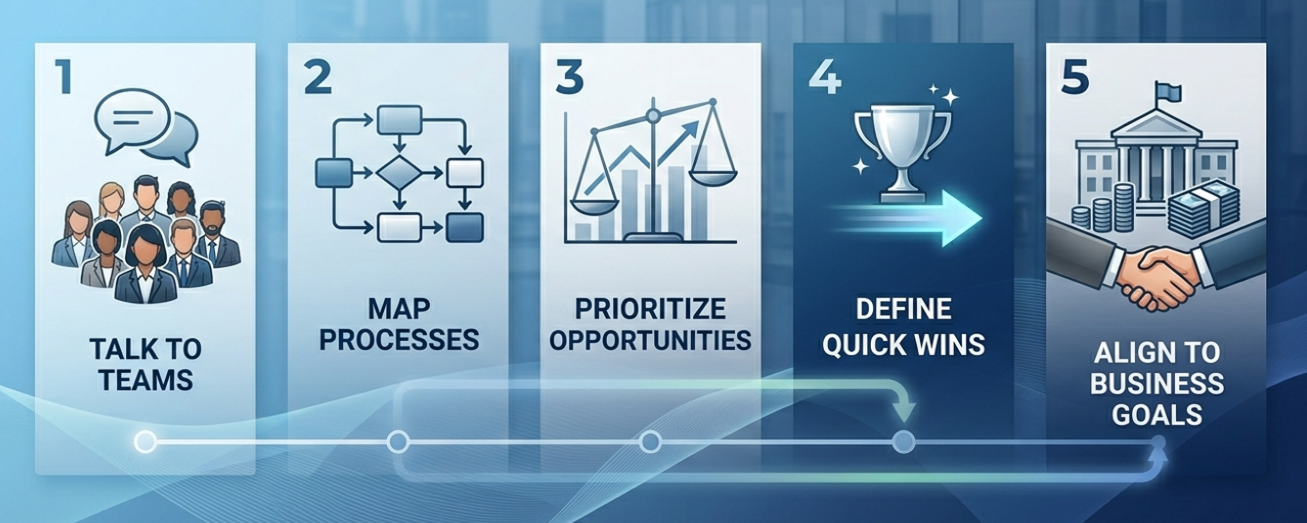
1. Talk to the People Closest to the Work
The most accurate picture of where manual bottlenecks exist comes from the people doing the work. Conduct structured conversations with teams across departments that include questions about where they spend the most time, where errors tend to occur, and what they wish they could stop doing manually.
2. Map Your Processes End to End
Next, document every step from initiation to completion. Include the people involved, the systems touched, the data that flows through it, and the points where human judgment is required. This exercise brings up the inefficiencies that were previously invisible because they had become so normalized.
3. Prioritize Using a Simple Framework
Prioritize which task should be automated based on three factors: how frequently the task occurs, how rule-based and predictable it is, and how much impact an error or delay has on the business or customer. Tasks that score high on all three are your best starting points.
4. Define Your Quick Wins
Quick wins are the processes that are highly repetitive, clearly defined, and relatively contained. Automating these first delivers visible results quickly, builds organizational confidence in automation, and makes more complex automation projects easier to execute.
5. Align Automation Targets with Business Goals
Every automation initiative should connect to a measurable business objective like reducing processing time, improving data quality, lowering cost, or enhancing the customer experience. This alignment ensures that automation efforts remain focused on outcomes that matter to your digital transformation strategy.
Building an Automation Roadmap
The key to automation is starting with small, well-defined wins and scaling iteratively. This approach reduces risk, builds confidence, and generates early evidence of value that helps secure broader organizational commitment.
Avoid Common Pitfalls Before You Begin
One of the most significant mistakes organizations make is automating without considering change management. Automation reshapes workflows, roles, and expectations. Without preparing people for those changes, even the best-designed automation can stall due to resistance or confusion.
Another common pitfall is automating the wrong processes. Despite the appeal of eliminating all manual work, some tasks genuinely require human judgment, contextual understanding, or flexibility that automation cannot replicate. Understanding which tasks belong in each category is essential before you invest in any tool or platform.
Build Integration Into Your Planning
One of the biggest challenges post-automation is tool fragmentation. Organizations that adopt automation in silos end up with disconnected systems that create new inefficiencies. Hence, plan for integration. Your automation tools should connect to your CRM, ERP, HR systems, and data platforms so that information flows seamlessly across the business and decisions are made from a single source of truth.
Take an Iterative Approach
Modernization through process automation is an evolution, not a single transformation event. Each improvement lays the groundwork for the next. As early automations succeed, they build the trust needed to tackle more complex workflows.
Here is a checklist to assess your organization’s readiness for automation across key business functions:
Table 2: Automation Readiness Checklist by Business Function
| Business Function | Key Automation Opportunities | Readiness Signal | Priority Level |
|---|---|---|---|
| Finance & Accounting | Invoice processing, payment reminders, and reconciliation | High-volume, rule-based transactions | High |
| Human Resources | Onboarding workflows, payroll processing, and leave management | Repetitive paper-based processes | High |
| Customer Service | Ticket routing, FAQ responses, follow-up emails | High query volume, slow response times | High |
| IT Operations | System monitoring, access provisioning, and patch management | ‘Keep the lights on’ tasks dominate | Medium-High |
| Sales & Marketing | Lead scoring, email sequences, and reporting dashboards | Manual CRM updates, missed follow-ups | Medium |
| Supply Chain | Purchase orders, inventory alerts, vendor communications | Frequent manual data entry across systems | Medium-High |
| Compliance & Legal | Document generation, audit trails, policy updates | Manual record-keeping, audit risk | High |
| Data Management | Data validation, cleansing, migration, and enrichment | Analysts spend time on data prep | High |
The Human Side of Automation
The most important conversation to have within any organization considering process automation is “what does this mean for our people?”
The fear that automation leads to job losses is understandable. But the evidence tells a more nuanced and ultimately more optimistic story. When organizations address manual processes and operational inefficiency through automation, they are not removing the need for people. They are removing the need for people to spend their working hours on tasks that offer no creative, strategic, or relational value.

Consider what becomes possible when a data analyst is no longer spending the majority of their time on data preparation. They can focus on building models, generating insights, and influencing strategic decisions. When a customer service agent is freed from manually routing and responding to routine queries, they can focus on complex cases, relationship-building, and the kind of empathetic human support that technology cannot replicate.
Automation is most successful when it is introduced with transparency, supported by training, and framed clearly as a tool that makes people’s working lives better rather than a threat to their livelihoods. The organizations that get this right create cultures of digital fluency where employees at every level understand and embrace the tools available to them.
Communication and collaboration across departments are also critical during any automation initiative. Executives often underestimate how many steps, dependencies, and approvals are involved in completing a single task. Automation surfaces that complexity, creating an opportunity to redesign workflows in ways that are genuinely better for everyone involved.
Measuring Success
A common challenge with automation initiatives is knowing what success actually looks like. The right measure depends on what your organization values most and where the pain was greatest before automation was introduced.
Success tends to look different for leaders at different levels:
| Role | What Success Looks Like |
|---|---|
| CEOs | Strategic growth, competitive agility, and long-term shareholder value |
| CFOs | Cost reduction, improved operational efficiency, and measurable ROI on technology investment |
| Technology Leaders | Scalability, system integration, data quality, and alignment with digital transformation goals |
| Operations Leaders | Process cycle time reduction, error rates, compliance consistency, and throughput |
| Customer Experience Leaders | Response time improvements, satisfaction scores, and reduced friction across touchpoints |
Every step toward automating foundational processes, every improvement in data quality, and every workflow that is streamlined and standardized builds the infrastructure on which these advanced capabilities will run. The most successful modernization strategies treat automation not as a destination but as an ongoing investment in organizational capability.
Conclusion
In a world defined by speed, data, and customer expectations, organizations that continue to rely on manual operations as their default mode are actively falling behind. Process automation is the bridge between where most organizations are today and where digital transformation can take them. It reduces risk, improves compliance, frees talent, and creates the data foundation that every advanced technology initiative, from AI to predictive analytics, depends on.
The most successful organizations treat modernization as a continuous, strategic commitment rather than a one-time project. They align automation efforts with business outcomes, not just efficiency metrics. They start small to build confidence, then scale through iterative success. Turn your manual bottlenecks into modernization wins, and use process automation to build an organization that is ready for whatever comes next.
Ready to take the first step? Explore how our Digital Transformation services can help you identify automation opportunities, modernize manual workflows, and build the foundation for lasting business growth.

