


Keep AWS applications highly available with Elastic Load Balancing. Our AWS Support team helps improve uptime and traffic distribution.
Every modern application must be always available. Downtime leads to lost revenue, frustrated users, and damaged trust. Paired with reliable AWS managed services, the real secret behind highly available applications on AWS is not a single server or powerful instance it is AWS Elastic Load Balancing (ELB).
Elastic Load Balancing ensures your application remains reachable, responsive, and resilient by automatically distributing traffic and handling failures behind the scenes.
This blog walks through a clean, practical, and production-ready explanation of how ELB enables high availability, its architecture, types, and best practices without unnecessary complexity.
An Overview
- An Overview on AWS Elastic Load Balancing for High Availability
- What Is AWS Elastic Load Balancing (ELB)?
- Why High Availability on AWS Depends on Elastic Load Balancing?
- Types of AWS Load Balancers
- How AWS Elastic Load Balancing Achieves High Availability/?
- Setting Up Elastic Load Balancing
- AWS Elastic Load Balancing Architecture Diagrams
- Real-World Use Case
- Best Practices for High Availability with AWS ELB
- Key Benefits of AWS Elastic Load Balancing
An Overview on AWS Elastic Load Balancing for High Availability
- Distributes incoming traffic across multiple backend resources
- Eliminates single points of failure
- Automatically handles instance and Availability Zone failures
- Integrates seamlessly with Auto Scaling
- Scales transparently with demand
- Improves performance and reliability with minimal operational effort
What Is AWS Elastic Load Balancing (ELB)?
AWS Elastic Load Balancing is a fully managed service that automatically distributes incoming application traffic across multiple targets, such as:
- Amazon EC2 instances
- Containers running on ECS or EKS
- IP addresses (on-premises or hybrid)
- AWS Lambda functions (via ALB)
ELB continuously monitors the health of registered targets and routes traffic only to healthy resources. If a target fails, ELB immediately redirects traffic elsewhere ensuring uninterrupted service availability.
Why High Availability on AWS Depends on Elastic Load Balancing?
High availability is about designing systems that continue to operate despite failures. ELB enables this by:
- Acting as a single, stable entry point for users
- Distributing load across multiple instances and Availability Zones
- Detecting unhealthy targets automatically
- Supporting rapid scale-out during traffic spikes
Without ELB, applications are exposed to single-instance failures and traffic overloads.
Types of AWS Load Balancers
-
Application Load Balancer (ALB)
-
- Operates at Layer 7 (HTTP/HTTPS)
- Supports path-based and host-based routing
- Ideal for microservices and containerized applications
- Integrates natively with ECS, EKS, and AWS WAF
Essential Pattern: Route /api requests to one service and /auth requests to another.
ALB operates at the application layer or the seventh layer of the OSI (Open Systems Interconnections) model. It controls communications between multiple systems, identifying traffic in order of priority and directing it to registered targets in good standing. For example, URLs marked with the /API extension can be directed to suitable application resources, while traffic associated with /MOBILE can be guided to mobile access management resources.
This type of load balancing is a new generation from AWS that handles multiple requests in a single connection. The HTTP/2 protocol reduces network traffic.
AWS users can apply ALB through internal load balancing against AWS EC2 instances, applications (via Rest API), or containers. ALB can also be combined with other AWS services to optimize application availability and scalability. These services can include AWS Certificate Manager, Amazon EC2, Amazon Route 53, AWS WAF, and Amazon CloudWatch.
-
Network Load Balancer (NLB)
- Operates at Layer 4 (TCP/UDP)
- Extremely low latency and high throughput
- Preserves client source IP addresses
- Supports static IPs
Essential Pattern: Real-time financial systems or gaming platforms.
NLB in AWS distributes end-user traffic across multiple cloud resources, yielding low latency and high throughput for applications. Its goal is to equalize traffic load support for elastic or dynamic IP addresses. It can handle millions of end-user requests per second and unpredictable spikes in end-user traffic.
The NLB system performs health checks on so-called „targets” – an EC2 instance, an IP address, or a container, among others – to ensure it is directing traffic to a high-performance resource. If this is not the case and the target becomes unavailable, the network load balancing module directs traffic to another target.
-
Gateway Load Balancer (GWLB)
- Operates at Layer 3 (IP)
- Designed for security appliances
- Enables centralized traffic inspection
Essential Pattern: Firewalls, IDS/IPS, and network monitoring tools.
The GLB system facilitates the installation, administration, and monitoring of virtual devices, including intrusion detection and prevention systems, firewalls, and deep packet inspection systems. It combines a network gateway and distributes traffic. You can scale your virtual appliances (up or down) according to your specific requirements by using a single gateway to distribute traffic to multiple destinations. With fewer potential failures, the reliability of your network increases.
How AWS Elastic Load Balancing Achieves High Availability/?
-
Traffic Distribution
ELB evenly distributes incoming requests across registered targets, preventing any single resource from becoming overloaded.
-
Multi–Availability Zone Support
When enabled across multiple AZs, ELB:
- Deploys load balancer nodes in each AZ
- Routes traffic only to healthy zones
- Survives complete AZ failures transparently
-
Health Checks
ELB performs continuous health checks using HTTP, HTTPS, or TCP protocols. Unhealthy targets are automatically removed until they recover.
-
Auto Scaling Integration
ELB works hand-in-hand with EC2 Auto Scaling:
- New instances are registered automatically
- Failed instances are removed
- Capacity scales based on demand
Setting Up Elastic Load Balancing
Let us now take a look at how to set up an ELB.
Step 1: Create a Load Balancer
Go to the EC2 Console, navigate to “Load Balancers,” and select the type of Load Balancer you need (ALB, NLB, or GWLB).
Step 2: Configure Listeners
Listeners define how the load balancer listens for requests (e.g., HTTP on port 80). You can also configure SSL for HTTPS traffic.
{

"ListenerConfigurations": [

{

"Protocol": "HTTP",

"Port": 80,

"TargetGroupARN": "arn:aws:elasticloadbalancing:region:account-id:targetgroup/my-targets"

}

]

}
Step 3: Create a Target Group
A Target Group defines the backend targets (EC2 instances, containers, or IP addresses) that the load balancer routes traffic to.
Step 4: Register Targets
Associate your instances with the Target Group.
aws elbv2 register-targets \

--target-group-arn arn:aws:elasticloadbalancing:region:account-id:targetgroup/my-targets \

--targets Id=i-1234567890abcdef0 Id=i-abcdef01234567890
AWS Elastic Load Balancing Architecture Diagrams
-
ELB with Multi-AZ Deployment
Diagram 1: ELB with Multi-AZ Deployment
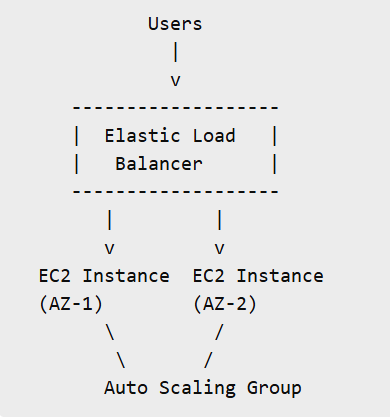
Description:
User requests hit a single ELB endpoint. The load balancer distributes traffic across EC2 instances running in multiple Availability Zones. If one AZ fails, traffic continues flowing to healthy zones.
Result: No downtime during infrastructure failures.
-
ALB with Path-Based Routing
Diagram 2: ALB with Path-Based Routing
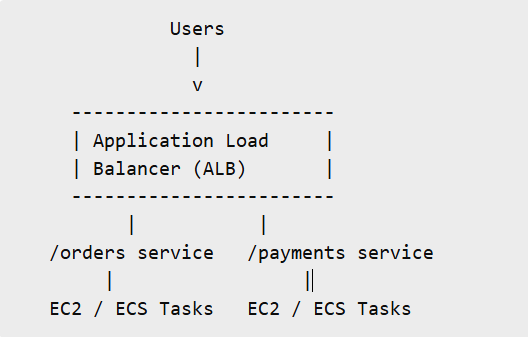
Description:
An Application Load Balancer routes traffic based on URL paths:
- /orders → Orders service
- /payments → Payments service
Result: Each service scales independently while sharing the same load balancer.
-
ELB with Auto Scaling
Diagram 3: ELB with Auto Scaling
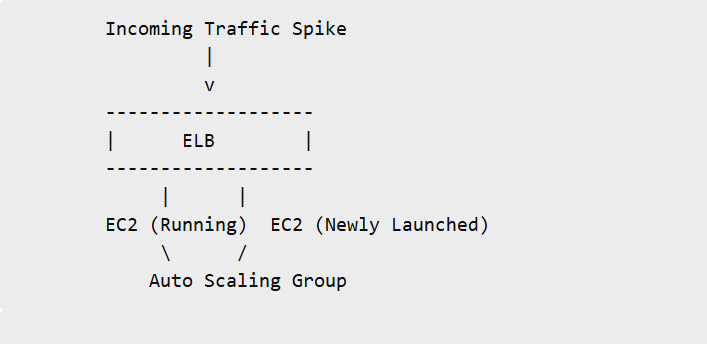
Description:
During traffic spikes, ELB distributes load across existing instances. Auto Scaling automatically launches new instances and registers them with the load balancer.
Result: Consistent performance without manual intervention.
Real-World Use Case
Consider an e-commerce platform during a flash sale:
- Traffic surges suddenly
- ELB distributes traffic across multiple instances
- Auto Scaling adds capacity automatically
- Failed instances are removed by health checks
Outcome: High availability, stable performance, and satisfied users.
Best Practices for High Availability with AWS ELB
- Always deploy across multiple Availability Zones
- Design applications to be stateless
- Configure meaningful health checks
- Enable HTTPS using AWS Certificate Manager
- Monitor ELB metrics with Amazon CloudWatch
Key Benefits of AWS Elastic Load Balancing
- Improved availability and fault tolerance
- Automatic scalability
- Reduced operational complexity
- Better application performance
- Seamless integration with AWS services
Conclusion
Building Highly Available Applications with AWS ELB
AWS Elastic Load Balancing is the backbone of high availability on AWS. By intelligently distributing traffic, monitoring target health, and integrating with Auto Scaling, ELB ensures applications stay online even when failures occur.
If high availability is your goal, ELB is not optional; it is Essential.

