


Build a secure GitOps-based Kubernetes delivery pipeline with best practices. Our Kubernetes Support team helps keep deployments secure.
Modern cloud-native applications need to be fast, reliable, and secure. Kubernetes helps orchestrate containers, but deploying applications safely and consistently can be challenging with traditional CI/CD pipelines.
GitOps simplifies this by using Git as the single source of truth for both application and infrastructure configuration. When paired with proper security practices, it enables auditable, automated, and reliable deployments.
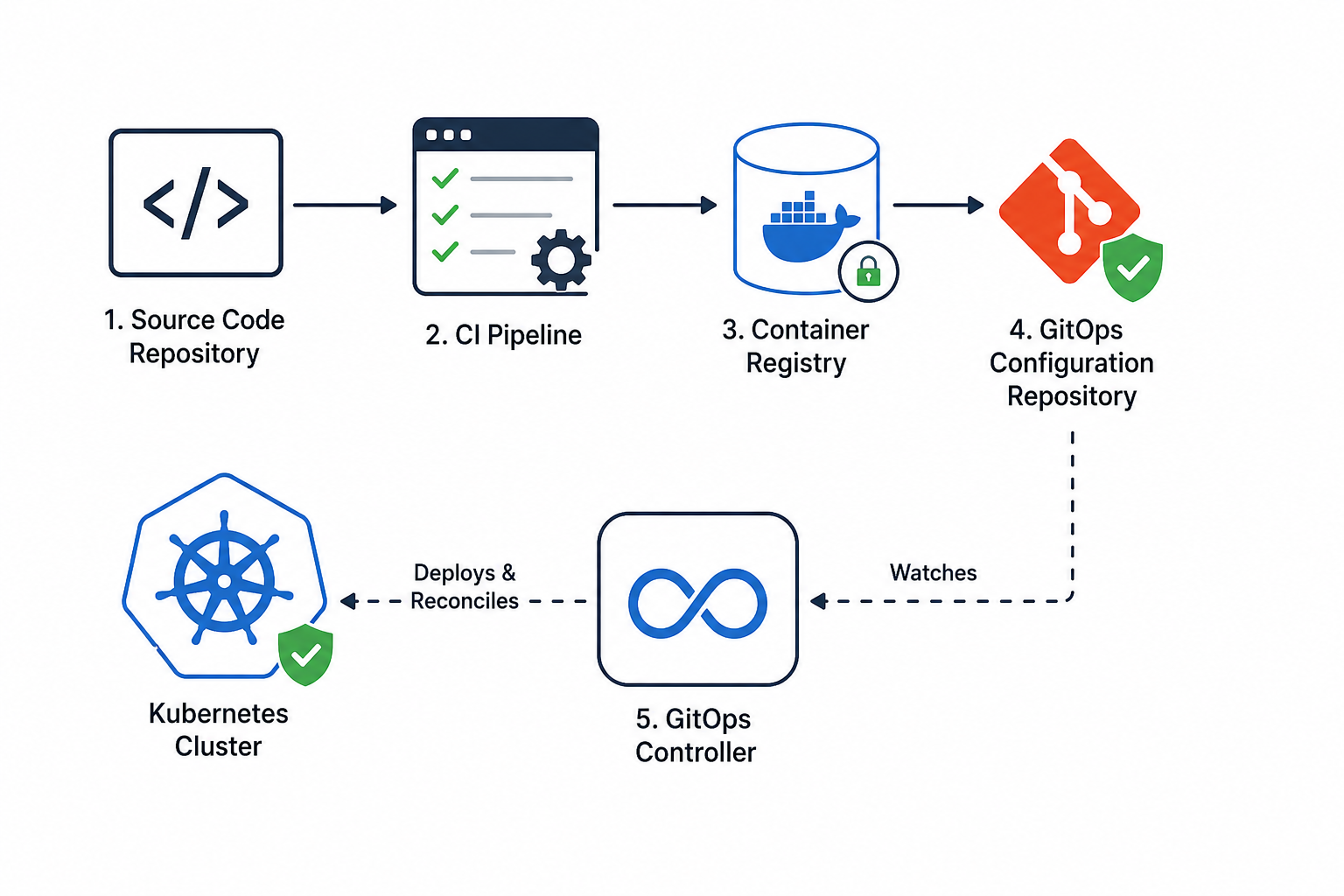
An Overview
What Is GitOps?
GitOps is a way to manage infrastructure and deployments using Git as the single source of truth. Instead of manually applying changes, a GitOps tool ensures the cluster matches the desired state stored in Git.Core Principles of GitOps:
- Declarative Configuration: All changes are described in files (YAML/Helm).
- Version-Controlled Source of Truth: Git tracks all changes for rollback and auditing.
- Automated Reconciliation: A GitOps controller keeps the cluster in sync with Git.
- Continuous Verification: Drift between Git and the cluster is automatically corrected.
Why GitOps for Kubernetes Delivery?
Traditional CI/CD pipelines often deploy directly to clusters, leading to:- Accidental configuration changes
- Limited visibility into production
- Security risks from over-permissioned CI systems
- Improved security
- Consistent deployments
- Easy rollback
- Scalable for multiple clusters
Core Components of a GitOps Pipeline
1. Source Code Repository
Contains:- Application code
- Dockerfile
- Unit and integration tests
2. CI Pipeline
Handles:- Tests
- Container image builds
- Vulnerability scans
- Push to container registry
3. Container Registry
Stores container images securely. Examples: Amazon ECR, Google Artifact Registry, Azure Container Registry Security Tips:- Scan images for vulnerabilities
- Use immutable tags/digests
4. GitOps Configuration Repository
Holds deployment manifests and environment-specific configurations. Example structure:gitops-repo/
├── apps/
│ └── sample-app/
│ ├── deployment.yaml
│ └── kustomization.yaml
├── environments/
│ ├── dev/
│ └── prod/5. GitOps Controller
A tool like Argo CD or Flux CD that:- Watches the Git repository
- Applies changes to the cluster
- Continuously reconciles the cluster state
Security Considerations
Security isn’t something to tack on at the end. It needs to be built into every stage of your pipeline. Here’s how to do it:- CI Pipeline: Protect Secrets and Dependencies Use least-privilege credentials and secure secret management tools. Scan all dependencies for vulnerabilities before they make it into your builds. Catching issues early keeps your pipeline and applications safe from the start.
- Container Images: Scan, Sign, and Lock Scan images for vulnerabilities and sign them cryptographically. Always deploy images using digests instead of tags to ensure immutability. This guarantees that only verified, tamper-proof images reach your cluster.
- Git Repository: Guard Your Source of Truth Enforce branch protections, mandatory code reviews, and secret scanning in Git. These steps prevent accidental exposure of sensitive data and ensure that every change is reviewed and auditable.
- Kubernetes Cluster: Enforce Boundaries Use Role-Based Access Control (RBAC), namespace isolation, and policy enforcement to limit what workloads and users can do. Segmentation reduces blast radius and keeps your cluster secure.
- GitOps Controller: Minimal Permissions, Maximum Visibility Restrict cluster permissions for your GitOps controller and enable comprehensive audit logging. This ensures automated deployments can’t escalate privileges and every action is traceable.
Example Workflow: Secure GitOps Deployment
Step 1: Developer Pushes Code
- CI pipeline triggers tests and builds container image.
Step 2: CI Pipeline Secures and Pushes Image
CI pipeline actions:- Run tests
- Build Docker image
- Scan image for vulnerabilities
- Push image to registry
- Output image digest
myregistry.io/sample-app@raj256:abcd1234Step 3: Update GitOps Repository
A pull request updates the deployment manifest:spec:
template:
spec:
containers:
- name: sample-app
image: myregistry.io/sample-app@raj256:abcd1234- Update deployment manifests with the new image digest
- Pull request reviewed and merged
Step 4: GitOps Controller Deploys Change
- Detects Git update
- Applies manifests to the cluster
- Monitors deployment health and auto-corrects drift
Step 5: Continuous Security & Auditing
- Manual changes are reverted
- Every deployment is traceable
- Rollbacks are easy by reverting commits
Best Practices for a Secure GitOps Kubernetes Pipeline
- Keep CI and CD Separate Treat building and testing your code (CI) separately from deploying it (CD). As a result, deployments become more predictable, easier to audit, and safer for production environments. Think of it as cooking in one kitchen and serving in another. You don’t want raw ingredients ending up on the plate.
- Git as the Single Source of Truth Store all code and deployment configurations in Git. Every change—whether in your app or infrastructure—goes through Git, making it easy to track, review, and roll back if needed. Git becomes your pipeline’s “memory.”
- Deploy Immutable, Scanned, Signed Images Once a container image is built, it should not change. Scan it for vulnerabilities and sign it before deployment. This helps ensure your Kubernetes cluster runs only verified images, reducing the risk of unexpected or unauthorized changes.
- Enforce Code Reviews and Git Policies Require pull requests, code reviews, and branch protections. These practices prevent unauthorized changes, catch errors early, and maintain coding standards across your team. It’s your safety net against mistakes reaching production.
- Automate Security Checks Early Integrate security checks early instead of waiting until deployment. For example, include vulnerability scanning, policy validation, and static code analysis in your CI pipeline. As a result, you can identify issues sooner, reduce costs, speed up remediation, and avoid the challenges of fixing problems in production.
Conclusion
A GitOps based Kubernetes delivery pipeline helps teams deploy applications in a secure, reliable, and scalable way. It gives better visibility, control, and a clear record of every change throughout the deployment process.
By following GitOps principles and strong security practices, organizations can deliver updates faster while keeping their applications stable and secure.

