


Manage KVM virtualization with our Virtualizor Support team. Improve VM performance, reliability, and infrastructure efficiency.
Virtualization is the backbone of modern cloud and data center technologies. It enables organizations to make better use of hardware, improve scalability, and simplify system management. Among the many virtualization technologies available today, KVM (Kernel-based Virtual Machine) stands out as a powerful, open-source, and enterprise-ready solution.
An Overview
What is KVM?

KVM (Kernel-based Virtual Machine) is a virtualization technology built directly into the Linux kernel.
KVM allows a Linux system to function as a hypervisor, capable of running multiple virtual machines (VMs), each with its own operating system.
What makes KVM special is that it transforms Linux itself into a Type-1 (bare-metal) hypervisor, combining performance with flexibility.
How KVM Virtualization Works
KVM relies on a layered architecture that combines kernel-level virtualization with user-space management tools.
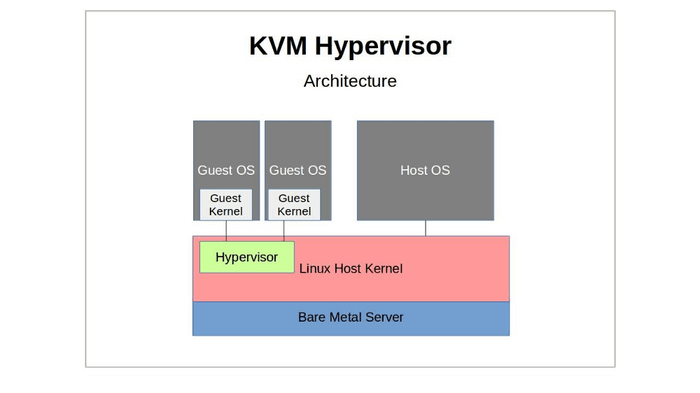
Key Components of KVM Architecture
1. Linux Kernel
The Linux kernel provides: – Process scheduling – Memory management – Security isolation
KVM integrates directly into the kernel, allowing virtual machines to be treated like regular Linux processes.
2. Hardware Virtualization Support
KVM requires CPU virtualization extensions such as: – Intel VT-x – AMD-V
These extensions allow guest operating systems to run efficiently and securely.
3. KVM Kernel Modules
• kvm.ko : Core virtualization module
• kvm-intel.ko or kvm-amd.ko : Hardware-specific modules
These modules expose virtualization capabilities to user-space applications.
Types of Virtualization with KVM
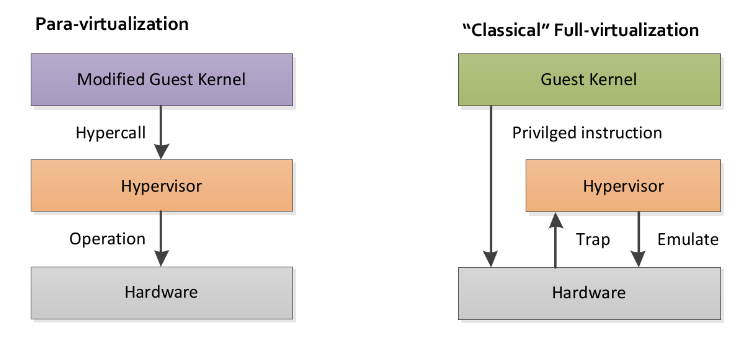
Full Virtualization
KVM supports full virtualization, allowing unmodified guest operating systems to run independently of the host OS.
Paravirtualization
Using optimized drivers such as VirtIO, KVM improves performance by allowing the guest OS to communicate more efficiently with the host
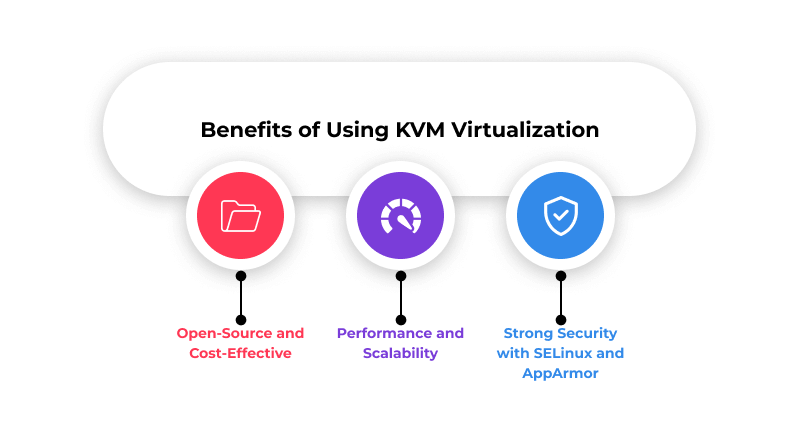
Benefits of KVM Virtualization
Common Use Cases of KVM
1. Server Consolidation – Organizations use KVM to run multiple workloads on fewer physical servers, reducing hardware and energy costs.
2. Cloud Computing – KVM is widely used in public and private clouds to provide scalable and on-demand virtual infrastructure.
3. Development and Testing
Developers use KVM to: – Test applications across different OS environments – Simulate production systems – Quickly spin up and tear down environments
4. Disaster Recovery and Backup
Virtual machines hosted on KVM are easy to snapshot, clone, and migrate, making disaster recovery faster and more reliable.
5. Virtual Desktop Infrastructure (VDI)
KVM enables centralized desktop environments, improving manageability and security.
Conclusion
KVM virtualization is a powerful, flexible, and cost-effective solution for modern computing. Whether you are new to virtualization or building a growing IT infrastructure, KVM provides a reliable platform backed by the Linux ecosystem.

