


Here is a step-by-step guide to migrating legacy systems for digital transformation. Learn best practices, minimize downtime, and modernize your IT infrastructure effectively from our experts.
To stay competitive, organizations must continuously evolve their technology. Migrating from legacy infrastructure to modern architecture is often the foundation of digital transformation.
If your business is still running on a legacy system, now may be the right time to consider an upgrade, before outdated technology slows your growth.
Migrating away from outdated systems is no longer optional for businesses aiming to stay competitive. Old technologies often struggle to keep up with changing customer expectations, new regulations, and increasing data demands. For many companies, legacy systems have become bottlenecks rather than enablers of growth. These systems can still carry critical data and business logic, but they often lack flexibility and present security vulnerabilities.
Transitioning to modern architecture allows businesses to unlock new opportunities, improve operational efficiency, and prepare for future expansion. If you are still on the fence about why it is time to migrate to a digital system, keep reading!
Today, we will explore why organizations need to move away from legacy systems, the benefits of adopting modern architecture, different migration strategies, technical considerations, and real-world examples.
An Overview
- Legacy System Migration In a Nutshell
- Why Businesses Need to Consider Legacy System Migration
- Benefits of Modern Architectures
- Pre-Migration Planning
- Migration Strategies
- Technical Considerations
- Minimizing Downtime During Migration
- Real-World Example – Migrating a Monolithic E-Commerce Platform
- Real-World Example – Legacy ERP to Cloud-Native Solution
- Post-Migration Best Practices
Legacy System Migration In a Nutshell
A legacy system refers to any software, hardware, or application that a company still uses but is no longer considered current. These systems may be outdated in terms of technology, unsupported by vendors, or unable to integrate with new tools. Examples include old ERP platforms, customer management systems, or accounting software built decades ago.
Legacy system migration involves moving data, processes, and functionality from these older environments into modern platforms. This process may include migrating from on-premise servers to cloud solutions, refactoring old codebases into modern frameworks, or even rebuilding applications entirely. The goal is not just to replace outdated systems, but also to align IT with current business requirements.
Without migration, organizations risk higher costs, reduced efficiency, and security vulnerabilities. For example, an outdated payroll application may expose sensitive employee data due to weak encryption. Migrating to a modern, secure solution ensures compliance with labor laws and data privacy regulations. Operational complexity increases with new architectures. Our comparison of AIOps vs traditional IT monitoring highlights how intelligent observability solutions accelerate issue detection and resolution.
Why Businesses Need to Consider Legacy System Migration
Companies often reach a point where their existing systems no longer serve their evolving needs. Outdated technology creates inefficiencies, introduces risks, and prevents businesses from adopting new innovations. Here are some of the most common reasons for migration:
- Emerging technologies:
New tools and platforms can handle business processes faster and more effectively.
- System obsolescence:
Old systems may no longer receive updates or vendor support.
- Security risks:
Legacy systems are more vulnerable to breaches, as they lack modern defenses.
- Business growth:
Organizations expanding operations require scalable systems that can adapt to higher demand.
Consider a manufacturing company still relying on a COBOL-based ERP system. The software may not integrate with newer supply chain management tools, slowing down operations. By migrating to a modern ERP platform, the company can streamline procurement, automate reporting, and gain real-time insights.
In short, migration is not just about fixing technical problems. It enables innovation, supports compliance with regulations like GDPR or HIPAA, and improves customer experience. Businesses that fail to modernize risk being overtaken by competitors who are faster, more secure, and more adaptable.
Benefits of Modern Architecture
Modern IT architectures are designed to meet today’s business demands while preparing for tomorrow’s challenges. By moving away from rigid, monolithic systems, organizations gain several advantages:
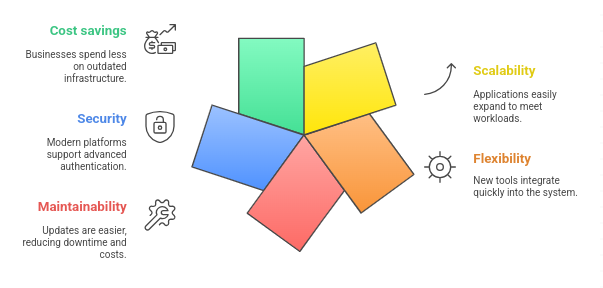
Take the example of an e-commerce platform transitioning from a monolithic application to microservices. In the old system, a sudden spike in traffic like during a holiday sale, could cause the entire application to slow down. However, with microservices, critical functions like payments or product searches can scale independently, ensuring smooth performance even during high demand.
This is why our experts believe that modern architectures create space for innovation. Businesses can experiment with artificial intelligence, predictive analytics, or IoT integration, which are often incompatible with older systems. This adaptability ensures that organizations can stay competitive and agile in a constantly shifting marketplace.
Pre-Migration Planning
If you are ready to migrate, jumping into action without a plan can lead to costly delays, data loss, or unexpected downtime. Pre-migration planning ensures that the transition is well-organized and aligns with business goals. This is where a trusted partner like Bobcares comes in handy. The first step is assessing the existing system. This means reviewing the codebase, identifying dependencies, checking database performance, and understanding bottlenecks. It also involves interviewing stakeholders to capture user needs and expectations.
Once the current state is analysed, the next step is defining objectives. This may include reducing page load times, improving system reliability, or enabling compliance with regulations. Setting measurable goals helps track success once the migration is complete.
The final step is selecting the right architecture. For example:
- Microservices allow applications to be divided into smaller, independent services.
- Serverless models eliminate server management by running code only when needed.
- Containers provide consistent environments across development and production.
A structured plan reduces risks, provides clear direction for developers, and ensures the migration stays aligned with business outcomes. Without this groundwork, organizations risk overspending, underestimating technical challenges, or failing to deliver the expected improvements.
Migration Strategies
Now that we have made up our mind to migrate, it is time to pick a strategy. The chosen strategy determines how smoothly the transition happens. Each approach has its own balance of cost, time, and level of change required.
- Lift and Shift:
This involves moving applications and data to a new environment with minimal changes. It’s quick and relatively inexpensive but doesn’t deliver much improvement in performance or functionality. For instance, moving a website hosted on physical servers to cloud virtual machines without altering the code.
- Replatforming:
This makes small modifications to the application to take advantage of features in the new environment. For example, migrating from an old database to a cloud-based relational database service for improved efficiency.
- Refactoring:
This requires rewriting parts of the application code to improve performance, scalability, or maintainability. A monolithic app might be refactored into microservices, making it easier to update or scale individual components.
- Rebuilding:
This is the most extensive strategy, where the application is rebuilt from scratch using modern frameworks. Although time-consuming and resource-heavy, it produces a system designed to meet current and future business needs.
Business transformation migration involves redesigning systems to support new business models or improve customer experiences.
Within business transformation, there are two subtypes:
- Core System Migrations:
Large-scale migrations of mission-critical systems like ERP or CRM. These require careful planning, complex data transfers, and performance tuning.
- Non-Core Migrations:
Smaller applications like Microsoft Access databases or SharePoint apps. These are simpler but still provide benefits like centralized governance and easier maintenance.
For example, a bank migrating its core customer database faces a much larger challenge than a department digitizing its workflow tool. Understanding the type of migration helps set realistic expectations, budgets, and timelines.
According to our experts, choosing the right strategy depends on budget, timeline, and business priorities. In many cases, organizations use a hybrid approach, combining elements of multiple strategies to balance speed and quality.
Technical Considerations
Beyond strategy, technical execution plays a major role in ensuring migration success. One of the most complex challenges is data migration. Companies must carefully map old data formats to new ones, validate integrity, and ensure sensitive information remains secure throughout the transfer. Our experts recommend using automated tools to reduce risks and shorten timelines.
API integration is another critical area. New systems often need to communicate with legacy applications still in use. RESTful APIs, GraphQL, or middleware solutions allow smooth communication between old and new environments. This helps businesses transition gradually rather than switching everything overnight.
Furthermore, security needs to be a top priority. Modern systems should include strong encryption, access controls, and adherence to compliance standards such as GDPR, HIPAA, or PCI DSS. Failing to address security during migration can result in vulnerabilities or legal risks.
Finally, performance optimization ensures the new system delivers value. Caching frequently accessed data, implementing load balancing, and tuning databases can significantly improve speed and reliability. For example, using Redis or Memcached for caching reduces strain on backend services during heavy traffic.
By addressing these technical factors upfront, organizations reduce the likelihood of setbacks and ensure that the new system is not only functional but also secure, efficient, and future-ready.
Minimizing Downtime During Migration
One of the biggest fears many businesses have during migration is extended downtime that disrupts customers and operations. To address this, we use deployment techniques designed to keep systems available throughout the transition.
Blue-Green Deployment involves running two identical environments, one live and one idle. When the new system is ready, traffic is switched to the new environment. If issues arise, it’s easy to roll back to the previous version.
Canary Releases gradually introduces changes to a small group of users before expanding to everyone. This allows teams to test functionality in real-world conditions and address problems before a full rollout.
Rolling Updates update applications in phases. For example, one microservice is updated and tested before moving on to the next, reducing the risk of widespread failures.
Feature Toggles allow developers to activate or deactivate features without redeploying code. This helps test new capabilities with select users while maintaining stability for the rest.
These approaches minimize downtime, reduce risk, and improve user experience during the migration process. For customer-facing systems like e-commerce platforms or banking apps, where even a few minutes of downtime can lead to lost revenue, these methods are especially critical.
Real-World Example – Migrating a Monolithic E-Commerce Platform
A retail company struggled with a monolithic application that slowed down during peak traffic. They decided to migrate to a microservices architecture. The system was broken into smaller services like inventory, checkout, and user accounts, using Docker and Kubernetes. A blue-green deployment ensured minimal downtime. The result was a scalable system that handled traffic spikes seamlessly and reduced maintenance overhead.
Real-World Example – Legacy ERP to Cloud-Native Solution
A manufacturing business relied on a COBOL-based ERP system that was expensive to maintain and lacked modern integrations. The company replatformed to AWS, using APIs to connect with existing on-premises systems. Data migration was handled using AWS Database Migration Service. Rolling updates ensured that business operations continued during the transition. After migration, costs dropped, performance improved, and the system became adaptable to future needs.
These case studies demonstrate that migration is not a one-size-fits-all process. Each business must choose a strategy that fits its systems, budget, and long-term goals. Success comes from careful planning, testing, and phased execution rather than rushing through the process.
Post-Migration Best Practices
A common mistake made by many businesses is assuming that migration ends once the new system goes live. Post-migration practices ensure stability, security, and long-term success.
- Monitoring and Maintenance:
Tools like Prometheus, Grafana, or CloudWatch provide real-time insights into performance and potential issues. Automated alerts help IT teams respond quickly before small issues escalate.
- Continuous Integration and Deployment (CI/CD):
Implementing pipelines with Jenkins, GitLab, or GitHub Actions ensures updates can be tested and released quickly without disrupting operations.
- User Training:
Employees need guidance on how to use the new system effectively. Training sessions, step-by-step manuals, and helpdesk support ensure smooth adoption.
- Documentation:
Detailed documentation helps both users and developers. It reduces reliance on individual knowledge and provides a foundation for future upgrades.
Neglecting these practices can undo the benefits of migration. For example, if employees don’t understand the new CRM system, adoption will lag, and business outcomes will suffer. By investing in ongoing monitoring, training, and documentation, organizations ensure that migration delivers lasting value.
[Need assistance with a different issue? Our team is available 24/7.]
Conclusion
Migrating from legacy systems to modern architecture is not just a technical task. It’s a business transformation journey. If done right, it reduces risks, increases efficiency, and prepares organizations for future challenges. On the other hand, if it is poorly done, it can disrupt operations and waste resources.
The earlier organizations embrace legacy migration as a stepping stone to digital transformation, the better. This way, they can unlock the benefits of modern technology and stay ahead in an increasingly competitive marketplace. Talk to our team today!

