


Please Note: This article is part of our historical archive. Because it was published a while ago, some of the information, links, or context may now be outdated.
Over 80% of websites on the internet are vulnerable to hacks and attacks. In our role as hosting support engineers for web hosts, we perform periodic security scans and updates in servers to protect them from hacks.
A recent bug that affects the servers is the SWEET32 vulnerability. By exploiting a weak cipher ‘3DES-CBC’ in TLS encryption, this bug has caused many server owners to panic about their data security.
If you see that your website is failing security scans with this message, that means your server is vulnerable to SWEET32 attacks.
“SSL/TLS server supports short block sizes (SWEET32 attack)”
See how we secure your servers!
What is SWEET32 Birthday Attack (CVE-2016-2183)?
By default, servers have the ‘3DES-CBC’ cipher enabled in TLS. This makes HTTPS connections in those servers vulnerable to this SWEET32 bug.
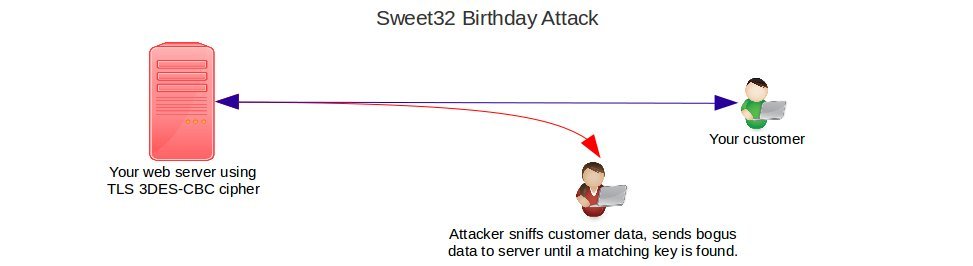
Hackers can then easily decrypt your valuable data using a method called Birthday Attack. Here’s how it works:
The web server encrypts data using cryptographic keys. These keys are chosen randomly, and the probability of any two customers getting the same key is very low.
By misusing the SWEET32 vulnerability, an attacker can send in a large volume of dummy data, and get blocks of cipher text that matches that of a customer.
To break it down:
- The attacker sniffs all data sent to your customer.
- The attacker sends dummy data to your server until a key used for a customer matches the attacker’s session key.
- Once there’s a match, sensitive data can be decrypted by determining how the key was chosen.
Are your servers vulnerable to SWEET32 Birthday Attack (CVE-2016-2183)?
OpenSSL protocol uses the vulnerable ‘Triple-DES’ ciphers for encrypting the data. So if your web servers such as Apache, Nginx, etc. use OpenSSL with the vulnerable ‘Triple-DES’ cipher support, your server is susceptible to attack.
If your servers are running OpenSSL versions prior to 1.0.1, which cannot support strong ciphers, your servers are already vulnerable to many other attacks too, such as CCS Injection Vulnerability.
The first thing we do is check the version of the OpenSSL server:
root@host ~ $ openssl version
OpenSSL 1.0.1f 6 Jan 2014
To examine the ciphers that are enabled in the OpenSSL server, we use the ‘nmap’ command. The code ‘3DES’ indicates cipher suites that use triple DES encryption. These are the ones we disable for server security.
Today, we are going to take a close look at how to secure different servers from the SWEET32 vulnerability:
- What is SWEET32 Birthday Attack?
- Are your servers vulnerable to SWEET32 attacks?
- How to fix the SWEET32 vulnerability
How to fix the SWEET32 (CVE-2016-2183) Vulnerability
To secure confidential information from this critical SWEET32 birthday attack vulnerability, we disable all 64-bit block weak ciphers. For enhanced security, we allow only strong ciphers such as AES.
Though OpenSSL has disabled support for weak ciphers from version 1.1.0 release onwards, we’ve seen many servers still running older versions that are vulnerable.
For the servers that we manage, our expert technicians keep all server software updated, to protect them from attacks. If your servers are running vulnerable versions, you should disable these weak ciphers without delay.
[ Don’t wait for an attack to strike. Secure your servers right now! Our world-class server security specialists are here to protect your servers. ]
How we secure Apache and Nginx web servers from the SWEET32 bug
In servers that are running Apache web server, here is how we secure them:
- To begin with, edit the Apache SSL configuration file at ‘ /etc/apache2/mods-available/ssl.conf ‘
- Go to the SSL section and ensure that old protocols such as SSLv2 and SSLv3 are disabled.
- Then, go to the CIPHER text section and update the entry with the relevant ‘SSLCipherSuite’.
- Restart the Apache web server.
In servers with Nginx web server, we do these steps:
- Edit the Nginx configuration file ‘/etc/nginx/nginx.conf’.
- Go to the SSL section, set the secure protocols, and update the Cipher text with the relevant ‘ciphers’ list.
- Restart the web server after saving the new settings.
How to fix the SWEET32 bug in RedHat and CentOS servers
RedHat and CentOS servers use their own OpenSSL package, which is updated from their repository using the ‘yum’ command. But RHEL/CentOS 5,6,7 versions use vulnerable OpenSSL packages.
To know the version of the OpenSSL package in the server, we execute the command:
root@host ~ $ rpm -qa | grep openssl
openssl-0.9.8e-20.el5_7.1
To immediately mitigate the SWEET32 Birthday attack (CVE-2016-2183) until the new OpenSSL secure package is made available in RedHat and CentOS repositories, we disable the weak ciphers in the services that use SSL.
The services we update with strong ciphers include web servers such as Apache and Nginx, mail servers such as Exim, POP/IMAP server, FTP server, etc.
Fixing SWEET32 vulnerability in Debian and Ubuntu servers
Ubuntu has different versions and the OpenSSL packages available in them are:
Ubuntu 15.10:libssl1.0.0        1.0.2d-0ubuntu1.2
Ubuntu 15.04:libssl1.0.0        1.0.1f-1ubuntu11.5
Ubuntu 14.04 LTS:libssl1.0.0    1.0.1f-1ubuntu2.16
Ubuntu 12.04 LTS:libssl1.0.0    1.0.1-4ubuntu5.32
To check the version of the OpenSSL package in the server, we use the command:
dpkg -s openssl
If it is running older vulnerable versions, we update the OpenSSL package to the latest supported version.
The latest secure OpenSSL version is not yet available in these packages. So, as an immediate mitigation, we disable the weak ciphers in all public services with OpenSSL support.
Securing OpenSUSE servers from the SWEET32 bug
In OpenSUSE, the ‘zypper’ tool helps us to update and install the latest OpenSSL packages in the server.
We use this command to update your Suse server:
# zypper in -t patch secsp3-openssl1-12539=1
To mitigate the SWEET32 Birthday attack (CVE-2016-2183) vulnerability, we disable the 3DES and other weak ciphers from all the public SSL-based services.
How to protect IIS Web Servers from the SWEET32 bug
To disable weak ciphers in the Windows IIS web server, we edit the Registry corresponding to it. Here is how to do that:
- Click Start, click Run, type ‘regedit’ in the Open box, and then click OK.
- Locate the following security registry key:
HKEY_LOCAL_MACHINE\SYSTEM\CurrentControlSet\Control\SecurityProviders\SCHANNEL
-
Go to the ‘SCHANNEL\Ciphers subkey’, which is used to control the ciphers such as DES and RC4.
-
Edit the subkey ‘SCHANNEL\Ciphers\Triple DES 168’ and set the DWORD value data to 0x0.
Registry edits are done very carefully, as any mistake can cause the server to become non-functional. Server restarts may be required for the updates to come into effect.
[ Secure your server now and avoid a catastrophe! Our 24/7 expert technicians are here to safeguard your servers from an attack. ]
The steps to restrict the ciphers and edit the registry can vary with the Windows version on your server. It is therefore recommended to do it only with expert assistance.
At Bobcares, our security experts are specialized in securing the servers of our customers. By taking proper backups of the registry and other relevant config, we ensure that the servers do not get messed up.
Conclusion
SWEET32 is a vulnerability in 3DES-CBC ciphers, which is used in most popular web servers. Today we’ve seen how we fix it in popular operating systems and web servers.
Older operating systems such as Windows XP use 3DES-CBC to establish connections. Researchers have shown that these connections can be easily decrypted during SWEET32 Birthday Attacks (CVE-2016-2183).
Bobcares helps online businesses of all sizes achieve world-class security and uptime, using tried and tested solutions. If you’d like to know how to make your server more reliable, we’d be happy to talk to you.
PREVENT YOUR SERVER FROM CRASHING!
Never again lose customers to poor server speed! Let us help you.
Our server experts will monitor & maintain your server 24/7 so that it remains lightning fast and secure.




I made the regedit change to stop the IIS attack, then rescanned the server with Trustwave and it is still coming up as vulnerable. Any suggestions?
Tim,
The registry edits and restricting the ciphers can vary with the Windows version you’re running in your server. Please feel free to contact our 24/7 support team here – https://bobcares.com/contact-us/ – for further assistance.
You need to add the registry dword ‘Enabled’ and set it to 0. So the full path for disabling in IIS is
“HKEY_LOCAL_MACHINE\SYSTEM\CurrentControlSet\Control\SecurityProviders\SCHANNEL\Ciphers\Triple DES 168”
new dword Enabled = 0
Hi,
The cipher setting varies with the Windows version in the server. In earlier versions, if you do not configure the Enabled value, the default is enabled. This setting is to disable that Triple DES cipher. If it is not enabled, then no need to worry.
I use plesk 12.5 and have already used their recommendations for PCI compliance, which includes updating the cipher text as you mentioned. However, their cipher text is much longer that the one that you have suggested, “EECDH+AESGCM+AES128:EECDH+AESGCM+AES256:EDH+AESGCM+AES128:EDH+AESGCM+AES256:EECDH+SHA256+AES128:EECDH+SHA384+AES256:EDH+SHA256+AES128:EDH+SHA256+AES256:EECDH+SHA1+AES128:EECDH+SHA1+AES256:EDH+SHA1+AES128:EDH+SHA1+AES256:EECDH+HIGH:EDH+HIGH:AESGCM+AES128:AESGCM+AES256:SHA256+AES128:SHA256+AES256:SHA1+AES128:SHA1+AES256:HIGH:!aNULL:!eNULL:!EXPORT:!DES:!RC4:!MD5:!PSK:!KRB5:!aECDH:!EDH+3DES”. I am hesitant to change this for your much shorter cipher text. I found that merely adding, “:!3DES”, to the end of my cipher text, it removed all of the 3DES ciphers. This seems sufficient, but I thought I would get your thoughts on the matter.
Jason,
Since SWEET32 is based on 3DES vulnerability, the key intention behind this article is on how to avoid using that cipher in your servers. AES cipher is considered a strong cipher as of now and it comes in 128 and 256 bit combinations. You can enable as many strong ciphers as you would like your server to support.
Making this registry change to remediate the vulnerability break RDP. No more remote desktop when applied!
“HKEY_LOCAL_MACHINE\SYSTEM\CurrentControlSet\Control\SecurityProviders\SCHANNEL\Ciphers\Triple DES 168”
new dword Enabled = 0
Bruno,
You may have to update RDP packages to support the latest versions of TLS. Please feel free to contact our 24/7 support team here – https://bobcares.com/contact-us/ – for further assistance.
Hey, Bob. Just wanted to say that this information helped me pass my TrustKeeper compliance test. Good stuff!
Thank you, happy to know that 🙂
I have 3 servers that are currently affected:
– Windows Server 2012R2
– Windows Server 2008R2
– Windows Server 2008
After editing the registry changes, do I need to reboot the servers for the changes to take effect
Server restart is not required for the cipher key changes to come into effect, but maybe required for protocol key changes. However, as mentioned, you need to be very careful while editing the registry. Please feel free to contact our 24/7 support team here – https://bobcares.com/contact-us/ – for further assistance.
I have encountered some issue. I have a Windows Server 2008R2 server has been detected with this Sweet32 Vulnerability.
The following is the registry configuration.
[HKEY_LOCAL_MACHINE\SYSTEM\CurrentControlSet\Control\SecurityProviders\SCHANNEL\Ciphers]
[HKEY_LOCAL_MACHINE\SYSTEM\CurrentControlSet\Control\SecurityProviders\SCHANNEL\Ciphers\RC4 128/128]
“Enabled”=dword:00000000
[HKEY_LOCAL_MACHINE\SYSTEM\CurrentControlSet\Control\SecurityProviders\SCHANNEL\Ciphers\RC4 40/128]
“Enabled”=dword:00000000
[HKEY_LOCAL_MACHINE\SYSTEM\CurrentControlSet\Control\SecurityProviders\SCHANNEL\Ciphers\RC4 56/128]
“Enabled”=dword:00000000
So for this Scenario, How will I be able to disable 3DES Cipher ? Kindly advise ?
Hi,
To disable the 128-bit weak cipher, edit the value in ‘SCHANNEL\Ciphers\RC4 128/128 subkey’ and change the DWORD value data to 0x0. Repeat this for all such entries related to weak ciphers.
But isn’t that for Disabling RC4 Cipher Suite ?
And these 3 are already disabled.
What I mean is I am unable to find this registry below from W2K8 and W2K8R2 Servers.
\SCHANNEL\Ciphers\Triple DES 168
How could I resolve this issue ?
Hi,
For keys that are not being listed, you may have to manually add the cipher keys and disable them, as the default value is ‘Enabled’. Please feel free to contact our 24/7 support team here – https://bobcares.com/contact-us/ – for any further assistance.
Hi Reeshma.
Below are the plugin name of my VAPT findings. Appreciate if you could advise on the steps, and what should I do to remediate both VAPT finding.
1) SSL Medium Strength Cipher Suites Supported (SWEET32)
Port 3389
Description: The remote host supports the use of SSL ciphers that offer medium strength encryption. Nessus regards medium strength as any encryption that uses key lengths at least 64 bits and less than 112 bits, or else that uses the 3DES encryption suite.
Note that it is considerably easier to circumvent medium strength encryption if the attacker is on the same physical network.
2) SSL Medium Strength Cipher Suites Supported (SWEET32)
Port 4000
Description: The remote host supports the use of SSL ciphers that offer medium strength encryption. Nessus regards medium strength as any encryption that uses key lengths at least 64 bits and less than 112 bits, or else that uses the 3DES encryption suite.
Note that it is considerably easier to circumvent medium strength encryption if the attacker is on the same physical network.
Hi Omar,
Our experts can help you with the issue.we will be happy to talk to you through our live chat(click on the icon at right-bottom).
Planning on making this change, but would like to know if it will break Microsoft Exchange Server / mail Flow??
Jake,
It would depend on the Exchange server you’re running on. SMTP support for TLS 1.1 and 1.2 were added in Exchange Server 2013 CU8 and Exchange Server 2010 SP3 RU9. So, if you update the ciphers and TLS versions, you may need to apply an update for the SMTP service or else mails may stop working.
Please feel free to contact our 24/7 support team here – https://bobcares.com/contact-us/ – for a detailed investigation and further assistance.
Dear Team,
We are using RHEL5 and wanted to get away with Sweet32 Vulnerability. For which we are trying to upgrade the openssl package from 1.0.1u to 1.1.0f. But we are facing lot of issues. Could you please suggest an alternate.
Hi Renuka,
It would require a check of your server software version and its dependencies, please contact our server experts at https://bobcares.com/server-administration-service/ , and they will secure your server from sweet32 bug.
Hai,
I have Linux Readheat server, with Weblogic service. please how to solved the 3DES and RSA
thanks
Hello, I’m getting this vulnerability on my Windows Server 2012 R2 vSphere server. I tried looking through regedit, but my …/SCHANNEL/Ciphers/ folder only has (Default). Am I missing something or is there somewhere else to fix this vulnerability?
Hi there,
We would require to have a closer look at the server software version and its dependencies. If you still find problems, we’ll be happy to talk to you on chat (click on the icon at right-bottom).