


Learn the steps, key components, security practices, and testing required for reliable payment integration. Explore Bobcares API integration Services for reliable and secure setups.
Payment APIs can be described as software tools that allow applications to integrate payment processing directly into their workflows. They allow businesses to accept payments on their own websites, which helps reduce shopping cart abandonment. In other words, these APIs handle transaction data securely and support efficient payment operations.
Payment APIs and payment gateways work together. The API is integrated into the website or application and sends transaction data to the external payment gateway, which then communicates with banks and card networks to complete the transaction.
An Overview
Key Functions of Payment Gateway APIs
Payment gateway APIs support multiple payment methods, including credit cards, debit cards, digital wallets, and bank transfers. This allows businesses to offer customers several payment options through a single integration.
Security is a central function of payment APIs. Techniques such as tokenization replace sensitive card details with unique tokens, reducing the risk of exposing payment data. APIs also manage transaction states by processing payments, handling refunds, and managing cancellations, helping businesses maintain accurate records and provide clear payment updates.
Benefits and Features of Payment Gateway APIs
Payment gateway APIs simplify checkout by keeping users on the business website during payment. They support international payments through multi-currency handling and help automate payment workflows to reduce manual effort and errors.
Common features include tokenization, recurring billing for subscription models, fraud detection tools, and chargeback management capabilities. Payment gateways also provide API documentation and technical support to assist developers during implementation and maintenance. When building secure and reliable integrations, it’s also important to understand how APIs and middleware work together to enable smooth communication between systems.
Integrating a Payment Gateway Using APIs
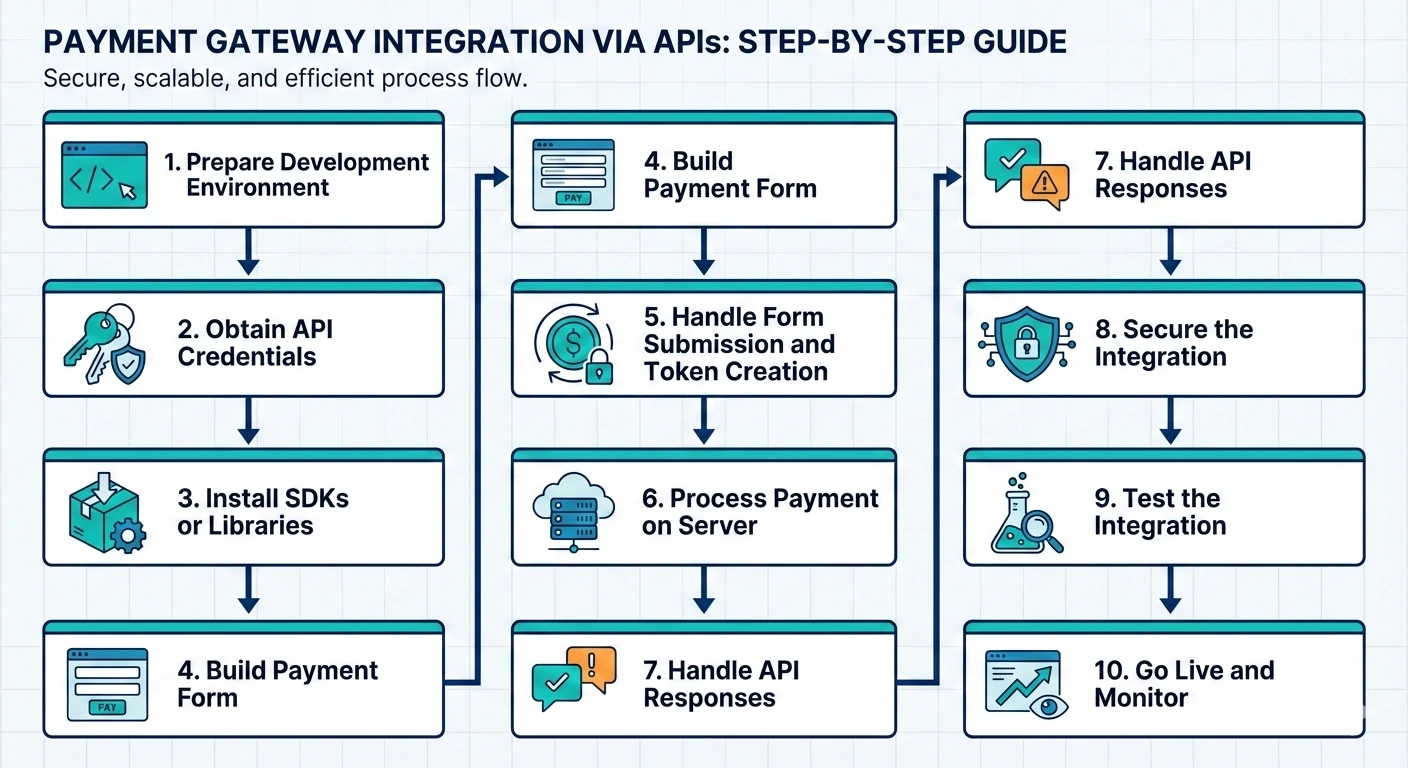
Step 1. Prepare the Development Environment
Start by selecting a text editor or IDE such as Visual Studio Code, Sublime Text, or Atom. These tools provide features like syntax highlighting, code completion, and debugging.
A local server environment should be set up using tools such as XAMPP, MAMP, or Docker to test the integration before deployment. Required dependencies like Node.js, npm, or Composer must also be installed based on the chosen language and framework.
Step 2. Obtain and Secure API Credentials
Payment gateways provide API keys, secret keys, or client ID-secret pairs to access their services. These credentials should be stored securely using environment variables or secure storage systems.
API keys should be reviewed and rotated periodically. Additional controls such as IP whitelisting and rate limiting help reduce the risk of unauthorized access.
Step 3. Install SDKs or Libraries
Many payment gateways offer SDKs or libraries that simplify API interaction by providing pre-built methods. Documentation should be reviewed to understand how each library works and what it supports.
Here are some examples of installing the Stripe library using npm for Node.js or Composer for PHP:
npm install stripecomposer require stripe/stripe-phpStep 4. Build the Payment Form
The payment form should be simple and request only essential information. Input validation ensures data is correctly formatted before submission.
Sensitive information such as card details should not be stored on the server. Client-side tokenization provided by the payment gateway should be used instead.
Here is a sample HTML payment form:
<form id="payment-form">

<div>

<label for="card-number">Card Number</label>

<input type="text" id="card-number" name="card-number" required>

</div>

<div>

<label for="card-expiry">Expiration Date</label>

<input type="text" id="card-expiry" name="card-expiry" required>

</div>

<div>

<label for="card-cvc">CVC</label>

<input type="text" id="card-cvc" name="card-cvc" required>

</div>

<button type="submit">Pay Now</button>

</form>
Step 5. Handle Form Submission and Token Creation
Client-side code captures user input and interacts with the payment gateway API to create a token that represents the payment details. This token is then sent to the server.
Error handling should return clear messages for issues such as invalid input, expired cards, or insufficient funds.
Here is an example using JavaScript and Stripe:
<script src="https://js.stripe.com/v3/"></script>
const stripe = Stripe('your-public-key');

const elements = stripe.elements();

const cardElement = elements.create('card');

cardElement.mount('#card-element');

document.getElementById('payment-form').addEventListener('submit', async (event) => {

event.preventDefault();

const {token, error} = await stripe.createToken(cardElement);

if (error) {

console.error(error);

} else {

const response = await fetch('/process-payment', {

method: 'POST',

headers: {

'Content-Type': 'application/json',

},

body: JSON.stringify({token: token.id}),

});

const result = await response.json();

if (result.success) {

alert('Payment successful!');

} else {

alert('Payment failed. Please try again.');

}

}

});
Step 6. Process Payments on the Server
Server-side processing sends the token to the payment gateway along with transaction details such as amount and currency. Sensitive information should never be exposed in server responses.
Frameworks like Express for Node.js or Django for Python help manage routing and request handling.
Here is an example using Node.js and Stripe:
const express = require('express');

const stripe = require('stripe')('your-secret-key');

const bodyParser = require('body-parser');

const app = express();

app.use(bodyParser.json());

app.post('/process-payment', async (req, res) => {

try {

const { token } = req.body;

const charge = await stripe.charges.create({

amount: 2000,

currency: 'usd',

source: token,

description: 'Example charge',

});

res.json({ success: true, charge });

} catch (error) {

res.json({ success: false, error: error.message });

}

});

app.listen(3000, () => console.log('Server running on port 3000'));
Step 7. Handle API Responses
After processing a payment, the system should update the database and return a confirmation message for successful transactions. Failed payments should return clear error messages and next steps for the user.
Temporary issues such as network failures can be logged and retried using controlled retry logic.
Build reliable API Integrations with Bobcares

Step 8. Secure the Integration
Payment integrations must follow security best practices. HTTPS should be used to encrypt data in transit, and user inputs must be validated and sanitized. Tokenization should be used for handling payment details.
Regular security audits, dependency updates, and automated vulnerability scans help maintain compliance with industry standards such as PCI-DSS.
Step 9. Test the Integration
Testing should be done using the payment gateway’s sandbox or test mode. Scenarios should include successful payments, declined transactions, incorrect card details, and network failures.
Server logs should be reviewed during testing to identify errors or unexpected behavior.
Step 10. Go Live and Monitor
Going live requires switching to production API keys and monitoring initial transactions closely. Logging and monitoring tools help track transaction status and detect issues early.
A support process should be in place to handle payment-related queries after launch.
Conclusion
In short, integrating a payment gateway using APIs requires a clear understanding of how payment components interact and careful implementation at each stage. A structured process that covers environment setup, secure data handling, testing, and ongoing monitoring helps maintain accurate payment processing and a consistent user experience.

