


Troubleshoot the failed to run /snap/lxd/current/bin/lxd forkstart container error. Our LXC/LXD Support team is ready to assist you.
Understanding and Resolving the LXD Forkstart Error
LXD is a popular tool for managing Linux containers, but errors can stop containers from running. The forkstart error is a common issue that can block services and disrupt workflows. This guide explains its causes and shows simple ways to troubleshoot and resolve it.
LXD Forkstart Error
The error “failed to run /snap/lxd/current/bin/lxd forkstart” occurs when the LXD service cannot start or a container fails to launch. This happens due to issues such as misconfigured settings, corrupted files, or conflicts with other system services, preventing the container from running properly. Backing up and restoring LXD containers before troubleshooting can prevent data loss.
Common Reasons for the LXD Forkstart Error
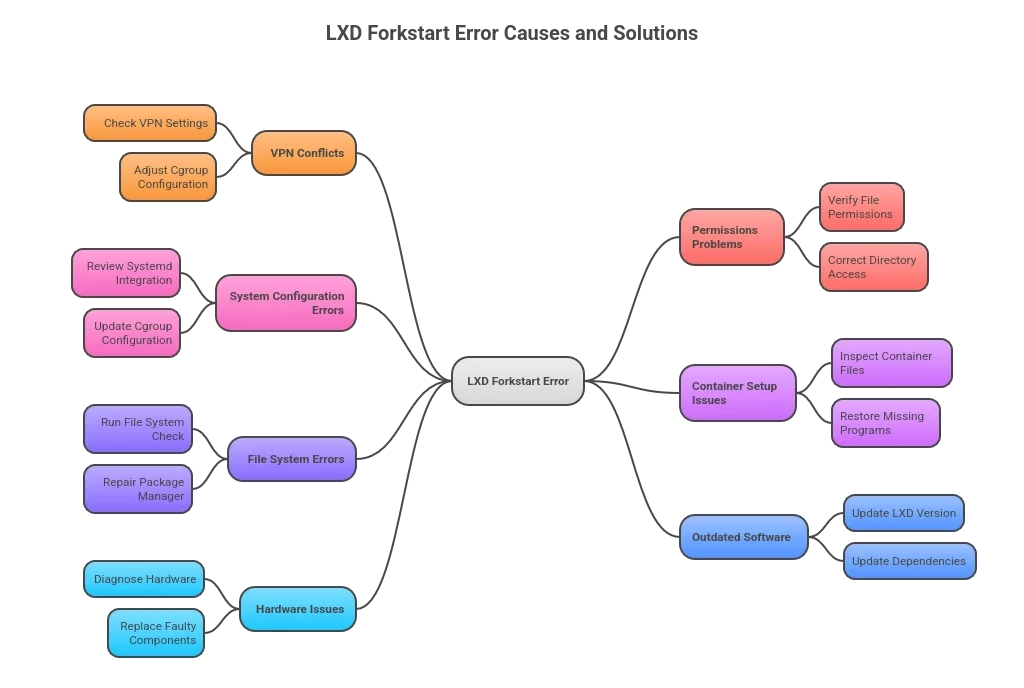
The error “failed to run /snap/lxd/current/bin/lxd forkstart” occurs when LXD cannot start a service or launch a container. Several factors can cause this problem, and understanding them can help resolve it quickly.
- VPN Conflicts: Some VPN clients can alter cgroup settings, which control container resources. This can prevent containers from starting properly.
- Permissions Problems: Incorrect permissions on critical directories or files can block LXD from accessing the resources it needs to run.
- System Configuration Errors: Misconfigured system settings, such as cgroup integration with systemd, can interfere with container operations.
- Container Setup Issues: Missing or corrupted container files, including essential programs like init, can stop a container from launching. Creating a storage pool in LXD ensures containers have a proper storage backend.
- File System Errors: Corrupted files or issues with the package manager can cause incomplete installations or locked files, which can prevent LXD from starting.
- Outdated Software: Using older versions of LXD or dependencies like liblxc may create compatibility issues with the current system kernel.
- Hardware Issues: Rare hardware problems can cause unpredictable system behavior, leading to LXD startup errors.
Understanding these causes helps identify the source of the error and guides effective troubleshooting.
Start Your LXD Containers Smoothly

How to Troubleshoot the LXD Forkstart Error
The error /snap/lxd/current/bin/lxd forkstart happens when LXD cannot start a container or the service fails. It usually occurs due to configuration issues, permission problems, or conflicts with other services.
Basic Checks
Start by checking the logs. Use journalctl -u snap.lxd.activate.service to see errors for LXD, or journalctl -f to watch logs in real time. Make sure snapd is running with snap services. Check that the LXD service is active using systemctl status snap.lxd.activate.service and refresh systemd with systemctl daemon-reload.
Common Fixes
Refresh LXD with sudo snap refresh lxd. If that does not work, remove and reinstall it using sudo snap remove lxd –purge and sudo snap install lxd.
Check for conflicts with other services using the same ports or resources. Verify permissions and AppArmor settings to make sure LXD has access. Inspect storage, especially if you use ZFS, for errors. Look for leftover processes using ps ax | grep ‘lxc monitor’ and terminate them if needed.
Advanced Checks
If nvidia.runtime is active, make sure nvidia-container-cli is installed and environment variables are correct. Clear SNAP or other variables that may interfere. Ensure the rootfs directory exists and the file system is healthy.
Following these steps helps LXD start containers successfully.
[Need assistance with a different issue? Our team is available 24/7.]
Conclusion
The failed to run /snap/lxd/current/bin/lxd forkstart error stops containers from running. Following simple troubleshooting steps can resolve it and get LXD working again.

