


Upgrading LibreNMS to the Latest Major Release? Learn key architecture insights, preparation steps, upgrade process, common issues, and validation practices. Bobcares Laravel Support assists with upgrades, troubleshooting, and performance stability to keep your applications running reliably.
LibreNMS is an open-source network monitoring platform built on PHP and Laravel. Minor updates are typically routine. A major release upgrade requires structured planning because it can introduce changes to architecture, dependencies, database schema, and permission models.
This blog outlines a real-world upgrade to the latest major LibreNMS release, focusing on architecture awareness, preparation, execution steps, issues encountered, and key lessons learned.
An Overview
LibreNMS Architecture Overview
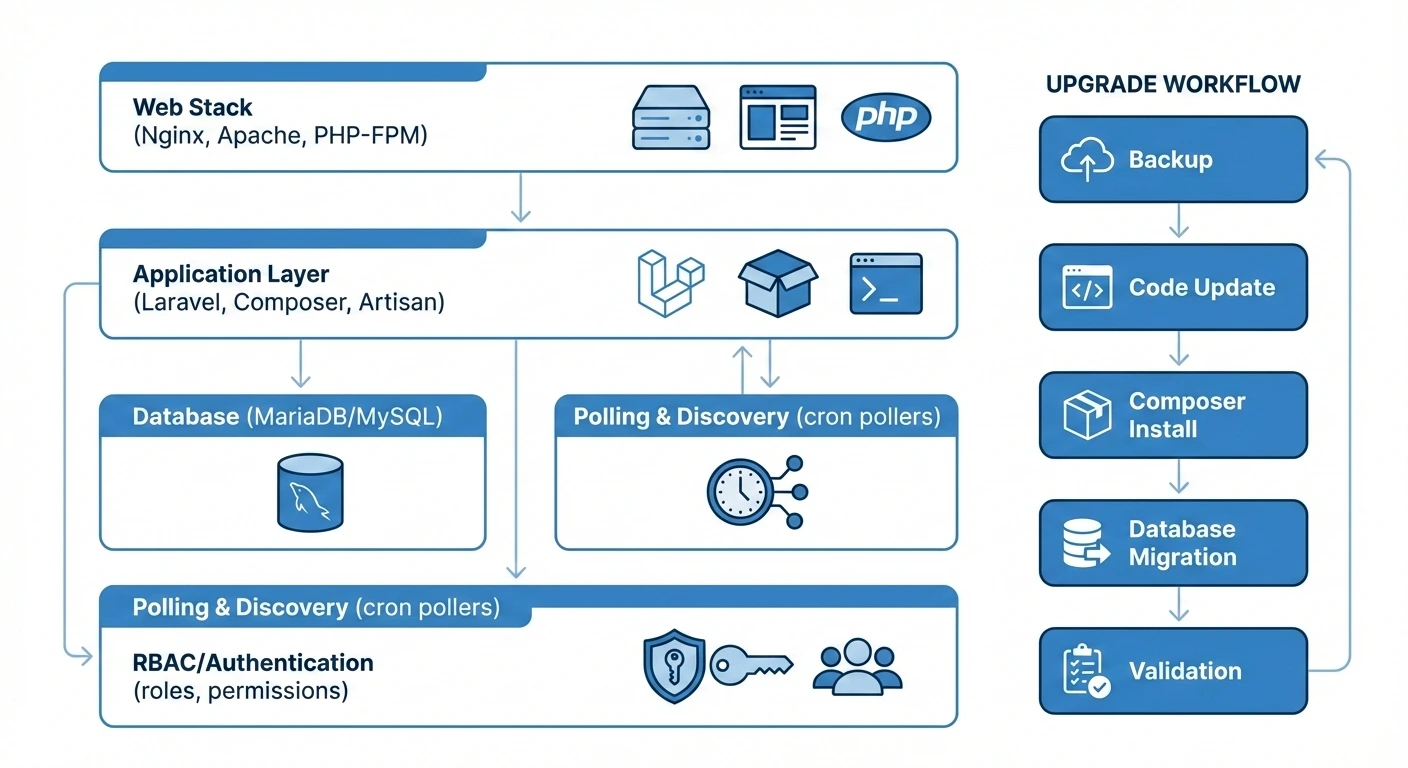
Understanding the platform structure is essential before performing a major upgrade. Changes in one layer can affect others, particularly when schema updates and dependency shifts occur together.
| Layer | Components | Role |
|---|---|---|
| Web Stack | Nginx or Apache, PHP aligned to the release, PHP-FPM | Handles request processing and application execution |
| Application Layer | LibreNMS (Laravel-based), Composer dependencies, Artisan commands | Controls logic, migrations, and maintenance tasks |
| Database | MariaDB or MySQL managed through Laravel migrations | Stores monitoring data and evolves with schema updates |
| Polling and Discovery | Cron-driven pollers and discovery processes | Collects metrics and drives alert evaluation |
| Permissions and Authentication | Laravel RBAC with optional LDAP or SSO | Manages user access and role assignments |
Architectural awareness reduces troubleshooting time during upgrades.
Preparation Before Upgrade
Major upgrades should begin only after verifying release requirements and system readiness.
Release documentation must be reviewed carefully to confirm PHP compatibility, deprecated functionality, database adjustments, and authentication changes. System validation should confirm supported PHP versions, required extensions, compatible database versions, and adequate disk capacity.
Complete backups are mandatory. This includes a database dump, the full LibreNMS application directory, and configuration files such as config.php and .env. Backup integrity should be verified through test restoration.
Polling and alerting must be paused before proceeding. Disabling cron jobs prevents inconsistent monitoring states, and temporarily suspending alerts avoids unnecessary notifications during maintenance. To broaden your understanding of monitoring tools and how they fit into modern infrastructure management strategies, check out this overview of the Prometheus distributed monitoring system.
Upgrade Execution
A controlled sequence ensures clarity and reduces operational risk.
The system should first be placed in maintenance mode by stopping pollers and background jobs. Source code can then be updated through Git by fetching the latest tags or release branch and switching to the target version. Structural changes within vendor libraries may appear at this stage.
Composer should be executed to align dependencies with the new release. Clearing the vendor directory may be necessary to prevent conflicts. Dependency mismatches are a common source of runtime errors after upgrades.
Database migrations must then be applied. Laravel migrations adjust tables, introduce new structures, and update permission-related schema elements. Migration output should be reviewed carefully.
File ownership and permissions should be validated before reactivating services. Furthermore, the web server user must retain appropriate access, the LibreNMS CLI user must match the recommended configuration, and cache and storage directories must remain writable. If you’re curious about how emerging technologies like AIOps can enhance automated monitoring and alerting across your network environments, this beginner’s guide explains it well.
Bobcares Laravel experts can help.

Issues Encountered
RBAC Conflicts
Access issues appeared immediately after the upgrade. Administrative users were unable to manage settings due to conflicts between legacy role tables and Laravel’s default RBAC structure. Missing or inconsistent pivot table entries caused authorization failures.
Resolution required removing non-standard role tables, rebuilding roles using LibreNMS defaults, and reassigning users. Also, direct database modifications to RBAC structures introduce long-term risk.
Database Inconsistencies
Schema validation errors revealed duplicate records and legacy data that did not meet newer constraints. Cleanup required identifying duplicate entries, correcting data through controlled SQL queries, and rerunning validation checks.
Older installations often surface structural inconsistencies during major upgrades.
Alert Flooding
Alert emails increased sharply after services were reactivated. Devices required time to stabilize following schema and dependency updates.
Alerts were temporarily suppressed while polling and discovery normalized. Gradual reactivation restored expected behavior.
Post-Upgrade Validation
Validation confirms operational stability before returning the system to full production use. The validate.php utility or equivalent checks should be executed. Web interface functionality, polling processes, alert rules, and transport configurations must be verified. Application and web server logs should be reviewed for anomalies.
System readiness should be confirmed only after these checks are completed without error.
Conclusion
In short, a major LibreNMS upgrade is a structured lifecycle event rather than a routine update. Our Bobcares experts are here to help you with the upgrade if you are having trouble.

