


AWS managed services help you build secure AWS VPC networks with public and private subnets, routing, gateways, and access controls.
When you deploy an application on AWS, you need to control how its servers, databases, and other resources communicate. This is where an AWS Virtual Private Cloud (VPC) comes in.
A VPC gives your AWS resources a private network with its own IP range, subnets, routing rules, and security controls. It also helps you decide which resources can connect to the internet and which ones should stay private.
This guide explains the main parts of an AWS VPC and shows how they work together in a common application setup.
For complex deployments, AWS cloud consulting can help teams plan network architecture, configure access controls, and manage connectivity between AWS resources.
An Overview
What Is an AWS VPC?
An AWS VPC is a logically isolated virtual network inside AWS. You define its IP address range and place resources such as EC2 instances, RDS databases, and load balancers inside it.
A VPC uses several components to manage network traffic:
| VPC Component | Main Purpose |
|---|---|
| CIDR block | Defines the VPC IP address range |
| Subnets | Divide the VPC into smaller network sections |
| Route tables | Direct network traffic |
| Internet Gateway | Provides a path to and from the internet |
| NAT Gateway | Provides outbound internet access for private resources |
| Security Groups | Control traffic at the resource level |
| Network ACLs | Control traffic at the subnet level |
If one of these components has an incorrect configuration, connectivity problems can occur.
How Public and Private Subnets Work
You can divide a VPC into public and private subnets.
For example:
- VPC: 10.0.0.0/16
- Public Subnet: 10.0.1.0/24
- Private Subnet: 10.0.2.0/24
The main difference comes from routing.
Public Subnet
A subnet becomes public when its route table has a route to an Internet Gateway. You can place resources that need direct internet connectivity in this subnet.
For example, an internet facing load balancer can use a public subnet.
Private Subnet
A private subnet does not have a direct route to an Internet Gateway. You can use it for backend servers and databases that do not need direct inbound access from the internet.
This separation gives you better control over network access.
An AWS cloud consultant can help assess subnet placement and routing requirements when designing networks for production workloads.
Talk to us about AWS.

How an Internet Gateway Connects Your VPC
An Internet Gateway (IGW) provides a path between your VPC and the internet.
A basic setup includes:
- Create an Internet Gateway.
- Attach it to the VPC.
- Add a route to the required route table.
For example:
Destination: 0.0.0.0/0
Target: Internet Gateway
However, the route alone does not make every resource publicly reachable. The resource also needs suitable network settings and security rules that allow the required traffic.
How a NAT Gateway Protects Private Resources
Private servers can still need outbound internet access for tasks such as software updates or connections to external services.
A NAT Gateway provides this outbound path without allowing the public internet to start connections to those private resources.
A common setup places the NAT Gateway in a public subnet and adds this route to the private subnet:
Destination: 0.0.0.0/0
Target: NAT Gateway
As a result, private instances can make outbound internet connections while remaining inaccessible to direct inbound connections from the public internet through the NAT Gateway.
How Security Groups Control Access
Security Groups act as virtual firewalls for supported AWS resources. They control inbound and outbound traffic.
For example, a web server could allow:
- HTTP on port 80 from 0.0.0.0/0
- HTTPS on port 443 from 0.0.0.0/0
- Required outbound traffic
A database could instead allow:
- MySQL traffic on port 3306
- Traffic from the web server’s Security Group
- No direct public access
Using the web server’s Security Group as the database traffic source limits database access to the required application resources.
A Simple Secure VPC Architecture
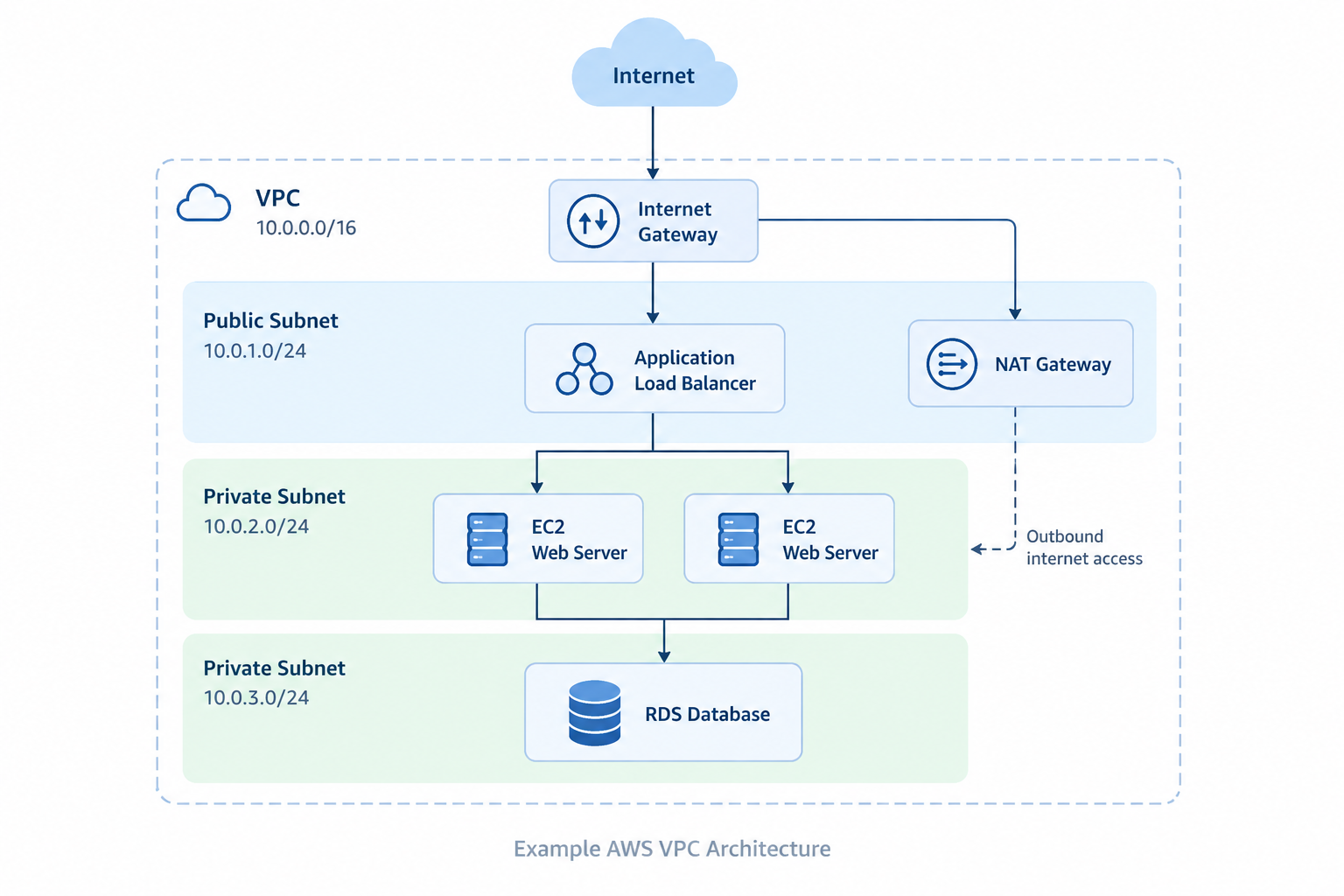
A common application setup looks like this:
Internet
↓
Application Load Balancer in Public Subnets
↓
EC2 Web Servers in Private Subnets
↓
RDS Database in Private Subnets
This design keeps the public entry point separate from the application and database layers.
As a result:
- The load balancer handles public web traffic.
- Application servers stay in private subnets.
- The database remains private.
- Each layer can use its own network access rules.
For production environments, you can also place resources across multiple Availability Zones.
AWS VPC Security Best Practices
Keep these points in mind when designing your VPC:
- Keep databases in private subnets when they do not need direct internet access.
- Use subnets across multiple Availability Zones.
- Restrict Security Group rules and avoid unnecessary public access.
- Use VPC Flow Logs to monitor network traffic.
- Use Network ACLs when you need subnet level traffic controls.
- Use AWS Systems Manager or a Bastion Host for controlled server access.
Conclusion
AWS VPC forms the network foundation for your cloud resources. Subnets control network separation, route tables direct traffic, Internet Gateways provide internet connectivity, NAT Gateways support outbound access from private resources, and Security Groups control resource traffic.
Once these parts work together, you can keep public resources accessible while placing backend servers and databases in private network sections.

