


Boost website professionalism by setting up Custom Error Pages in Plesk. Our Plesk Support team is ready to assist you.
Setting up Custom Error Pages in Plesk
Error pages appear when a visitor requests a page that the server cannot deliver. By default, web servers display standard error messages, but these generic pages can frustrate users and harm your website’s credibility. Plesk allows website owners to create custom error pages that enhance user experience, maintain brand consistency, and guide visitors back to relevant content.
Understanding Website Error Pages
Web servers show error pages for various reasons. Some common HTTP error codes include:
- 404 Not Found: Triggered when a requested page or file does not exist.
- 403 Forbidden: Appears when the server refuses access due to insufficient permissions.
- 401 Unauthorized: Requires authentication but the provided credentials are invalid or missing.
- 500 Internal Server Error: Indicates a problem on the server side, often due to misconfigurations or code errors.
- 503 Service Temporarily Unavailable: Shown when the server is overloaded or undergoing maintenance.
- 400 Bad Request: Occurs due to malformed requests from the client side.
These errors impact user experience differently. Default pages are often confusing and may drive visitors away, while custom pages can guide users effectively and reduce bounce rates.
Benefits of Custom Error Pages
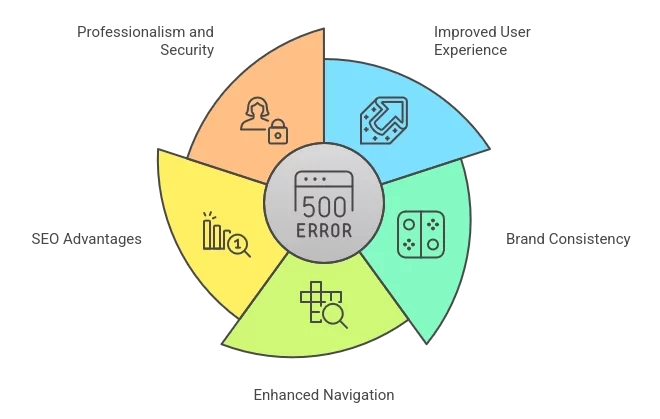
Creating personalized error pages in Plesk delivers multiple advantages:
- Improved User Experience
Custom error pages provide clear explanations of issues and suggest ways for visitors to continue navigating the site. This keeps users engaged even when something goes wrong.
- Brand Consistency
You can design error pages that reflect your website’s branding, including logos, colors, and fonts. A well-branded error page maintains a professional look and builds trust with visitors.
- Enhanced Navigation
Including links to your homepage, sitemap, or contact page helps users find the content they need. This reduces frustration and keeps visitors exploring your website.
- SEO Advantages
Although custom error pages do not directly boost rankings, they can improve metrics like time on site and bounce rate, indirectly benefiting SEO performance.
- Professionalism and Security
Custom error pages prevent exposing sensitive server information and demonstrate attention to detail. For additional security, administrators should regularly review the Plesk vulnerabilities list to ensure the server is protected against known issues.
Creating Custom Error Pages in Plesk
Follow these steps to design and implement custom error pages:
Step 1: Design Your Pages
Create HTML files for each error code you want to customize, such as 404.html or 500.html. Include clear messages, helpful instructions, and navigation links.
Step 2: Upload to Server
For Linux servers, upload your files to the error_docs directory within your domain’s root using FTP or Plesk File Manager.
For Windows servers, you can upload them to error_docs or a custom directory like httpdocs/my_errors.
Step 3: Configure Pages in Plesk
- Log in to Plesk and go to Websites & Domains.
- Select your domain and navigate to Apache & Nginx Settings or Virtual Directories.
- Enable Custom Error Documents.
- Link your custom pages using the file location or URL. Ensure the filenames match the error codes, such as not_found.html for 404 errors.
Step 4: Test Your Pages
Try accessing a non-existent page or triggering other errors to confirm that your custom pages display correctly.
Handling Common HTTP Errors
Understanding common HTTP error codes helps create meaningful custom pages:
- 400 Bad Request: Verify the URL and clear browser cache.
- 401 Unauthorized: Ensure correct login credentials.
- 403 Forbidden: Check file permissions and authentication rules.
- 404 Not Found: Double-check URLs and set up redirects if necessary.
- 500 Internal Server Error: Review server logs and correct code issues.
- 503 Service Unavailable: Check server resources or wait for maintenance completion.
Troubleshooting Custom Error Pages
Common issues include incorrect file placement, permission errors, or caching problems. If access is blocked due to repeated failed attempts or security rules, use the Plesk Unblock IP feature to restore legitimate access quickly.
- Custom Pages Not Enabled: Activate them under Hosting Settings in Plesk.
- Incorrect File Placement: Place pages in the correct error_docs directory with proper filenames.
- Configuration Errors: Ensure Virtual Directories or Apache/Nginx settings point to the right files.
- File Permission Issues: Verify read permissions for the web server user.
- Caching Problems: Clear browser or server caches to display updated pages.
[Need assistance with a different issue? Our team is available 24/7.]
Conclusion
Custom error pages improve user experience, maintain brand consistency, and guide visitors effectively. Learning to set up Custom Error Pages in Plesk ensures your website remains professional and user-friendly even when errors occur.
In brief, our Support Experts demonstrated how to fix the “554 5.7.1 : Relay access denied” error.

