


Fix SSL chain, redirect, certificate, and browser issues with server administration services for secure and reliable website connections. Common SSL Errors can affect your site’s security and performance if not addressed promptly.
If a certificate chain is incomplete, redirect loops occur, certificates expire, or there is mixed content, then a secure connection cannot be established, and an error occurs. Consequently, a user is unable to access a website and APIs, and webhooks used for secure connections may malfunction.
This guide lists the common SSL errors and methods for identification and resolution.
An Overview
What Is an SSL/TLS Error?
SSL/TLS secure the connection between a website and a user’s browser. If the certificate or server configuration is incorrect, the browser displays a security warning and either blocks the connection or displays a warning.
These errors may result in:
- Loss of User Trust: Security warnings may prompt users to view other websites.
- Website Inaccessibility: Errors with certificates may prevent users from accessing a webpage.
- APIs and Webhooks: Implementation of incorrect TLS may break the secure connection of web services.
- Compliance: Secure connections may be required by rules and regulations.
Understanding the SSL Certificate Chain
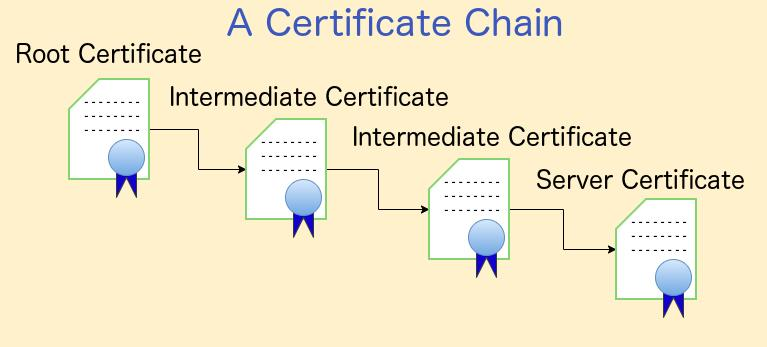
An SSL certificate chain connects the website certificate to a trusted Certificate Authority (CA).
| Certificate | Purpose |
|---|---|
| Server certificate | Identifies the website. |
| Intermediate certificate | Connects the server certificate to the root CA. |
| Root CA | Provides the trusted starting point. |
If the server does not provide the required intermediate certificate, some browsers and clients may not trust the connection.
Get Expert Server Support.

How to Check SSL Chain Issues
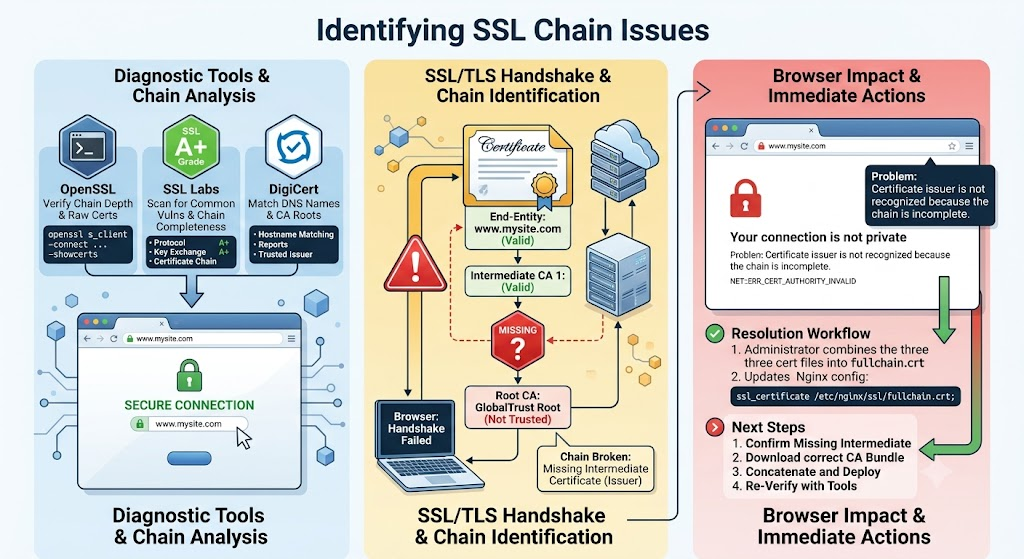
Use OpenSSL to view the certificate chain:
openssl s_client -connect yourdomain.com:443 -showcertsYou can also check the HTTPS connection with cURL:
curl -Iv https://yourdomain.comAn error such as “unable to get local issuer certificate” may indicate a missing intermediate certificate.
Fixing an Incomplete Certificate Chain
For Nginx, combine the website certificate with the intermediate certificate bundle:
cat yourdomain.crt ca-bundle.crt > fullchain.crtThen add the full-chain file to the Nginx configuration:
server {

listen 443 ssl;

server_name yourdomain.com;

ssl_certificate /etc/ssl/certs/fullchain.crt;

ssl_certificate_key /etc/ssl/private/yourdomain.key;

ssl_protocols TLSv1.2 TLSv1.3;

}
The server certificate should come first, followed by the intermediate certificates.
After making the change, test the configuration:
sudo nginx -t

sudo systemctl reload nginx
Fixing ERR_TOO_MANY_REDIRECTS
“ERR_TOO_MANY_REDIRECTS” occurs when a website repeatedly redirects between HTTP and HTTPS.
This can happen when a CDN or proxy connects to the origin through HTTP while the origin redirects HTTP requests to HTTPS.
Check the redirect path with:
curl -IL https://yourdomain.comIf the same URL keeps returning a “301” response, check the HTTPS settings on your CDN, proxy, and origin server.
For Cloudflare, Full (strict) can be used when the origin has a valid certificate.
Fixing Browser Security Warnings
Browsers may warn users about:
- Expired certificates
- Hostname mismatches
- Self-signed certificates
- Incomplete certificate chains
Check certificate details with:
openssl x509 -in fullchain.crt -text -noout | grep -E "Not Before|Not After|DNS:"Check the expiry date and make sure the hostname matches the certificate.
Fixing Mixed Content
Mixed content occurs when an HTTPS page loads resources through HTTP.
For example, an HTTPS page may load an image or script using:
http://yourdomain.com/image.jpgChange supported resource URLs to HTTPS. Also, scan the website database for old HTTP references.
SSL/TLS Best Practices
To reduce future SSL problems:
- Use TLS 1.2 or 1.3.
- Set up certificate auto-renewal with ACME/Certbot.
- Configure the complete certificate chain.
- Set up cert expiry alerts at 30, 14, and 7 days.
- After a certificate renewal, verify the certificate.
- HSTS should be enabled only after all endpoints support HTTPS.
- Use SSL Labs to test the changes.
- Always keep logs of all certificates, servers, configurations, and any proxies.
Conclusion
Errors in securing connections may be due to issues with certificates, redirects, or configuration of HTTPS. Start by troubleshooting with OpenSSL and curl. Then resolve the issue and test the website.
Keeping your website safe and operational minimizes the inconvenience of website downtime. Regularly checking your certificates, enabling auto-renewal, and configuring your TLS correctly are a few quick ways to help.
Automated certificate checks help you avoid the most inconvenient situation of downtime.


