


Explore DevOps services for GitOps on legacy VMs with automated configuration and drift checks.
Modern DevOps content tends to be centered around stateless microservices, containers and Kubernetes. But there are still plenty of mature companies operating workloads on virtual machines, bare-metal machines or a combination of both.
These systems can be data stores, have old database schemas, and rely on manual firewall rules. As such, teams can’t replace a server in the event they change a server configuration.
The bright side is that GitOps can be applied to legacy VMs. It’s not necessary to containerize the whole application before you do it.
What Does GitOps Mean?
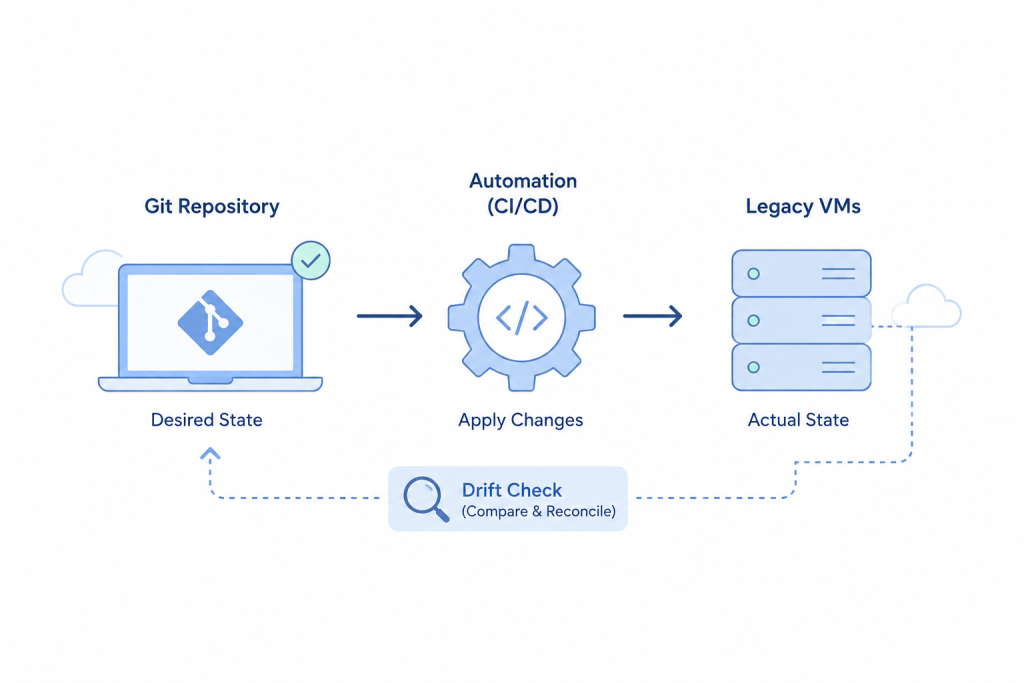
GitOps is an operating model that keeps the desired system state in Git and uses automation to apply and check that state.
It has three main parts:
- Define the desired state: Store infrastructure and configuration in Git.
- Apply changes automatically: Use automation after approved changes reach the main branch.
- Check for drift: Compare the live system with the state stored in Git.
GitOps is not limited to tools such as ArgoCD or Flux. Instead, these tools support the GitOps approach.
With Kubernetes, the platform can correct drift through its control loop. However, VMs need a different approach because they may contain important data and running services.
Pull vs. Push Configuration
When you manage VM configurations through Git, you can use a pull-based or push-based model.
Pull-Based Model
With the pull-based approach, each VM has an agent that monitors Git, and any necessary configuration is pulled.
Ansible, Puppet and SaltStack tools can help with this. For instance, when a change is made to an Nginx file by an administrator, the agent will be able to restore the version that is stored in Git.
But the agent requires regularly maintenance. The server can start to drift without a warning if it ceases to function or if it is no longer able to reach Git.
Modernise Your DevOps Today.

Push-Based Model
In a push-based setup, a CI/CD pipeline installs modifications once they’re pushed in to Git.
VMs can be reached via SSH by tools like GitLab CI and GitHub Actions, and can be updated using Ansible.
This is the easier method to begin since you don’t need to have an agent on each VM. Additionally, pipeline logs can indicate failures in deployment.
Managing State on VMs
State creates a major challenge for legacy VM deployments. Databases, user uploads, local session data, and application files may remain on the same systems that run the application.
Therefore, separate configuration from persistent data.
Move User Uploads
Upload “static assets” (images, files, attachments, etc.) to object storage like AWS S3 or MinIO.
This means that your VMs can devote their resources to running the application, without having to store user files.
Separate Configuration and Data
Separate Nginx sites, systemd services, application code from the database storage and other persistent data.
This simplifies and makes configuration changes safer.
Handle Database Changes Safely
Don’t execute raw SQL when deploying, use migration tools like Phinx, Laravel Migrations or Flyway.
Maintain migration files in the same git change as the application code they are required by. This maintains the consistency of both changes.
How to Start With GitOps
You do not need to change your entire VM setup at once. Instead, start with these steps:
- Store configuration in Git. Version your Nginx, PHP, and database configurations.
- Check for drift. Run a scheduled check that compares live server configurations with the versions stored in Git.
- Use pull requests. Require configuration changes to reach the main branch before deployment.
Conclusion
There is no need to migrate to Kubernetes for GitOps.
Bringing GitOps to legacy VM environment is possible through Git configuration storage, by automating changes, and by detecting drift. This provides your team with improved change tracking and auditing without having to rewrite your entire application.

