


Explore common Google Cloud security risks, from IAM and exposed storage to GKE and backup gaps, with practical best practices to strengthen cloud security.
Google Cloud gives businesses the infrastructure to run applications, databases, virtual machines, containers, and data platforms without maintaining the physical infrastructure underneath them. That does not remove the customer’s security responsibilities. IAM permissions, network exposure, workload configuration, data access, credentials, logging, and recovery controls still need to be managed correctly. Our Google Cloud managed services help identify security and configuration gaps across these areas. Our cloud security engineers are well-versed in Google Cloud environments and can assess IAM, network exposure, workload configuration, data access, and other controls that influence the security posture of a cloud environment.
Security problems often appear during ordinary infrastructure changes. A developer receives temporary project access and keeps it. A service account is given a broad role because the application needs one additional permission. A firewall rule created during troubleshooting is never removed. A storage bucket that should contain private data is made public to simplify an integration.
None of these changes necessarily looks serious in isolation. Together, they can leave a cloud environment with more access and exposure than the business intended. As projects and workloads multiply, keeping track of those changes manually becomes difficult.
An Overview
What Is Google Cloud Security?
Google Cloud security covers the controls used to protect identities, applications, workloads, networks, and data hosted on the platform.
That includes the obvious access question, such as who can administer a VM or read a storage bucket. It also covers less visible paths into an environment such as which service account an application uses, which ports are reachable, whether a Kubernetes workload can access another service, and whether a compromised identity can reach backups.
Google provides services for these areas. IAM manages access, Security Command Center provides security findings and posture visibility. Cloud Audit Logs records activity, Cloud Monitoring supports monitoring and alerting, and Secret Manager provides a dedicated mechanism for storing application secrets.
Using those services does not remove the need for sound configuration. A broad IAM role is still broad when IAM is enabled. A permissive firewall is still permissive when monitoring is running. Security controls have to reflect the way the environment is actually being used.
Google Cloud Shared Responsibility Model
Google secures the physical infrastructure and the underlying cloud platform. Customers secure the workloads and configure the services they use.
The exact boundary depends on the service. A Compute Engine VM leaves the customer responsible for areas such as the guest operating system, installed software, administrative access, and workload configuration. A managed service moves more of that responsibility to Google, but customers still control identities, data access, application configuration, and other service-specific settings.
Security checks are also important when moving workloads between environments. Google Cloud migration services can help businesses plan workload transitions while accounting for access controls, network exposure, and data protection requirements.
This is where the shared responsibility model becomes practical.
Suppose an application stores customer records in Cloud Storage. Google operates the storage infrastructure, but the customer decides which identities can access those records. If a firewall exposes an internal application to the internet, the underlying Google infrastructure is not necessarily the problem. The exposure came from the customer’s configuration.
Understanding that boundary helps teams investigate security issues without assuming that the cloud provider is responsible for every layer.
Common Google Cloud Security Risks
1. Over-Permissive IAM Access
IAM problems tend to accumulate quietly.
A user needs temporary access to troubleshoot a production service. A developer needs access to another project. An application requires one additional API permission. Each change is reasonable at the time, but old permissions often remain after the original requirement disappears.
The danger is the amount of damage an identity can cause if its credentials are compromised. Someone who only needs read access should not normally be able to modify or delete the same resources. The same principle applies to service accounts and other workload identities.
Use the narrowest suitable IAM role for the job. Check inherited permissions as well as direct bindings, remove access that is no longer required, and consider custom roles when predefined roles provide substantially more access than the workload needs.
Access reviews are particularly useful after staff changes, application migrations, and changes in project ownership.
Is Your Google Cloud Environment Properly Secured?

2. Service Account and Credential Risks
Service accounts give applications an identity in Google Cloud. Problems arise when that identity is broader than necessary or its credentials are allowed to escape the intended workload.
Long-lived service account keys are a common example. A key committed to a repository or copied into a build system can continue working even after the original developer or deployment process has changed.
Look for credentials in source repositories, scripts, CI/CD variables, container images, configuration files, and developer machines. Removing the file that contained a credential is not enough if the credential itself remains valid.
Where appropriate, use Workload Identity Federation or other supported short-lived authentication methods instead of distributing service account keys.
Keep service account permissions narrow as well. An application that needs to write to one storage location does not necessarily need broad access to the entire project.
3. Public Cloud Storage Exposure
Cloud Storage buckets frequently hold data that was never intended to be public: backups, exports, application uploads, logs, and internal documents.
Public exposure can happen through an incorrect IAM binding or a configuration change made for an otherwise legitimate reason. The danger is easy to underestimate because the bucket itself may continue functioning normally.
Public Access Prevention can block public access to applicable Cloud Storage resources and can be enforced at the bucket or organization level.
Before applying the control everywhere, identify buckets that intentionally serve public content. A public bucket used for a website’s static assets is different from one containing database exports.
For private data, review both bucket permissions and the identities accessing the bucket. Backups and data exports deserve particular attention because they can contain far more information than the live application exposes.
4. Firewall and Network Exposure
Firewall changes are often made under pressure.
An application is not reachable. A port is opened. The application starts working, and the incident is considered resolved. The rule then remains in place.
That kind of operational shortcut can leave a service exposed long after the original problem has disappeared.
For each ingress rule, establish the source, destination, protocol, port, and reason for the connection. Avoid broad internet-facing rules when a narrower source range will work. Administrative services deserve particular scrutiny, especially SSH, RDP, database ports, and management interfaces.
Private networking is preferable when a service does not need to be directly reachable from the internet. Segmentation also matters. If one workload is compromised, the attacker should not automatically have unrestricted network access to the rest of the environment.
5. Internet-Facing and Vulnerable VMs
A Compute Engine VM does not become unsafe simply because it has a public IP address. The question is whether that exposure is necessary and whether the services behind it are adequately protected.
Start by identifying why each public-facing VM needs internet connectivity. Remove unnecessary public exposure where possible. For systems that must remain reachable, reduce the number of exposed services and restrict administrative access.
The guest operating system is another concern. Unpatched software, obsolete packages, weak authentication, and unnecessary services can provide an attacker with an entry point even when the surrounding cloud configuration is sound.
Cloud infrastructure security and operating system security therefore have to be handled together.
6. GKE Security Misconfigurations
GKE adds Kubernetes-specific controls to the Google Cloud security model.
A cluster can have appropriate IAM permissions and still have excessive Kubernetes privileges. Conversely, Kubernetes RBAC can be restrictive while a workload has more Google Cloud permissions than it needs.
Review both sides.
Check who can access the Kubernetes API, what those users can do through RBAC, which workloads can communicate with one another, and which Google Cloud resources each workload can access.
Network policies can restrict unnecessary pod-to-pod communication. Workload identity controls can prevent applications from sharing a broad Google Cloud identity. Cluster access should also be limited to the people and systems that actually administer the environment.
The objective is to keep a compromised pod, account, or credential from becoming a path into unrelated workloads and services.
7. Secrets Management Gaps
Secrets rarely stay in one place when there is no defined process for managing them.
A database password may begin in a local configuration file, move into a repository, and later end up inside a deployment script or container image. Logs can create another copy if an application prints credentials while troubleshooting.
Keep passwords, API keys, tokens, and other sensitive values out of source code and ordinary configuration files. Google Secret Manager provides a dedicated service for storing and controlling access to application secrets.
Access to the secret still needs to be restricted. The application should retrieve only the values it requires, and credentials that are exposed should be revoked or rotated promptly.
A useful secrets policy should cover the entire lifecycle: creation, storage, access, rotation, and revocation.
8. Logging and Monitoring Gaps
Some security incidents do not look like incidents at first.
An administrator changes an IAM policy. A service account accesses a storage bucket at an unusual time. A new resource appears in a project. The application continues running, so nobody notices.
Cloud Audit Logs can provide the activity trail needed to investigate such changes. Cloud Monitoring can handle operational metrics and alerts, while Security Command Center can surface security findings.
The difficult part is deciding what the team needs to know immediately.
A useful monitoring setup should identify significant identity changes, access to sensitive resources, unusual administrative activity, and other events that matter to the particular environment. Alerts also need an owner. If nobody is responsible for investigating an alert, collecting it has limited value.
Logs should therefore support a response process, not simply satisfy a compliance requirement.
9. Data Exfiltration
An attacker does not need to steal an entire database in one operation.
A compromised identity may retrieve sensitive objects over time. An application vulnerability may provide access to data through a legitimate service. An overly privileged service account may allow an attacker to query resources that were never intended to be available to that workload.
Limit access to sensitive data first. Then look at the paths by which that data can be reached and monitored.
When investigating suspicious activity, data volume is only one clue. The identity, source, resource, timing, request pattern, and normal behavior of the workload all matter.
For sensitive environments, monitoring should make it possible to answer a basic question quickly: who accessed the data, through which identity, and what did that identity do?
10. Backup and Recovery Challenges
A successful backup job does not prove that a business can recover from an incident.
The restore process may depend on credentials that no longer exist. Backup permissions may be tied to production access. Retention may be too short. A backup may exist but take far longer to restore than the business can tolerate.
Define the required RPO and RTO first.
The RPO determines how much recent data the business can afford to lose. The RTO establishes how quickly the service needs to return.
Then test the recovery process against those requirements.
Backup access should also be separated from ordinary production access where practical. If an attacker compromises a production identity and can immediately delete the backups as well, the recovery strategy has a serious weakness.
Google Cloud Security Best Practices
Businesses that need help reviewing cloud architecture, IAM permissions, and security configurations can explore GCP consulting services to identify gaps and plan appropriate improvements.
The following practices cover the areas that deserve regular attention in a Google Cloud environment:
-
- Review IAM when the environment changes: New employees, new projects, migrations, and application changes can all leave behind permissions that are no longer justified.
- Treat service account keys as a risk: Use supported identity mechanisms that reduce reliance on long-lived credentials, and search repositories and deployment systems for credentials that should not be there.
- Know which data is public: Public access should be intentional. Review Cloud Storage permissions and use Public Access Prevention where data should never be publicly accessible.
- Question every internet-facing service: A public IP, open firewall rule, or exposed management port should have a clear operational reason.
- Keep workload boundaries tight: Separate sensitive services and restrict unnecessary communication between systems. In GKE, review both Kubernetes RBAC and Google Cloud workload permissions.
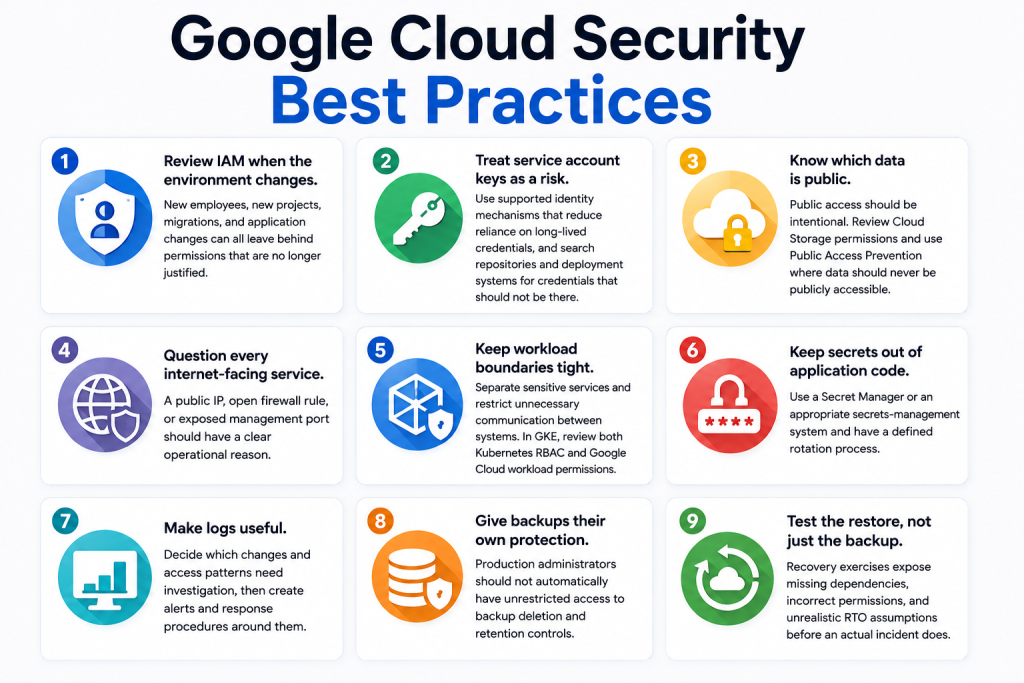
- Keep secrets out of application code: Use a Secret Manager or an appropriate secrets-management system and have a defined rotation process.
- Make logs useful: Decide which changes and access patterns need investigation, then create alerts and response procedures around them.
- Give backups their own protection: Production administrators should not automatically have unrestricted access to backup deletion and retention controls.
- Test the restore, not just the backup: Recovery exercises expose missing dependencies, incorrect permissions, and unrealistic RTO assumptions before an actual incident does.
How Bobcares Can Help With Google Cloud Security
Google Cloud security reviews often uncover problems that cross several parts of the infrastructure. An excessive IAM role may expose storage. A firewall rule may expose a vulnerable VM. A compromised service account may provide access to data and backups.
Bobcares engineers work across cloud infrastructure, security assessment, access control, system hardening, monitoring, and recovery. Our Security Assessment & Risk Posture service can help identify configuration and security gaps, assess their impact, and prioritize remediation.
For organizations that need to validate whether identified weaknesses can actually be exploited, Bobcares’ Vulnerability Assessment and Penetration Testing service provides a deeper assessment of exposed systems and applications.
The right approach depends on the environment. Some businesses need a focused security review. Others require ongoing monitoring, hardening, incident response, or help maintaining secure cloud operations.
Conclusion
Google Cloud provides the infrastructure and security controls needed to build a strong cloud environment. The remaining risk often sits in the configuration around those services.
Permissions accumulate. Temporary firewall rules become permanent. Credentials spread across deployment systems. Public access gets enabled for convenience. Backups exist but are never restored during a test.
Those are operational problems, and they need operational controls.
Regular IAM reviews, restricted network access, protected secrets, secure workloads, meaningful monitoring, and tested recovery procedures provide a much stronger security posture than simply enabling more security services.
The goal is not to make every Google Cloud resource inaccessible. It is to make access deliberate, exposure limited, activity visible, and recovery dependable.

