


Hybrid cloud environments break down in the same four places every time. Here are seven fixes and the tools that actually cover them.
Most enterprises no longer choose between private and public cloud. They run both. Regulated data and legacy systems stay on private infrastructure, where the organization can point to exactly where the data lives. Workloads that need to scale quickly go to the public cloud. Our Hybrid Cloud Management services help businesses manage these mixed environments without losing visibility across either side.
That split sounds simple enough on paper. Running two environments as though they were one is a different job entirely, and that job is what hybrid cloud management actually covers. It isn’t hard because the technology is exotic. It’s harder because two systems, left to drift on their own, pull apart in ways nobody notices until the bill or the breach shows up.
For an IT leader, that has a real financial dimension. An unmanaged hybrid environment is more expensive, more risky for security threats, and more time consuming when it comes to problem resolution. This article discusses common go-wrong situations with hybrid environments, the seven practices that overcome those situations and the tools appropriate to each of those practices, without the jargon.
An Overview
- What Distinguishes Hybrid Cloud Management From Single-Cloud Management?
- Seven Practices That Meaningfully Improve Hybrid Cloud Management
- Centralize Visibility Into a Single Dashboard
- Automate Repetitive Deployment Tasks
- Apply Security Consistently Across Both Environments
- Monitor the Environment Continuously
- Identify and Eliminate Unused Costs
- Integrate Compliance Into the Deployment Pipeline
- Extend DevOps Practices Across Both Environments
- Tools Worth Evaluating
- Conclusion
What Distinguishes Hybrid Cloud Management From Single-Cloud Management?
A single cloud environment means one provider, one toolset, and one console. Add a second environment and that simplicity is gone, because monitoring, identity systems, and billing don’t line up across providers on their own. Four problems tend to show up first.
Resource and Performance Gaps
A server sits idle in the private data center while its public cloud counterpart chokes under load, and nobody notices until performance drops. That’s wasted capital on one side and a customer-facing slowdown on the other, both caused by the same blind spot.
Security Policy Gaps
Security policies pull apart quietly. Every provider ships different default settings, and identity systems don’t sync with each other on their own. Left alone, an organization ends up running two different security postures under one name, which is exactly the kind of inconsistency an auditor, or an attacker, finds first.
Fragmented Monitoring
Visibility splits too.Most teams have their own monitoring of private and public infrastructure, and no one has all the information on a single platform. Incidents are not caught until late and after the incident, work is delayed due to the data being stored in various systems.
Cost Differences
Then there’s cost. Public cloud billing moves with usage. Private infrastructure costs stay mostly flat. Combine the two without disciplined tracking, and finance usually finds out about the overrun only after it’s already happened, typically at the worst point in the budget cycle.
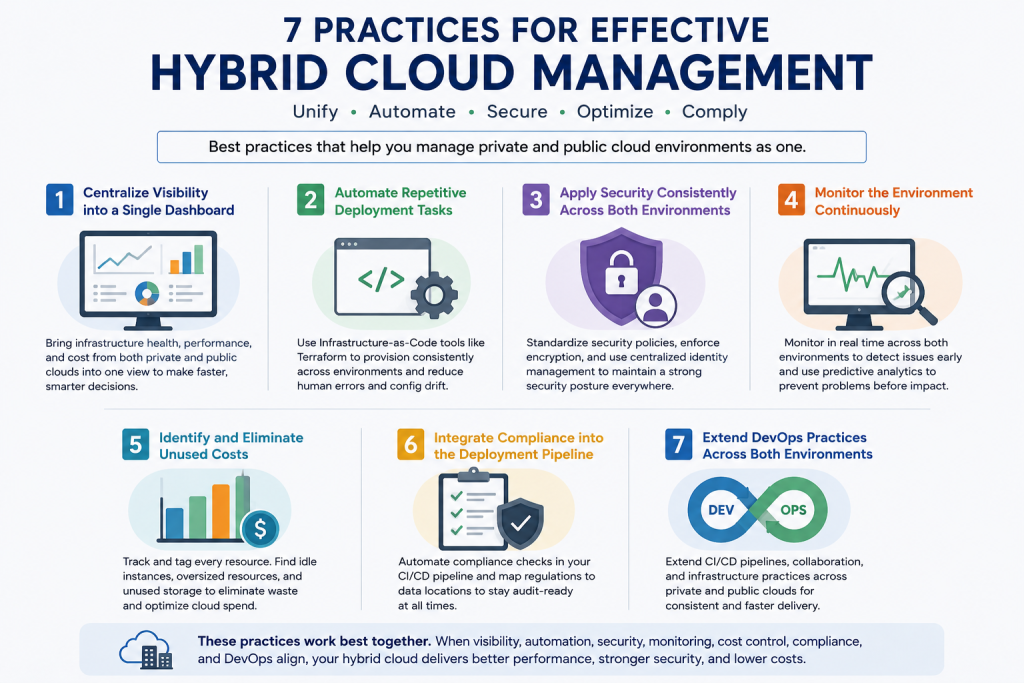
Seven Practices That Meaningfully Improve Hybrid Cloud Management
None of these work particularly well on their own. Automated deployment only stays clean if compliance checks catch what it misses, and cost visibility only means something once monitoring is already centralized. They’re built to reinforce each other.
1. Centralize visibility into a single dashboard
If understanding the environment requires three separate consoles, decisions lag behind whatever’s actually happening. Pull infrastructure health, performance, and cost into one view, and stop checking each provider’s native console on its own. That habit is where most teams lose the most time.
2. Automate repetitive deployment tasks
Manual deployment is slow, and it’s where mistakes happen, a missed setting here, a config drift there, usually caught only once it hits production. Infrastructure-as-code tools such as Terraform let a team define an environment once and deploy it the same way everywhere. There’s a quieter benefit too: once a policy lives inside a deployment template, it’s much harder to skip it under deadline pressure. In regulated industries, that template basically becomes an audit trail.
Need Help Managing Your Hybrid Cloud Environment?

3. Apply security consistently across both environments
A hybrid setup is only as strong as its weakest inconsistency, an access policy that differs by provider, encryption applied in one place and forgotten in the other. One standard, applied everywhere, closes that gap. Centralized identity management means a person’s access follows them across environments rather than resetting every time they cross one. This usually takes less engineering work than teams expect going in. The hard part is convincing anyone to prioritize it before something forces the issue.
4. Monitor the environment continuously
A weekly review misses whatever happens between reviews. Real-time monitoring across both environments catches problems as they’re forming, not after a customer notices first. Predictive analytics take this a step further, flagging a capacity problem weeks out rather than the day before it becomes an outage. Planned spend versus emergency spend, and emergency spend is always the more expensive of the two.
5. Identify and eliminate unused costs
Idle instances, oversized VMs, storage that hasn’t been touched in months. It piles up quietly, and most companies don’t go looking until finance flags something. Tag every resource by team, project, and environment from day one; retrofitting tags later takes far longer than anyone expects. Once that data exists, it becomes real leverage in negotiating reserved-instance pricing, not a guess.
6. Integrate compliance into the deployment pipeline
Finding a compliance gap during an audit is the most expensive way to find one. Automated checks catch configuration drift as it happens, not months later. Map every regulation, HIPAA, GDPR, SOC 2, whatever applies, against where the relevant data physically lives, and turn that map into the checklist every deployment runs against. It tends to be the first thing an auditor asks to see.
7. Extend DevOps practices across both environments.
A CI/CD pipeline that only touches public cloud isn’t really a hybrid pipeline. Stretch it to cover private infrastructure too, so developers and operations follow one process no matter where something deploys. This matters more here than in single-cloud setups, since the pipeline now has to account for two different sets of infrastructure quirks, not one. Skip that extension and every release touching the unautomated side drags the whole team’s pace down with it.
Tools Worth Evaluating
The tools being used have moved more than most vendor comparisons let on, so two corrections are worth making before anyone starts evaluating.
VMware’s vRealize Suite doesn’t exist under that name anymore. VMware rebranded the line to Aria in April 2023. After Broadcom completed the acquisition that December, the company retired the standalone Aria products and folded them into VMware Cloud Foundation and vSphere Foundation. Anyone hearing a “vRealize” pitch today should check which current licensing bundle it actually maps to.
CloudHealth went through something similar. VMware renamed it VMware Tanzu CloudHealth in 2023, and in 2024 Broadcom handed off global sales exclusively to Arrow Electronics. Broadcom still owns the product and sets its direction; buyers just go through Arrow now instead of direct.
VMware Cloud Foundation, which replaced the vRealize/Aria line, covers full-stack operations and automation. VMware now offers it through the Cloud Foundation and vSphere Foundation bundles rather than as a standalone product.
Microsoft Azure Arc handles Azure services across on-prem and multi-cloud setups. It’s the obvious fit for a shop already standardized on Azure.
HashiCorp Terraform covers multi-cloud infrastructure-as-code, and because it’s provider-agnostic, it tends to be the default pick for anyone actively avoiding vendor lock-in.
VMware Tanzu CloudHealth handles cost management and FinOps. Arrow Electronics now handles its global sales rather than VMware selling it directly.
Google Anthostargets application modernization across hybrid and multi-cloud environments. Built on Kubernetes, it fits containerized workloads far better than it fits legacy VMs.
Red Hat OpenShift handles Kubernetes-based application management, and it’s a solid choice for anyone standardizing on containers across every deployment target they’ve got.
No single tool covers all seven practices above. Most organizations end up needing at least two, one for infrastructure automation, one for cost governance. Treating this as a single-platform decision is a common procurement mistake. It ends up reshaping the whole evaluation around one vendor’s roadmap instead of what the organization actually needs.
Putting these practices into place is where the operational work starts. Our cloud engineers work with hybrid infrastructure, including private and public cloud environments, so they understand the practical issues involved in keeping monitoring, security, deployment, and cost controls consistent across both. They can also help teams review the setup as infrastructure and workloads change.
Frequently Asked Questions
1. What is hybrid cloud management?
It means running and administering private and public cloud infrastructure as a connected environment. The scope can include workload deployment, system monitoring, security, compliance, performance, and infrastructure spending.
2. What are the main challenges of managing a hybrid cloud environment?
Private and public infrastructure often come with different tools and operating methods. That can make it difficult to get a single view of the infrastructure or apply the same security and deployment rules everywhere. Cost information may be split between environments too. Compliance and DevOps processes add another layer of complexity when workloads span both sides.
3.Which tools can help manage hybrid cloud environments?
There are several choices, with each one covering a different part of the job. VMware Cloud Foundation, Microsoft Azure Arc, Google Anthos, and Red Hat OpenShift support hybrid infrastructure and workload management. Terraform is widely used to define and provision infrastructure through code, while VMware Tanzu CloudHealth focuses on cloud cost and resource management. The requirements of the environment determine which combination makes sense.
4. How can hybrid cloud management reduce infrastructure costs?
An environment-wide view of resource usage makes unnecessary capacity easier to spot. An instance that has been sitting idle, a VM with far more CPU or memory than its workload needs, or storage left behind after an application change can all add to the bill. Tags are useful for tracing those costs back to a workload, application, or team.
5. How does automation improve hybrid cloud management?
Repeated configuration work is a poor fit for manual administration. Infrastructure-as-code changes that. With Terraform, for example, a team defines the desired infrastructure in configuration files and can reuse that definition when another environment needs the same setup. That reduces the amount of manual work and limits configuration differences between private and public infrastructure.
6. How can organizations maintain consistent security across hybrid cloud environments?
Security rules need to follow the workload wherever it runs. Centralized identity management can keep access controls under one system, while encryption requirements can be applied according to the data and workload involved. Automated configuration checks are useful for another reason: they can detect when a resource has drifted from the approved configuration.
7. Is hybrid cloud management suitable for regulated industries?
Yes. A hybrid architecture can keep sensitive or regulated workloads on private infrastructure while other workloads use public cloud capacity. The split has to be based on the applicable compliance requirements. Data location, where processing takes place, how the data is stored, and who can access it all matter when deciding which environment should host a workload.
Conclusion
Hybrid cloud isn’t hard because the technology is unusual. It’s hard because two separate environments are being run as one, and closing that gap takes coordination, not a bigger budget or more headcount. What it actually takes is one person clearly responsible for it, and a process that still holds up when a deadline is bearing down.
The seven practices above all point at the same thing from different directions. Centralized visibility surfaces cost and security problems while they’re still cheap to fix. Automation turns policy into something enforced, not just written down somewhere. Treating security and cost management as ongoing work, not a quarterly cleanup, is what keeps the two environments actually working as one. Get that right, and hybrid cloud stops feeling like a tradeoff between control and flexibility. It just becomes infrastructure that does what it’s supposed to, which was the point all along. If you want support keeping both environments consistent, our hybrid cloud experts can review your current setup and help put these practices in place.

