


Secure ACR with managed kubernetes & containers using Azure RBAC and managed identities. Remove ACR admin keys and cut security risks for teams!
If you’ve ever spun up an Azure Container Registry (ACR), you know how tempting that little toggle is: “Admin user: Enable.”
With one click, you get a single username and two permanent, long-lived passwords. It gives you immediate root-level access to pull and push images from anywhere. In addition, local Docker logins become a breeze. Your Kubernetes cluster also connects to your images in seconds.
It is also an absolute compliance and security nightmare.
Relying on a shared admin key means zero individual accountability and zero automated credential rotation. Also, it creates a massive blast radius if that key ever leaks. In our latest infrastructure sprint, we decided it was time to kill the admin key for good. As a result, we migrated our entire cloud-native ecosystem to an identity-first architecture using Azure Role-Based Access Control (RBAC) and Managed Identities.
Here is exactly how we broke down the migration across three critical layers of our tech stack: AKS, NGINX storage proxies, and our local developer workflows.
An Overview
The Core Problem with Explicit Secrets
When you leave the ACR admin user enabled, you aren’t just creating a weak point in the registry itself—you are forcing the rest of your architecture to manage that secret.
To let an Azure Kubernetes Service (AKS) cluster pull your images, you have to pack that admin password into a Kubernetes secret (imagePullSecrets). This leads to secret sprawl, where base64-encoded strings end up living inside Helm values files, Git repositories, or cluster backup manifests.
Similarly, if an application layer like an NGINX proxy needs to read static assets out of Azure Blob Storage, you are often stuck injecting static connection strings or long-lived Shared Access Signature (SAS) tokens directly into configuration templates.
We wanted a Zero Trust architecture: a setup where no system component stores, manages, or handles passwords at all.
Secure Your Containers Today.

Layer 1: Securing the AKS Cluster (No More Helm Secrets)
Our first priority was stripping image-pull passwords out of our Kubernetes manifests entirely. Instead of passing explicit tokens to our Helm deployments, we shifted authentication directly onto the Azure cloud backbone.
The Technical Fix
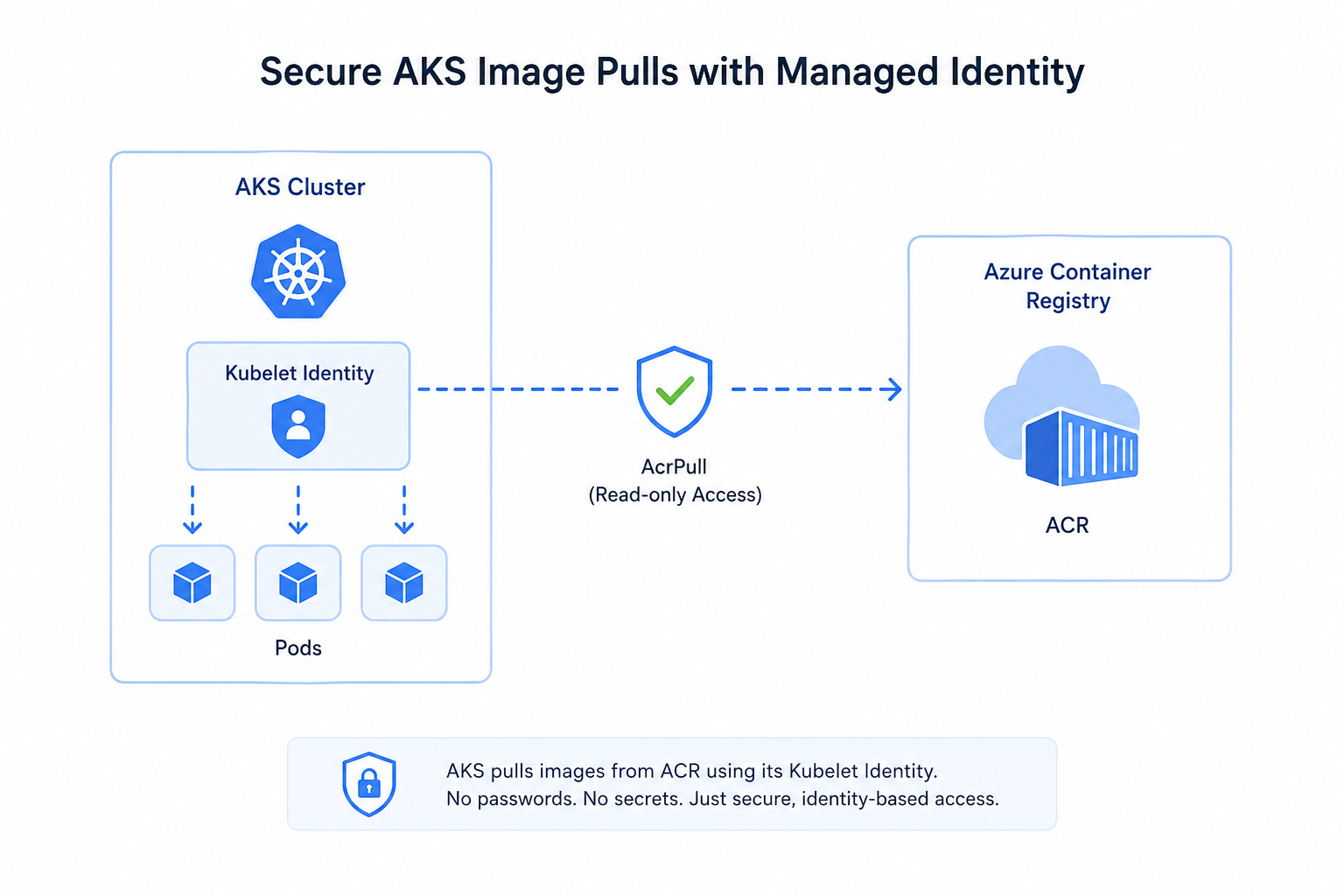
Within AKS, the virtual machine scale sets that run your actual worker nodes use a specific enterprise identity called the Kubelet Identity. This is distinct from the primary cluster identity. The primary cluster identity controls the API server.
By targeting this identity, we used Infrastructure as Code (IaC) to grant it direct access to the registry:
- Identity Object: AKS Kubelet Managed Identity
- Assigned Role: AcrPull (Strictly scoped, read-only registry access)
Once that role assignment was applied at the ACR resource scope, we went into our Helm templates and systematically deleted every single imagePullSecrets configuration block.
How it works now
When a pod initializes and needs to pull a container image, the underlying Kubernetes node intercepts the request. It natively requests a short-lived, ephemeral token from the Azure Instance Metadata Service (IMDS) identity endpoint and hands it to the container runtime. The cluster pulls the image securely without ever seeing a plain-text password.
Layer 2: Masking the Blobs (NGINX Storage Migration)
Our architecture uses an NGINX proxy layer that secures delivery of static assets to the public by serving from Azure Blob Storage. Formerly, this required us to maintain static storage keys or SAS tokens. These configurations exposed our storage endpoints to public networks.
The Technical Fix
We designated System Assigned Managed Identity direct to the compute instances that run our NGINX proxy service. Using Azure RBAC, we limited this identity to the read-only role of the Storage Blob Data Reader. This applies on the designated storage containers of our media assets.
The configuration for NGINX was changed to call the local HTTP loopback for the Azure IMDS to fetch Entra ID bearer tokens.
Nginx

# NGINX proxy routing using dynamic identity-based authentication

location /assets/ {

# Dynamically inject the short-lived Azure bearer token

proxy_set_header Authorization "Bearer $azure_access_token";

proxy_pass https://mystorageaccount.blob.core.windows.net/media/;

# Masking internal infrastructure headers from the end user

proxy_hide_header x-ms-request-id;

proxy_hide_header x-ms-version;

}
How it works now
Public web traffic interacts purely with our clean, structured NGINX proxy routing. The raw backend Azure Blob Storage URLs, access structures, and authentication layers are entirely masked and handled implicitly on the backend.
Layer 3: Redefining the Developer Experience (User-Level RBAC)
The biggest pushback when disabling a container registry’s admin key usually comes from the engineering team: “If you flip that switch, how am I supposed to run docker login or test my local builds?”
The answer is simple: We migrated human access to Azure User RBAC.
The Technical Fix
First, we configured the absolute root administrative shutdown: Admin user: False in our ACR configuration. With a single click, we eliminated all legacy static keys globally.
Next, we created direct mappings of Microsoft Entra ID security groups and engineering roles:
- CI/CD Service Principals / Pipelines: Assigned the AcrPush role to enable automated image construction and registration to a private repository.
- Engineering & Development Staff: Granted the AcrPull role to enable image pulls and registrations to a private repository.
To authenticate, engineers no longer copy/paste shared keys into local Docker config files. Instead, they authenticate natively using their corporate single sign-on credentials right through the Azure CLI:
Bash

az acr login --name <your-enterprise-registry>
Crucial Lessons Learned From the Trenches
If you are planning to replicate this migration in your own infrastructure, look out for these two architectural nuances that tripped us up initially:
- The Kubelet Identity vs. Cluster Identity Distinction: When configuring AKS, granting permissions to the main AKS cluster identity will not allow your nodes to pull images. Image pulling is entirely handled by the Kubelet identity. Make sure your RBAC script points to the right principal.
- Identity Propagation Buffers: RBAC assignments applied via the cloud control plane are not instant. We observed a propagation buffer of roughly 2 to 5 minutes before global endpoints recognized the new roles. If you are building automated CI/CD pipelines to tear down and stand up infrastructure, always bake in validation loops to verify token acquisition before running application code.
Conclusion
By eliminating the ACR admin toggle, we moved our entire container supply chain into a true Zero Trust model. We completely wiped out manual secret rotation overhead, stopped secret sprawl in our Git repositories, and gained 100% audit visibility—every container pulled or pushed is now tied directly to an individual enterprise identity.
The best part? Our deployment configurations are cleaner, more portable, and infinitely more secure.

