


Explore DevSecOps best practices to secure CI/CD pipelines, protect code and secrets, scan dependencies, and strengthen software delivery security.
CI/CD automation offers huge benefits to software delivery with many benefits such as reduced time for builds and deployments, but if not secured properly, CI/CD pipelines can become dangerous tools for bad actors. Unsecured CI/CD pipelines present many threat vectors to attackers, from source code to build systems and deployment.
One of the primary functional goals of effective CI/CD security is to protect against threat vectors and minimize the risk of data theft, malicious code, and unauthorized access to system functionality. This cheat sheet provides key best practices to secure the software delivery process.
An Overview
Why CI/CD Security Matters
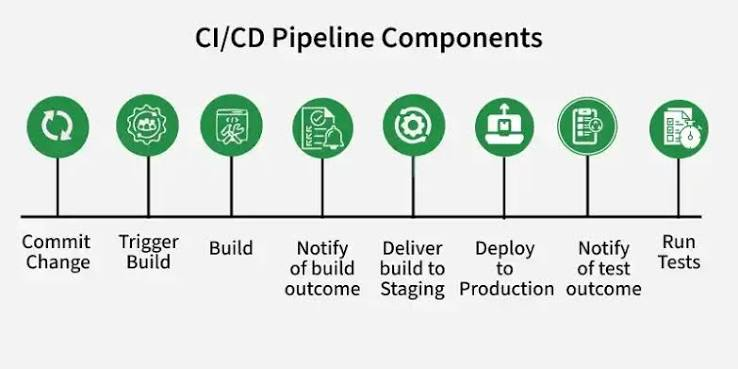
A CI/CD pipeline houses and processes important artifacts such as source code, credentials, builds, and deployments. Unauthorized access, or worse, malicious access, by an attacker may result in the insertion of malicious code, the exposure of sensitive data, and unauthorized changes to the CI/CD pipelines.
The software delivery process therefore needs security. This approach helps mitigate the risk and improves the security and compliance position of the organization.
Secure Your Source Code Repository
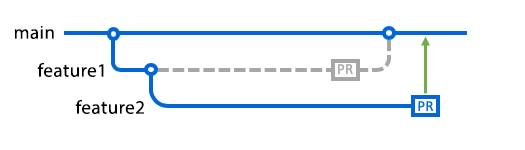
Protect your source code repository by enabling multi-factor authentication (MFA).
Once done, create branch protection rules. Ensure that the main or master branch is protected and requires a pull request. This provides the desired review of changes prior to code being added to the repository.
If possible, use signed commits.
Protect Secrets and Credentials
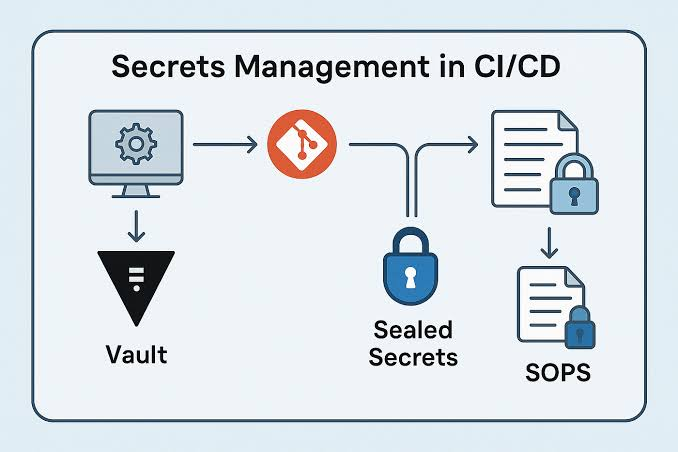
Protect your secrets! API keys and credentials should never be checked into source code repositories.
Secrets should never be stored in source code repositories.
Store and manage credentials using a secrets manager and limit pipelines to only the necessary credentials.
Credentials should be rotated on a regular basis. Rotation of secrets decreases the impact of compromised secrets.
Secure the Build Pipeline
Unnecessary files and changes from previous builds can become security issues if left on build pipelines. Ephemeral build pipelines ensure a clean environment for each build and lessen the risk that is posed by unnecessary files and changes.
Regularly check your pipeline permissions for errors that could expose sensitive information or allow unauthorized actions.
Furthermore, grant your pipelines only the permissions they require. Keep them up to date and configure them appropriately.
Scan Dependencies and Containers
Security scanning helps find potential issues before putting an application into production.
Consider static application security testing (SAST) to test source code for potential security risks. Scanning for vulnerabilities in dependencies and using the latest versions to replace vulnerable libraries are also necessary.
For security, container-based application scans help identify vulnerabilities and unnecessary packages in the container images. IaC scans can detect security risks in deployment infrastructure.
Tracking everything used in the application is also possible by using the SBOM.
Secure Deployments
Sign build artifacts, and verify the signature with each deployment.
For high-risk applications, put an approval process in place for production deployments.
Use RBAC to control access.
Before deployment, make sure containers meet all signature and vulnerability requirements.
Monitor and Audit Continuously
Post-deployment security checks should be an ongoing requirement. Security monitoring should be easier due to the centralized logging system for CI/CD pipelines.
Track user activity along with their configurations and deployments. Define alert thresholds for unauthorized access or unexpected changes to pipelines.
Automated regular monitoring helps developers to proactively mitigate potential security exposures.
CI/CD Security Cheat Sheet
| Area | Best Practice |
|---|---|
| Source Control | Enable MFA and branch protection |
| Secrets | Use a secure secrets manager |
| Dependencies | Scan builds for vulnerabilities |
| Containers | Use trusted and updated base images |
| Build | Use isolated or ephemeral runners |
| Deployment | Sign and verify build artifacts |
| Access | Apply least-privilege permissions |
| Monitoring | Enable audit logs and alerts |
| Compliance | Automate policy and compliance checks |
| Updates | Keep CI/CD tools and plugins updated |
Conclusion
Mitigating risks in the CI/CD process is a continuous task. You can achieve this by following these best practices: first, secure source code; next, grant access to required services through temporary keys; then, isolate build environments; also, scan dependencies and secure containers; and finally, implement control groups.
Continuous monitoring and regular updates would secure the CI/CD pipeline.

