


Strengthen data protection with server management services using the 3-2-1-1-0 backup strategy, Restic, Wasabi, and air-gapped storage.
Modern outages rarely happen because of one issue. Ransomware, accidental deletion, storage corruption, hardware failure, and poor recovery testing can all put critical data at risk.
That is why the 3-2-1-1-0 backup strategy makes sense. It adds multiple layers of protection and focuses on one important goal: successful data recovery.
An Overview
- What Is the 3-2-1-1-0 Backup Strategy?
- The “3” Keep Three Copies
- The “2” Use Two Storage Types
- The First “1” Keep One Copy Offsite
- The Second “1” Keep One Immutable or Air-Gapped Copy
- The “0” — Check Your Backups
- Why Use Restic, Wasabi, and Air-Gapped Storage?
- How Does Automation Improve Backups?
- Why Are Immutable Backups Important?
- Why Test Backups Every Month?
- Backup Management Best Practices
What Is the 3-2-1-1-0 Backup Strategy
The 3-2-1-1-0 rule builds on traditional backup practices to address modern IT risks, including ransomware and system outages.
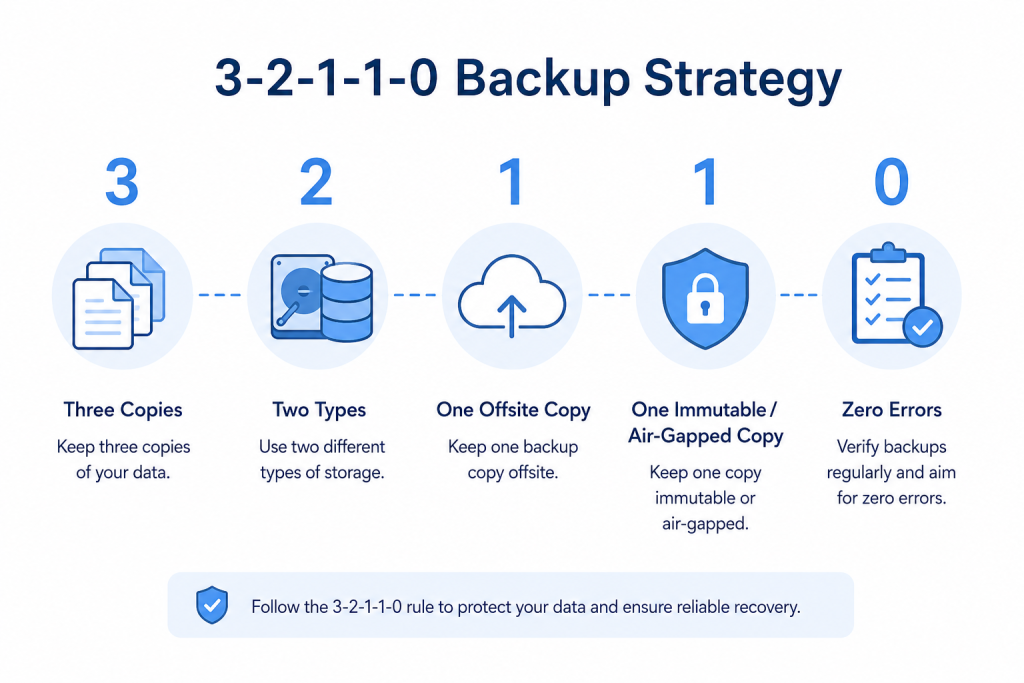
| Number | Meaning |
|---|---|
| 3 | Keep three copies of your data |
| 2 | Use two different storage types |
| 1 | Keep one backup offsite |
| 1 | Keep one immutable or air-gapped copy |
| 0 | Have zero backup verification errors |
Together, these steps reduce the risk of losing all recovery copies.
The “3” Keep Three Copies
Keep three copies of important data:
- Production copy
- First backup
- Second backup
For example, you can keep one copy in the production environment, one in object cloud storage, and one in offline storage.
Therefore, if one copy becomes unavailable, you still have other recovery options.
Secure Your Servers Today.

The “2” Use Two Storage Types
Do not keep every copy on the same type of storage.
Use the two alternatives below.
- Object cloud storage
- External drives or NAS Devices
Implementing object cloud storage and external storage devices can limit the impact of hardware failures and storage corruption as well as outages and platform errors.
The First “1” Keep One Copy Offsite
At least one copy must be stored offsite.
A power failure, hardware breakdown, server issue or ransomware attack can affect the main environment. An offsite copy therefore gives you an additional recovery option once the main environment is unavailable.
The Second “1” Keep One Immutable or Air-Gapped Copy
Ransomware can target backup copies after attackers gain access to a system.
An immutable backup cannot be changed during its defined retention period. An air-gapped backup stays isolated from the main system.
As a result, these backups add another layer of protection against actions that could affect your other recovery copies.
The “0” Check Your Backups
A completed backup job does not always mean that you can recover your data.
For that reason, check your backups through:
- Restore testing
- Backup integrity checks
- Continuous monitoring
- Backup verification and validation
The goal is to find backup problems before you need to restore your data.
Why Use Restic, Wasabi, and Air-Gapped Storage
Each option serves a different role in the backup process.
Restic for Efficient Backups
Restic supports backups that are:
- Encrypted
- Efficient
- Automated
- Deduplicated
It records the changed data, encrypts the backups and avoids unnecessary resource use.
Wasabi for Offsite Storage
Wasabi provides cloud storage for backup, retention and disaster recovery.
Consequently, it can be used to store backup copies.
Air-Gapped Storage for Extra Protection
There is some convenience in cloud backups, but if an attacker has the system and the backups, they can still target anything stored in the cloud.
Air-gapped storage keeps a backup isolated from the main. This technique is useful to protect the backup copy when all other backups are compromised.
How Does Automation Improve Backups
Manual backups can lead to mistakes and overlooked backups.
Automation controls:
- Backup jobs are carried out.
- Backup jobs are sustained.
- Retention policy is enforced.
As a consequence of automation, backup jobs don’t rely on user activity.
Why Are Immutable Backups Important
Ransomware may try to infect or delete available backup copies.
Immutable backups help prevent changes during the defined retention period. Therefore, they can preserve a recovery copy even when ransomware affects other parts of the environment.
Why Test Backups Every Month
A backup is useful only when you can restore your data from it.
Doing monthly backups allows you to do the following:
- Verify backups are still good
- Assess backup completeness
- Practice restoring backups
- Increase confidence in the restore process
This will find flaws in the restore process before a real outage occurs.
Backup Management Best Practices
A good backup plan consists of the following:
- Constant backup schedules
- Immutable backups
- Multiple Recovery locations
- Restore testing
- Monitoring backup health
- Recovery procedures outlined
- Regularly verify backups
Above all, you have to maintain the process and verify that your backups are still good.
Conclusion
The 3-2-1-1-0 backup strategy brings added protection to a backup plan.
It uses three copies of data, two different storage media types, one copy of data stored offsite, one immutable copy or air-gapped, and regular verification of backups.
Restic, Wasabi, and air-gapped storage can allow this approach to cover different areas of a backup process.

