


Convert your cPanel server to run LiteSpeed Web Server for faster, secure hosting. Our Litespeed Support team is ready to assist you.
Transform Your Hosting Power: Convert Your cPanel Server to Run LiteSpeed Web Server
LiteSpeed Web Server has emerged as one of the most powerful and efficient alternatives to traditional web servers like Apache. Known for its exceptional speed, robust security, and seamless compatibility, LiteSpeed enhances website performance while reducing server load. Whether you’re managing a small website or running enterprise-level applications, LiteSpeed offers a scalable and reliable solution designed to handle modern web demands effortlessly.
-
- What is LiteSpeed Web Server?
- LiteSpeed vs Apache: Performance and Scalability Comparison
- Key Benefits and Features of LiteSpeed Web Server
- Installing and Configuring LiteSpeed on cPanel or WHM
- LiteSpeed Cache and Optimization for WordPress and Other CMS
- LiteSpeed Security and DDoS Protection Features
- LiteSpeed Enterprise vs OpenLiteSpeed: Choosing the Right Version
- Common LiteSpeed Errors and Troubleshooting Tips
- Why Choose LiteSpeed Web Server
What is LiteSpeed Web Server?
LiteSpeed Web Server (LSWS) is a high-performance web server designed to deliver faster websites, improved scalability, and better resource management. Built as a drop-in replacement for Apache, LiteSpeed can seamlessly take over without breaking existing configurations. Its event-driven architecture and optimized caching make it one of the most efficient and reliable web servers available for modern hosting environments.
LiteSpeed vs Apache: Performance and Scalability Comparison
Apache and LiteSpeed are two widely used web servers, but they differ fundamentally in how they handle connections and resources. With its event-driven architecture, LiteSpeed efficiently manages multiple client connections using minimal processes. This design reduces CPU and memory usage, enabling the server to handle high traffic smoothly.
Apache, on the other hand, relies on a process or thread-based model. Each connection consumes system resources, which can lead to slower performance during peak load. While Apache performs well for smaller workloads, it struggles to maintain the same efficiency under heavy traffic conditions.
LiteSpeed’s event-driven model gives it a clear edge. It handles spikes in traffic more effectively, making it ideal for busy websites, eCommerce platforms, and enterprise-level hosting environments.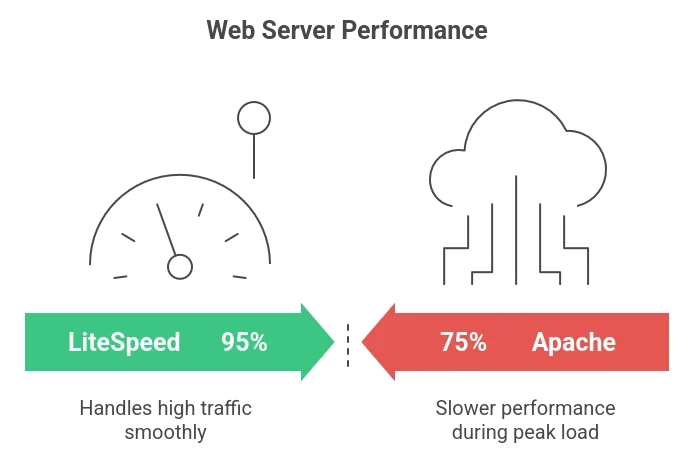
Key Benefits and Features of LiteSpeed Web Server
- Speed and Efficiency
LiteSpeed is built for speed. Its ability to serve thousands of concurrent connections with low CPU and memory usage ensures faster content delivery. The LSAPI PHP handler, unique to LiteSpeed, processes PHP requests faster than Apache’s mod_php or FastCGI methods, enhancing performance for dynamic websites. - Built-in Caching
LiteSpeed includes LiteSpeed Cache (LSCache), a server-level caching system that stores pre-generated pages. It reduces the need for repetitive processing, leading to shorter load times and better server performance. Websites running WordPress, Joomla, or Magento benefit significantly from this feature. - Modern Protocol Support
LiteSpeed supports HTTP/3 and QUIC, ensuring faster and more secure connections. These modern protocols reduce latency and improve site responsiveness across devices and networks.
Installing and Configuring LiteSpeed on cPanel or WHM
Installing LiteSpeed on cPanel or WHM is straightforward. You can also use the Litespeed extractor command line for faster installation and extraction of server files, which simplifies deployment on Linux servers.
Step 1: Installation
Log in to WebHost Manager as the root user. In the “Plugins” section, select “LiteSpeed Web Server Plugin for WHM” and click “Install LiteSpeed Web Server.” Enter your license key or request a trial license, set the installation directory, and define your preferred port offset.
Step 2: License Setup
LiteSpeed provides both trial and commercial licenses. After installation, activate your chosen license directly through the WHM plugin.
Step 3: Configure PHP Binaries
LiteSpeed uses its optimized LSAPI PHP handler for better speed. Rebuild PHP binaries if you switched from Apache to ensure compatibility. Access the WebAdmin Console, configure the external PHP application, and then switch LiteSpeed as your primary web server.
Once installed, LiteSpeed starts handling requests immediately, improving performance with minimal configuration.
LiteSpeed Cache and Optimization for WordPress and Other CMS
LiteSpeed Cache integrates directly into the web server, delivering server-level caching that accelerates websites dramatically. For WordPress sites, enabling persistent object cache LiteSpeed ensures frequently accessed data is stored in memory, reducing database queries and improving page load times.
Cache Integration
Dedicated plugins are available for WordPress, Joomla, and Drupal. These allow users to manage cache policies directly from their CMS dashboards. LiteSpeed differentiates between public and private cache, ensuring personalized content remains accurate for each user.
Performance Optimization
LiteSpeed Cache plugins offer image optimization, database cleanup, and file minification features. They also support CDN integration for faster content delivery worldwide. Combined, these features drastically reduce page load times and server load.
LiteSpeed Security and DDoS Protection Features
The web server offers advanced built-in protection features to defend against online threats.
- Anti-DDoS Tools
LiteSpeed includes bandwidth and connection throttling features to prevent malicious users from consuming excessive resources. IP blocking and rate limiting stop suspicious traffic before it can cause damage. - ModSecurity Support
LiteSpeed supports ModSecurity, enabling administrators to implement Web Application Firewall (WAF) rules for protection against SQL injection and cross-site scripting (XSS) attacks. It processes these rules efficiently without affecting server performance. - Resource Throttling
Administrators can control CPU, memory, and bandwidth limits per virtual host, helping isolate potential attack sources and maintain server stability.
LiteSpeed Enterprise vs OpenLiteSpeed: Choosing the Right Version
There are two versions of LiteSpeed available: Enterprise and OpenLiteSpeed.
LiteSpeed Enterprise
This commercial edition is fully compatible with Apache, supports all control panels like cPanel and Plesk, and includes advanced caching and security features. It is ideal for hosting providers, eCommerce businesses, and high-traffic websites that require reliability and zero-downtime updates.
OpenLiteSpeed
The free, open-source version offers impressive performance for static websites and smaller projects. While it lacks full Apache compatibility, it provides most of the core LiteSpeed benefits. OpenLiteSpeed works best for developers and small businesses seeking a lightweight, cost-effective solution.
Common LiteSpeed Errors and Troubleshooting Tips
Even with its stability, occasional errors may occur. Understanding these common issues helps ensure quick resolution.
HTTP 500 (Internal Server Error)
Often caused by a misconfigured .htaccess file or PHP issue. Rename the file temporarily to identify errors or rebuild it through your CMS settings. Also, check PHP memory limits and plugin conflicts.
HTTP 403 (Forbidden Error)
Usually linked to incorrect file permissions or restrictive .htaccess rules. Ensure files are set to 644 and directories to 755. Missing index files or overactive firewalls can also trigger this error.
HTTP 503 (Service Unavailable)
Indicates server resource exhaustion or PHP process crashes. Increase memory limits in the LiteSpeed WebAdmin Console or disable problematic plugins.
Cache-Related Problems
LiteSpeed Cache for WordPress may experience cache misses or stale content. Adjust cache rules in the plugin settings and verify correct file permissions. If optimization breaks the layout, disable CSS or JavaScript minification selectively.
For all errors, check logs under /usr/local/lsws/logs/error.log and restart LiteSpeed if necessary. Proper configuration and resource monitoring prevent most issues from recurring.
Why Choose LiteSpeed Web Server
LiteSpeed combines performance, stability, and security in a single solution. Its event-driven design, powerful caching system, and compatibility with popular control panels make it a preferred choice for hosting providers and website owners.
By switching from Apache to LiteSpeed, businesses can handle more traffic, deliver faster websites, and reduce hardware and support costs, all while maintaining compatibility and control.
LiteSpeed is more than just a web server; it is a performance-focused upgrade that transforms how websites operate under pressure.
[Need assistance with a different issue? Our team is available 24/7.]
Conclusion
To boost performance and security with minimal effort, you can easily convert your cPanel server to run LiteSpeed Web Server and enjoy faster, more reliable website hosting.
In brief, our Support Experts demonstrated how to fix the “554 5.7.1 : Relay access denied” error.

