


Strengthen your applications by integrating AI through API integration services without disrupting core performance.
AI has found its way into many applications, embedding new functionalities such as smart suggestions, automation of complex tasks, resource optimization, smart workflows, and many more that users have grown accustomed to. While a majority of teams are working to incorporate AI into their applications, there is a myriad of risks associated with the integration. The API calls generated as a result of commanding the AI may slow down your API, increase costs, serve as a blocker to the UI deployment, and add new issues when the AI service itself fails.
The fundamental principle in AI integration is that the application remains independent of AI.
This document provides you with a methodical approach to integrate AI into your existing application while ensuring stability and scalability.
An Overview
Why AI Integration Can Affect Application Stability
AI behaves very differently from most traditional application service behaviors, and interactions with AI services can disrupt application stability. For one, AI services can have very variable response times. AI services can also have external dependencies, token rate limits, and unpredictable output behaviors, to name a few.
Most issues occur when teams place AI components directly in application critical paths.
One of the most common examples is the placement of the following code in a business-critical or time-sensitive path of an application:
const summary = await openai.generateSummary(description);
If making this call is blocking, a failure or delay in the AI provider will cause a failure in the request.
The following are common issues:
AI Inside Core Logic
Developers place AI calls inside the core application APIs or business services and therefore make the application dependent on the AI provider.
No Separation for AI Workloads
AI tasks can require different resources and performance than typical application tasks. Running these tasks without explicit separation can affect the application.
Synchronous AI in Critical Flows
AI operations such as comparability checks or generation of embeddings can introduce delays in critical user actions.
Integrate AI Without Disruption

Keep AI Independent From the Core Application
AI should complement and extend an application.
An application should continue to manage business logic, validation, databases, and workflows.
AI should be used for the following:
- Suggestions
- Summaries
- Predictions
- Classifications
- Insights
This creates a system where the application must work while AI features are optional.
- Create an AI Service Layer as part of integrating AI into applications. In many modern development strategies, integrating AI into applications is key for robust functionality. Additionally, integrating AI into applications helps streamline processes and automate decision-making. Overall, the success of integrating AI into applications depends on thoughtful planning and testing.
Instead of calling the AI provider from the core application, create an AI service layer.
App → AI Service Layer → AI Provider
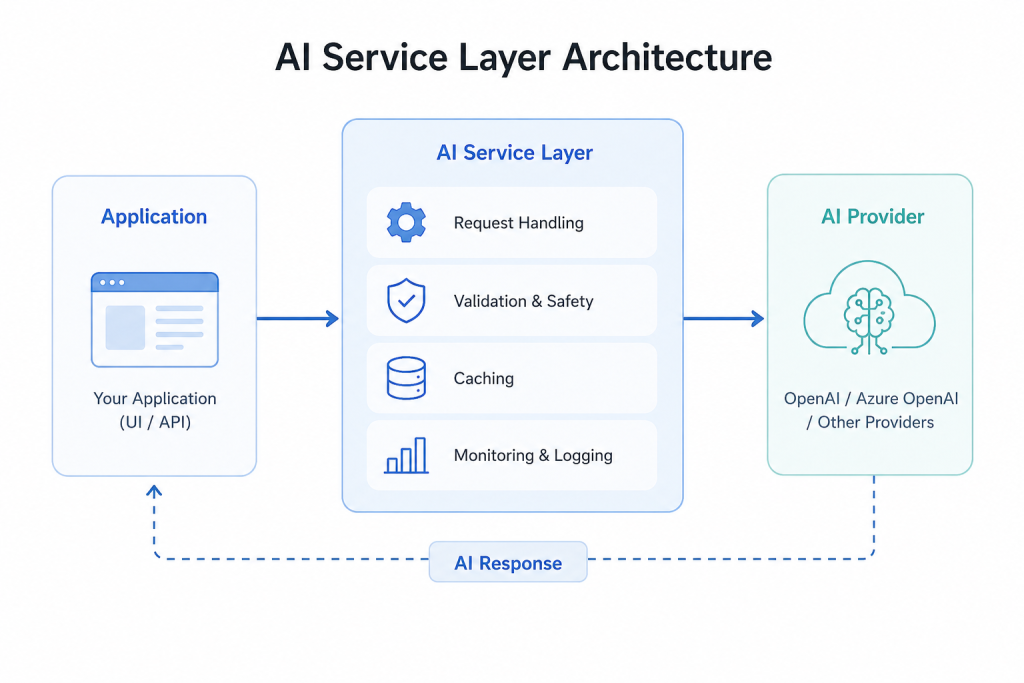
7. Monitor AI Separately
AI needs its own set of performance and usage checks.
Track:
- Token usage
- AI costs
- Response time
- Failure rates
- Drift
- Output quality
At the same time, continue monitoring your core application.
Separate monitoring helps you identify whether a problem comes from the application or the AI service.
Practical Examples of Safe AI Integration
E-Commerce Recommendations
Risks: Increased response times, costs, timeouts.
Better: Generate recommendations in the background and store them. The application can then serve recommendations without an AI response on each page load.
AI-Powered Compatibility Checks
Risks: Increased response times and harder to identify issues.
Better: Let AI determine the rules, and have them validated. A deterministic engine can apply the rules.
This maintains the AI’s supporting role, and the core system runs the final process.
AI Integration with a Simple Architecture
A safe architecture can have the core application processed separately from the AI:
Client
↓
API Gateway
↓
Core Application
↓
Event Bus / Queue
↓
AI Service Layer
↓
AI Provider
This architecture helps with:
- Failure isolation
- Independent scaling
- Controlled changes
- Predictable Performance
The architecture can differ based on the application. An AI service with real-time functionality may need a direct request; however, a background task could be controlled via a queue.
AI Integration Checklist
When adding AI to existing applications, ensure that all of the following are true:
- AI should operate beyond the scope of business logic.
- Background processing should be used for tasks that are not time-critical.
- Failures of AI should have fallbacks.
- Caching should be employed for retrieving suitable results.
- AI should have sufficient resources.
- AI should have dedicated monitoring.
- Models and prompts should be versioned.
- Core functions should be able to operate without AI.
Conclusion
AI can help build new features for an application without having to completely rebuild the application.
The most important thing is to separate the AI from the core application. Service layers, background processing, fallbacks, caching, dedicated infrastructure, versioning, and monitoring should be employed.
When the core AI functionalities are controlled by the core application, and not vice versa, then features can be made more intelligent while the application itself remains stable and predictable.

