


Azure consulting for secure Istio certificate management on AKS using Azure Key Vault, CSI Driver, and Workload Identity for safer TLS operations.
Managing TLS certificates by hand is tedious and easy to get wrong. A missed renewal can also affect external routing and HTTPS traffic.
If you run an Istio Ingress Gateway on Azure Kubernetes Service (AKS), you may use a Kubernetes TLS Secret and reference it through the credentialName field in your Gateway resource. This works, but it means certificate data stays inside the cluster.
A better approach is to store certificates in Azure Key Vault and use the Secrets Store CSI Driver with Azure Workload Identity. This approach eliminates the need for manual certificate handling while maintaining the existing Istio setup.
An Overview
Why Istio Needs a Kubernetes Secret
An Istio Gateway uses credentialName to locate the TLS certificate:
tls:

mode: SIMPLE

credentialName: ingress-cert-secret
Istio looks for this certificate in a local Kubernetes Secret. It does not directly connect to Azure Key Vault.
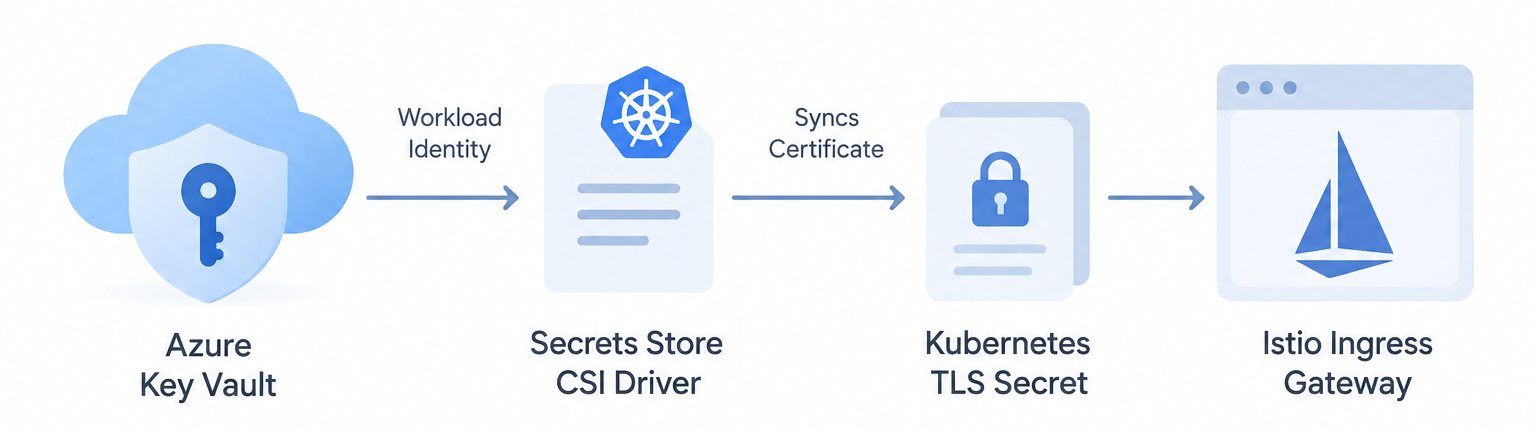
The Azure Key Vault Secrets Store CSI Driver connects these two parts. It retrieves the certificate from Key Vault and syncs it to a Kubernetes TLS Secret that Istio can use.
Azure Key Vault
│
│ Workload Identity
▼
CSI Driver
│
▼
Synced Kubernetes Secret
│
▼
Istio Gateway
Azure Workload Identity also removes the need to keep long-lived Azure client secrets inside the cluster. Instead, the workload uses short-lived OIDC tokens.
Secure Your Azure Setup.

Step 1: Store the Certificate in Key Vault
Collect parts of the certificate from the cluster. Create a .pfx certificate if it does not exist.
Import the .pfx certificate into Azure Key Vault as a Certificate. Here you can set up access control.
Give the Managed Identity of the cluster the roles below.
- Key Vault Reader — to discover the asset metadata.
- Key Vault Certificate User — to read the certificate content.
Step 2: Set Up Workload Identity
- Create a trust between Azure and Kubernetes.
- Create a unique ServiceAccount in the ingress namespace.
- Add the Managed Identity Client ID to the ServiceAccount.
- Create a Federated Credential in Azure that trusts the ServiceAccount and the OIDC issuer URL of the cluster.
This allows the workload to access Azure Key Vault without maintaining static Azure credentials in the cluster.
Step 3: Configure the CSI Driver
A SecretProviderClass is required to explain how to fetch the Key Vault asset and how to create a Secret in Kubernetes.
apiVersion: secrets-store.csi.x-k8s.io/v1

kind: SecretProviderClass

metadata:

name: ingress-gateway-cert-spc

spec:

provider: azure

secretObjects:

- secretName: ingress-gateway-managed-secret

type: kubernetes.io/tls

data:

- objectName: your-kv-cert-name

key: tls.crt

- objectName: your-kv-cert-name

key: tls.key

parameters:

usePodIdentity: "false"

clientID: "your-azure-managed-identity-client-id"

keyvaultName: "your-keyvault-name"

objects: |

array:

- |

objectName: your-kv-cert-name

objectType: secret
This example references objectType: secret; however, note that the asset in Key Vault is actually a certificate.
The CSI Driver will start a sync process once a pod has been deployed mounting the volume. Therefore, deploy a lightweight container to mount the volume and create the Secret:
ingress-gateway-managed-secret
Step 4: Switch Istio to the New Secret
Once the Secret has been created, modify the Istio Gateway.
- Back up the current configuration of the Istio Gateway.
- Change the Secret reference in the Gateway config from the old CSI Secret to the new Secret.
- Restart the deployment of Istio Ingress if prompted:
kubectl rollout restart deployment istio-ingress -n ingress-namespaceIstio can then use the new certificate through the Kubernetes Secret.
Finally, check the certificate from the public domain with openssl:
openssl s_client -connect your-domain.com:443 -servername your-domain.comCheck the certificate and its validity dates to confirm that the expected certificate is being served.
Benefits of Moving Certificates to Key Vault
Certificate management is simplified in a few different ways with this configuration.
- Centralized certificate storage: Teams no longer have to store certificates in the repository or apply them through kubectl.
- Automated certificate updates: When a certificate changes, the CSI Driver can sync the Kubernetes Secret with the certificate in Azure Key Vault.
- Audit logging: Azure can maintain logs of actions and activities on the Vault.
- Access control: Access to Certificate Data within the Azure vault is managed with RBAC.
Conclusion
With Azure Key Vault, moving Istio Ingress certificates eliminates much of the work involved in managing certificates. The Secrets Store CSI Driver connects Key Vault to the Kubernetes Secret Istio expects, while Azure Workload Identity provides the needed access without storing long-lived secrets in the cluster.
This means teams can maintain their Istio Cluster Gateway and manage certificates in a central Azure location. Contact our Azure Managed Services if need assistance.

