


Resolve Drupal AH01070 error parsing script headers and maintain site stability. Our Drupal Support team is ready to assist you.
Troubleshooting Drupal AH01070 Error Parsing Script Headers
The Apache AH01070 error occurs when a script, often a PHP script, fails to send proper HTTP headers, sometimes showing alongside the Premature end of script headers. This issue can disrupt website functionality and affect user experience. Understanding the common causes and following practical troubleshooting steps can help resolve the error quickly and prevent it from happening again.
What is Apache Error AH01070?
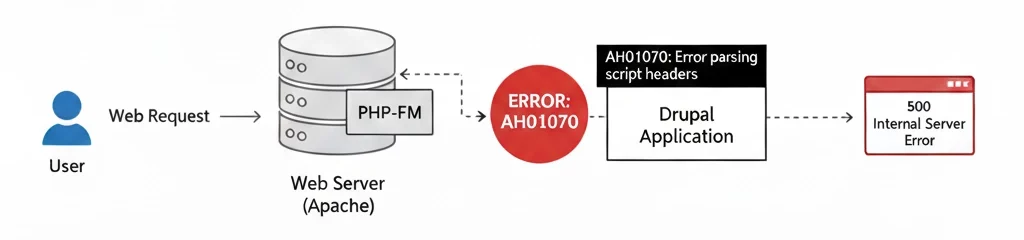
The Apache error AH01070: Error parsing script headers occurs when the web server cannot process the HTTP headers sent by a script, often a PHP script. This issue usually appears alongside the message Premature end of script headers, which indicates that the script stopped running before completing its header output.
Common Causes and Solutions
| Common Causes | Solutions |
| Authorization headers being stripped during request processing, often due to RewriteRule settings in .htaccess | Add directives in .htaccess to pass Authorization headers correctly. Example: RewriteEngine On, RewriteCond %{HTTP:Authorization} ^(.*), RewriteRule .* – [e=HTTP_AUTHORIZATION:%1] |
| Premature output before headers, even a single space or newline, causing errors | Remove all content before header statements and ensure headers are sent first |
| Applications exceed Apache’s LimitRequestFieldSize, often due to long headers from caching mechanisms in Drupal, Magento, or similar platforms | Increase LimitRequestFieldSize in Apache configuration. Example: LimitRequestFieldSize 16384. Adjust carefully to avoid security risks |
| PHP-FPM configuration issues, such as misconfigured pools or proxy settings | Verify PHP-FPM pools and Apache proxy settings to ensure proper communication |
| Resource-intensive scripts exceeding PHP max_execution_time or Apache Timeout or ProxyTimeout | Increase PHP max_execution_time in php.ini and adjust Apache Timeout or ProxyTimeout to allow longer script execution |
| Specific file types in content, like SVG images, causing header parsing issues | Replace or remove problematic file types from content |
| Incorrect header formatting, including extra spaces, line breaks, or wrong syntax in scripts | Review scripts to ensure headers are generated correctly. Example for PHP: <?php header(‘Content-Type: application/json; charset=UTF-8’); ?>. Avoid output before headers |
| Certain modules or extensions interfering with header processing, such as caching or security plugins | Identify and temporarily disable suspicious modules or extensions to test if the error resolves |
Handle Drupal AH01070 errors with ease

How to Troubleshoot and Fix the Apache AH01070 Error
The Apache AH01070 error appears when the server cannot read the HTTP headers generated by a script. This issue is common with PHP scripts and can cause website disruptions. Understanding the causes and following a structured approach can resolve the problem quickly.
Check for Premature Output and Syntax Errors
- Ensure there is no output such as spaces, HTML, or echo statements before the <?php opening tag or after the ?> closing tag in PHP files. Even a single space can trigger the error.
- Scan the script for syntax errors that may prevent it from running correctly.
- Review Apache error logs for PHP-related messages that reveal issues in the script.
Review Header Length Limits
- Scripts that generate long headers often cause this error. This is common in applications with many cache tags, like Drupal or Magento, or those using multiple Link headers for asset preloading.
- Apache users should check LimitRequestFieldSize and LimitRequestLine in the configuration file and increase the values if necessary. Example:
LimitRequestFieldSize 16384

LimitRequestLine 16384- Nginx users can adjust large_client_header_buffers to handle larger headers.
Examine Generated Headers
- Use browser developer tools or curl to inspect the headers returned by the script.
- Look for headers that are unusually long, such as X-Magento-Tags, Cache-Tags, or Link headers.
- Identify the code generating these headers. For example, in Drupal, debug_cacheability_headers can create large headers and should be disabled in production.
Investigate Modules or Extensions
- If the error appeared after installing a module or plugin, try disabling it temporarily.
- Focus on modules related to caching or security, as they often add multiple headers and increase header size.
Verify PHP-FPM Configuration
- Ensure PHP-FPM pools are configured correctly if the server uses PHP-FPM.
- Confirm PHP processes do not terminate unexpectedly or encounter errors that prevent headers from reaching Apache.
Following these steps helps identify the source of the AH01070 error and restore normal website functionality. Regular checks of scripts, headers, and server configurations reduce the chances of this error recurring.
[Need assistance with a different issue? Our team is available 24/7.]
Conclusion
The Drupal AH01070 error parsing script headers can disrupt your site, but checking output, header limits, modules, and PHP-FPM settings helps resolve it. Following these steps keeps your Drupal site running smoothly and prevents the error from happening again.

