Learn Azure ARM Templates for repeatable infrastructure deployments with Azure consulting. Understand templates, IaC, deployment, reuse, and Bicep.
If you are working with Azure, you may have come across the term ARM Template. At first, it can sound like another complicated Azure concept, but the basic idea is actually quite simple.
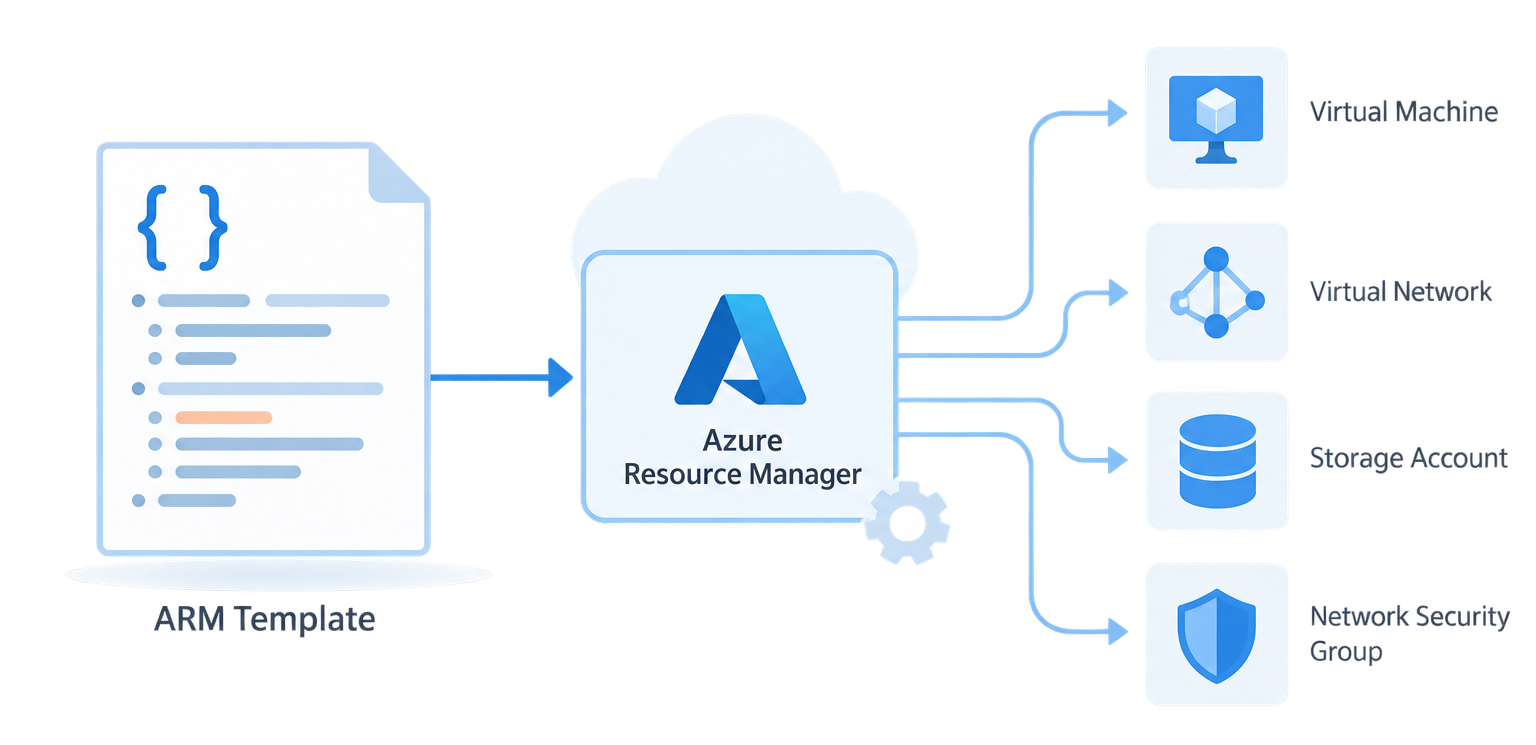
An ARM Template is basically a blueprint for creating and managing resources in Azure.
Instead of going to the Azure Portal and manually creating everything one by one, we can describe what we need in a template and let Azure create it for us.
An Overview
Why do we need ARM Templates?
Let’s say we want to create a small application environment in Azure.
We may need:
-
- A Virtual Machine
- A Virtual Network
- A subnet
- A public IP
- A network security group
- A storage account
We can create all of these manually from the Azure Portal. But if we need to create the same setup again, doing everything manually can take time and there is always a chance of missing something or making a different configuration.
This is where ARM Templates become useful.
We can define our required infrastructure in a template and use the same template whenever we need to create the environment again.
So instead of:
Portal → Click → Configure → Create → Repeat
we can have:
Template → Deploy → Azure creates the resources
What does ARM actually mean?
ARM stands for Azure Resource Manager.
It is the service in Azure that manages resources such as virtual machines, networks, storage accounts and many other Azure services.
An ARM Template is basically a way of telling Azure Resource Manager:
“This is the infrastructure I want. Please create or configure it like this.”
That’s the main idea.
Talk to Our Azure Experts.

What does an ARM Template look like?
ARM Templates are written in JSON.
A very simple example could look like this:
{

"$schema": "...",

"contentVersion": "1.0.0.0",

"resources": [

{

"type": "Microsoft.Storage/storageAccounts",

"name": "mystorageaccount",

"location": "eastus"

}

]

}
You don’t need to understand every line here to understand the concept.
The important part is that we are describing the Azure resource we want to create.
In this example, we are defining a storage account.
Can we reuse the same template?
Yes, and this is one of the main benefits.
For example, imagine we have three environments:
Development
Testing
Production
Instead of creating each environment manually, we can use the same template and provide different values when deploying it.
For example, we might use a different resource name or Azure region depending on the environment.
This makes deployments much more consistent.
ARM Templates and Infrastructure as Code
ARM Templates are also part of something called Infrastructure as Code (IaC).
The idea behind Infrastructure as Code is simple:
Instead of keeping infrastructure configuration only in our heads or in documentation, we describe it in files.
Those files can also be stored in a Git repository, reviewed, changed and reused.
For example:
Azure Infrastructure
↓
ARM Template
↓
Git Repository
↓
Deploy whenever required
This becomes especially useful when working with larger environments or when infrastructure needs to be recreated regularly.
How is an ARM Template deployed?
An ARM Template can be deployed using different Azure tools.
For example, it can be deployed through the Azure Portal, Azure CLI, PowerShell or an automation pipeline.
The basic process is:
Create ARM Template
↓
Provide required values
↓
Start deployment
↓
Azure Resource Manager
↓
Resources are created/updated
Azure takes care of applying the template to the environment.
ARM Templates vs Bicep
If you start learning Azure Infrastructure as Code today, you will also come across Bicep.
Bicep is another way of defining Azure infrastructure, and it is designed to be easier to read and write than traditional ARM JSON templates.
For example, an ARM Template can become quite large when you have many resources.
Bicep provides a cleaner way to write the same type of infrastructure definition.
So you may see both ARM Templates and Bicep when working with Azure.
Where are ARM Templates useful?
ARM Templates can be useful when:
-
- We need to create the same Azure environment multiple times.
- We want consistent configurations.
- We want to automate infrastructure deployments.
- We want to keep infrastructure definitions in Git.
- We want to reduce manual work in the Azure Portal.
They are especially useful in DevOps environments where infrastructure and application deployments need to be repeatable.
Conclusion
When I first came across ARM Templates, the JSON format made them look more complicated than they actually are.
The easiest way to understand them is to think of an ARM Template as a blueprint for Azure infrastructure.
Instead of manually telling Azure:
“Create this VM, then create this network, then configure this resource…”
we define what we want in a template, and Azure Resource Manager takes care of the deployment.
That’s really the core idea behind ARM Templates. Our Azure managed services is here to lend a hand if you are having trouble.