


Learn how Amazon S3 storage classes work with cost optimization & monitoring to reduce AWS storage costs and optimize storage more efficiently.
Optimizing costs requires that you evaluate the frequency at which data is accessed for each Storage Class in order to avoid higher storage costs. Teams that select the appropriate Amazon S3 Storage Class can optimize costs and set data availability accordingly.
An Overview
The Storage Bill Nobody Expects
Most teams start with Amazon S3 for images, documents, backups, and logs without thinking much about storage costs. Over time, however, this data continues to accumulate and occupy storage.
EC2 and Lambda costs may remain normal while S3 charges increase. Storage classes help solve this problem by allowing teams to match storage costs with data access needs.
Optimize Your S3 Costs.

How Storage Costs Grow
Most workloads with an AWS base begin their storage journey with the S3 Standard class, as it is well suited for frequently accessed data. S3 buckets can slowly accumulate the following data:
- Old Customer Invoices
- Backups of Databases and Applications
- CloudTrail and Logs
- Media of All Formats
- Compliance Documents
- Data Artifacts of Applications
Most, if not all, of this will be used at some point, and paying for S3 Standard for rarely accessed data will just increase storage costs. Therefore, the goal isn’t to delete data, but to store it intelligently.
Why S3 Has Multiple Storage Classes
Not all data access patterns are the same. Some data are accessed frequently, while other data access patterns may be months or years.
The Amazon S3 storage classes bring a balance to:
- Cost of Storage
- Time to Retrieve Data
- Frequency of Access
They provide durable object storage and differ in: Price for Retrieval, Availability, Minimum Duration of Storage, and Architecture of Availability Zones.
Understanding S3 Storage Classes
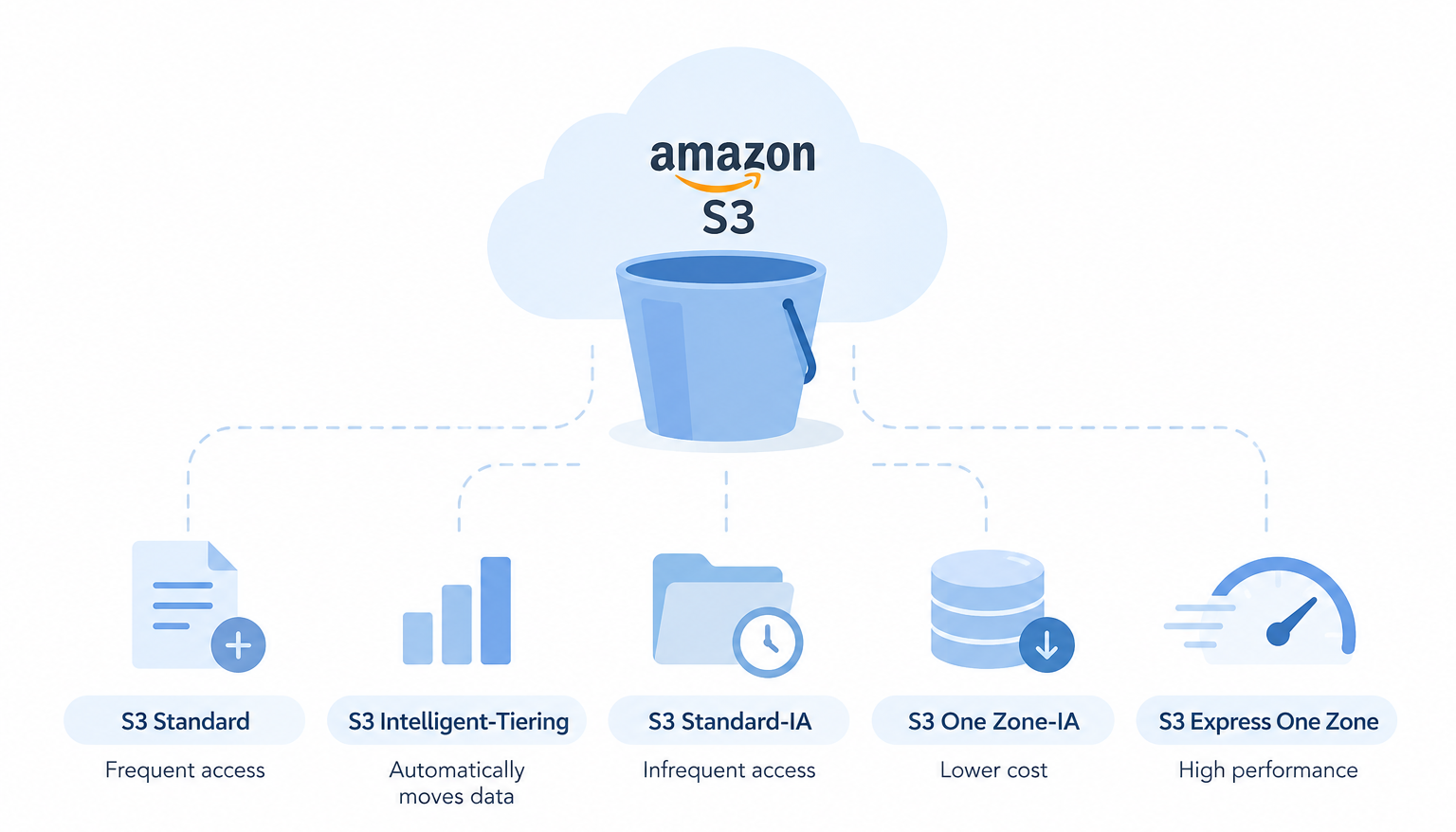
S3 Standard — For Frequently Accessed Data
Standard storage works well for data that applications access, such as images, videos, and documents. It provides low latency and high throughput.
You should move data that has an infrequent access pattern out of S3 Standard to avoid increased storage costs.
S3 Intelligent-Tiering — Let AWS Decide
Whereas you normally have to predict access patterns, S3 Intelligent-Tiering is great for cases where the access pattern is unknown. S3 Intelligent-Tiering monitors object access and automatically stores objects in the optimal access tier.
As data becomes inactive, it can move to low-cost storage. This further alleviates the burden of predicting access patterns.
S3 Standard-IA — For Infrequently Accessed Data
S3 Standard-Infrequent Access (Standard-IA) is a storage class for data that is accessed infrequently, but which requires quick access.
Examples:
- Disaster recovery backups
- Monthly exports
- Reports
- Previous application releases
Because retrieval from Standard-IA is not free, Standard may be more cost-effective for data that is accessed frequently.
S3 One Zone-IA — Lower Cost for Re-creatable Data
If data can be easily recreated, S3 One Zone-IA is the most cost-effective solution for data storage because it only uses a single Availability Zone.
S3 One Zone-IA can be used to store development data or reports, backups and outputs.
Data can be moved using lifecycle policies.
S3 Express One Zone — For High Performance
S3 Express One Zone targets extremely low latency and high request rates. It can suit:
- Machine learning pipelines
- Real-time analytics
- Interactive media processing
- High-performance computing
Like One Zone-IA, it uses a single Availability Zone. Therefore, choose it when performance needs justify the trade-off.
Getting S3 Costs Under Control
Reducing S3 storage costs doesn’t always require deleting data. Start by examining your usage and buckets. For this, you could use AWS Storage Lens, S3 Inventory, or Cost Explorer to determine the storage growth and usage.
Next, you can apply lifecycle rules to automatically move data to cheaper storage tiers.
For example:
New files → S3 Standard
After 30 days, move the data to Standard-IA.
At 90 days, shift the data to Glacier Instant Retrieval.
Once one year passes, transition the data to Glacier Deep Archive.
Remember that this example is just that — an example. Your choice of access frequency and retention should determine your strategy.
This last section will show you how to reduce storage costs by removing incomplete multipart uploads, duplicate backups, outdated artifacts, and unused logs.
A Hypothetical Example
For years, BrightData Solutions stored all company data in Amazon S3 and paid for S3 Standard. As logs, backups, images, and reports were added, storage costs grew.
After looking at usage, the company saw that most data remained untouched for months. As a result, BrightData Solutions moved active files to S3 Standard, infrequently accessed files to Intelligent-Tiering and Standard-IA tiers, backups to Glacier Flexible Retrieval, and files for permanent storage to the Glacier Deep Archive tier.
With these changes, storage costs saw dramatic reductions, but performance and user experience remained unaffected.
Conclusion
Amazon S3 gives organizations flexibility beyond simple file storage. However, choosing the right storage class matters.
Three practices can help:
- Keep active data in the right high-performance storage class.
- Use lifecycle policies to move inactive data automatically.
- Review storage usage regularly as access patterns change.
Storage optimization doesn’t mean deleting valuable information.
Data optimization means that you pay for the storage performance that you actually need.
Organizations that have an optimized AWS storage environment do not store less data. Instead, they store it more efficiently.

