


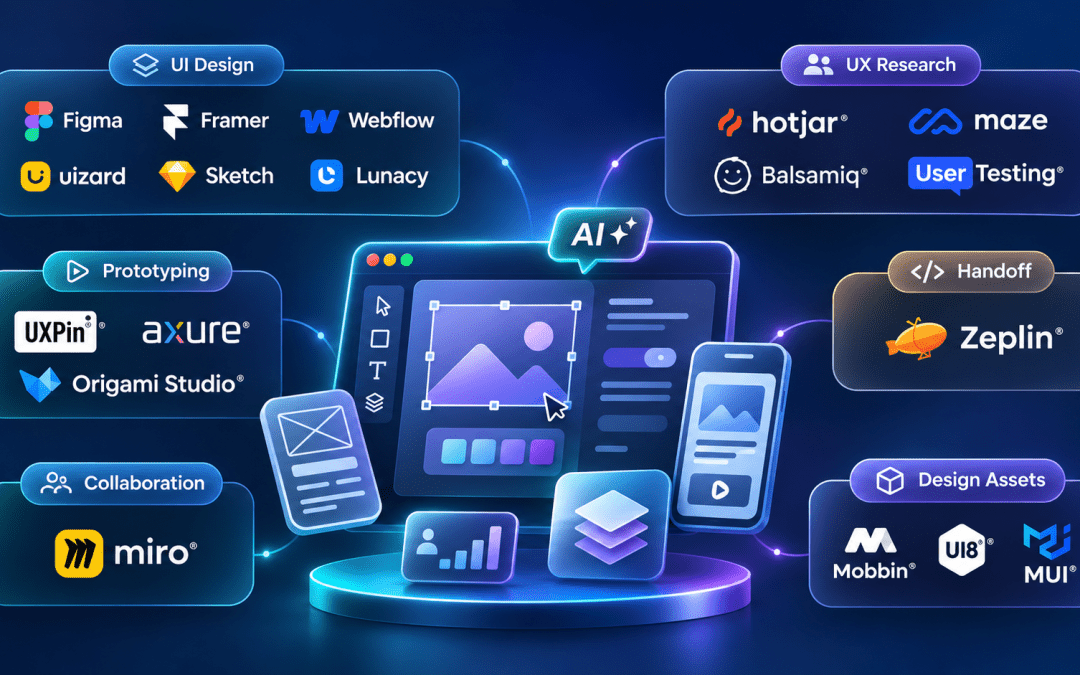
The UI/UX design landscape has changed significantly in 2027. AI features are now part of many leading design platforms, helping designers generate layouts, suggest components, analyze usability tests, and speed up repetitive work.
Modern product development also requires more than creating visual designs. Designers need tools for wireframing, prototyping, user research, collaboration, developer handoff, and design systems. You can also opt for our UI/UX services to take this off your plate so you can focus on expanding your business.
This blog covers 10+ UI/UX design tools across these use cases. Each tool includes its key capabilities, ideal use case, and pricing information to help you identify the right options for your workflow.
Why Choosing the Right Design Tools Matters in 2027
A typical product workflow can involve several design tools, from initial wireframes and prototypes to user testing and developer handoff. Choosing the wrong tools can create friction across these stages.
Poor tool selection can make design handoff harder, leave prototypes disconnected from actual interactions, and slow down the process of turning user research into actionable improvements.
The right tools can provide a shared source of truth for designers, developers, and stakeholders. They can also reduce unnecessary revisions and make it easier to test design assumptions before development begins.
AI is also changing how these platforms work. Features such as AI-generated layouts, automated analysis, and component suggestions can reduce repetitive work and give designers more time to focus on product decisions.
The tools in this guide are evaluated based on their capabilities, collaboration features, and practical value of their AI functionality in 2027. Pricing reflects the publicly listed plans provided in the source material at the time of writing.
UI Design Tools
UI design tools support the visual and interactive layer of a product. They are often where interface design begins and where designs are prepared for handoff to development.
Figma
Figma remains a leading choice for collaborative UI design in 2027. Its cloud-based workflow allows multiple people to work in the same file without creating traditional version conflicts.
Its AI capabilities support tasks such as microcopy suggestions, design variations, and component matching.
Best for: Product organizations of different sizes, particularly those working closely with developers.
Framer
Framer combines design and production by allowing designers to create animated interfaces and publish them as live websites without writing code.
Its AI capabilities can generate complete page layouts from text prompts, making it useful during early design exploration.
Best for: Startups and marketing groups that need to move from design to a live website without a separate development handoff.
Webflow
Webflow combines visual development, responsive layout control, CMS functionality, and hosting in one platform. It can produce production-ready HTML, CSS, and JavaScript.
This makes it particularly useful when the goal is to create and manage a live website rather than only produce a prototype.
Best for: Designers who want greater control over developing marketing websites and web applications.
Uizard
Uizard focuses on making interface design accessible to both professionals and people without extensive design experience.
Its AI can turn hand-drawn sketches or screenshots into editable mockups. This makes it useful for exploring several concepts quickly before moving into detailed design.
Best for: Product managers, founders, and designers working on rapid concept exploration.
Sketch
Sketch is a mature Mac-native design application with a strong plugin ecosystem and developer handoff integrations.
Its desktop-first approach continues to appeal to designers who prefer working with local files and value native performance.
Best for: Mac-based design groups with established Sketch workflows and plugin dependencies.
Lunacy
Lunacy is a free desktop UI design editor that supports Sketch files natively. It provides an accessible option for designers who want a capable editor without committing to a paid subscription.
Its AI-powered features include background removal, image upscaling, and automatically generated avatars and placeholder content.
Best for: Individual designers and small organizations looking for a cost-effective UI design tool.
UX Research and Testing Tools
UX research and testing tools help designers understand user behavior, validate design decisions, and identify friction in existing products.
These platforms can provide insights into how people interact with a product rather than focusing only on how the interface looks.
Hotjar
Hotjar captures how users interact with live websites and web applications. It can show where users click, scroll, hesitate, and leave a page.
Its AI features can summarize session recordings and identify patterns across user segments, reducing the time required to review large amounts of behavioral data.
Best for: Product and UX groups analyzing live websites and web applications for usability issues and conversion friction.
Maze
Maze integrates with Figma and other design platforms to turn prototypes into structured usability tests.
It measures factors such as task completion rates, misclicks, and time on task. Its AI analysis can also generate summaries of test results for stakeholder review.
Best for: Design groups that conduct regular prototype testing and need quantitative usability data.
Balsamiq
Balsamiq uses a deliberately rough visual style that makes it clear that a design is still exploratory.
This makes it useful during early discovery, where the goal is to gather feedback on ideas and functionality without distracting stakeholders with polished visual details.
Best for: Discovery workshops, early product definition, and exploratory design work.
Miro
Miro is a digital whiteboard used for activities such as UX workshops, journey mapping, affinity mapping, and stakeholder alignment.
Its templates for personas, service blueprints, and customer journey maps provide starting points for different research and planning activities.
Best for: Remote workshops, journey mapping, and cross-functional collaboration.
UserTesting
UserTesting provides access to real users who can interact with a product, prototype, or concept and provide screen recordings and verbal feedback.
It supports moderated interviews and unmoderated tests. Its AI capabilities can transcribe, tag, and summarize sessions.
Best for: UX researchers who need structured studies with specific participant criteria and direct video feedback.
Prototyping and Handoff Tools
Prototyping tools connect design and development by turning static screens into interactive experiences. Handoff tools provide developers with the specifications and assets needed to implement approved designs.
UXPin
UXPin is designed to create prototypes that closely resemble production applications. It uses React components so that prototypes can share a component foundation with the production product.
Its Merge feature helps keep design systems aligned with engineering component libraries.
Best for: Design system groups and product engineers who need production-accurate prototypes.
Zeplin
Zeplin focuses specifically on design-to-development handoff. It generates style guides, spacing specifications, asset exports, and color tokens from finished designs.
Its annotation and commenting features also support asynchronous design review and approval.
Best for: Organizations that want a structured developer handoff process separate from the main design file.
Axure RP
Axure RP allows designers to create detailed prototypes without writing code. It supports conditional logic, dynamic content, data-driven interfaces, and adaptive layouts.
This makes it useful for demonstrating complex interactions before development begins. Its learning curve is higher than many other prototyping tools.
Best for: Enterprise UX groups and consultants working on complex interaction patterns.
Origami Studio
Origami Studio was developed by Meta’s design group and focuses on prototyping native mobile interactions.
It connects to device hardware APIs, supports Figma imports, and allows designers to create detailed animations and transitions for iOS and Android experiences.
Best for: Mobile UX designers working on native iOS and Android applications.
Design Asset Libraries and Component Tools
Asset libraries and component tools provide ready-made UI kits, templates, illustrations, and component frameworks. These resources can reduce the need to create common design elements from scratch.
Mobbin
Mobbin provides a library of real mobile and web application screens from hundreds of products.
Instead of focusing only on conceptual designs, it shows how real products handle patterns such as onboarding, checkout, empty states, and error messages.
Its Figma plugin allows designers to bring reference screens into working files.
Best for: Designers researching how existing products solve specific UI and interaction challenges.
UI8
UI8 is a marketplace for premium design assets created by professional designers.
Its all-access subscription provides access to a broad library of assets, making it useful for organizations that regularly need polished starting points for product or client work.
Best for: Design agencies and product organizations that frequently use premium design assets.
MUI
MUI is a React component library based on Material Design principles. It includes production-ready components for interfaces such as forms, buttons, navigation, and data tables.
Its design tokens and theming capabilities allow developers to customize the visual style while retaining component behavior and accessibility features.
Best for: Frontend engineers and design-engineering groups building React web applications.
How to Choose the Right UI/UX Design Tool Stack
No single tool covers every design requirement. The right combination depends on the product lifecycle, technical capabilities, workflow, and the areas creating the most friction.
Start With Your Biggest Bottleneck
Identify the stage where the current workflow slows down.
If design-to-development handoff is causing problems, tools such as Zeplin or UXPin may be worth considering. If usability testing and analysis are taking too long, Maze or Hotjar’s AI capabilities may be more suitable.
Match Complexity to Capability
Advanced tools such as Axure RP and Origami Studio offer extensive functionality but may take longer to learn.
Organizations without dedicated interaction design specialists may find tools such as Figma, Framer, and Maze easier to adopt.
Look for Tool Overlap
Using several tools that solve the same problem can add unnecessary complexity.
Figma’s built-in prototyping capabilities may be enough for many mid-fidelity requirements. A dedicated prototyping platform becomes more useful when the workflow requires code-based components or high-fidelity native mobile interactions.
Test Free Plans Before Committing
Many of the tools covered here provide free plans with useful functionality.
Testing a tool on an actual project can better indicate its suitability than relying only on product demonstrations or feature comparisons.
Impact of a Well-Chosen Design Tool Stack
A suitable design tool stack can affect several areas of the product development process.
| Area | Observed Impact |
|---|---|
| Prototype iteration speed | Up to 40% faster using AI-assisted layout generation in Figma and Framer |
| Usability test turnaround | Reduced from days to hours with Maze’s direct Figma integration |
| Design-to-development revision cycles | Reduced through Zeplin’s generated specifications and token exports |
| Early design discovery | Compressed through low-fidelity exploration with Balsamiq |
| Stakeholder alignment | Improved through shared Miro boards and presentation workflows |
| Component consistency | Maintained through Figma design systems linked to MUI |
Business Impact of the Right Design Tools
The value of a design tool stack extends beyond the design department.
- AI-assisted design tools can reduce the time spent creating initial layouts and components, allowing designers to focus more on user experience and product direction.
- Usability testing can identify design problems before development begins, reducing the cost of addressing issues later.
- Structured handoff tools can reduce back-and-forth between design and engineering and shorten the path from design approval to development.
- Consistent design systems can help reduce visual inconsistencies as products grow.
- Low-fidelity wireframing can direct early feedback toward functionality and product ideas instead of visual details.
- Behavior analytics can reveal how users interact with a live product and provide insights for future design decisions.
Conclusion
AI-assisted design is becoming a standard part of many leading design platforms. Figma, Framer, Maze, Hotjar, and Uizard all demonstrate how AI can support different stages of the design process.
However, AI does not replace the judgment required to select the right tool or evaluate the resulting designs.
The goal of a good design stack is not to collect as many tools as possible. It is to select tools that address actual workflow problems and reduce unnecessary friction across the product design lifecycle.
According to our UI/UX experts, the right combination reduces time spent on repetitive execution and increases time spent on product thinking, user experience, and meaningful design decisions.


