


The first thing many developers notice after creating a Laravel project is how many folders there are.
You have models, controllers, views, routes, migrations, and middleware. If you are coming from plain PHP, it can feel like Laravel is making a simple task more complicated.
That was my reaction when I first started using it.
I was used to putting things wherever they were needed. A database query here, some HTML there, maybe a little validation in the same file. It was not perfect, but it was fast.
The problem with that approach is that it works best when the application is small.
As a project grows, the same shortcuts that helped you move quickly can become what slows you down. You spend more time finding code than writing it.
That is where MVC becomes useful.
Laravel doesn’t separate files just to make the project look organized. It is designed to keep different responsibilities from becoming mixed together.
MVC Makes More Sense When You Build Something Real
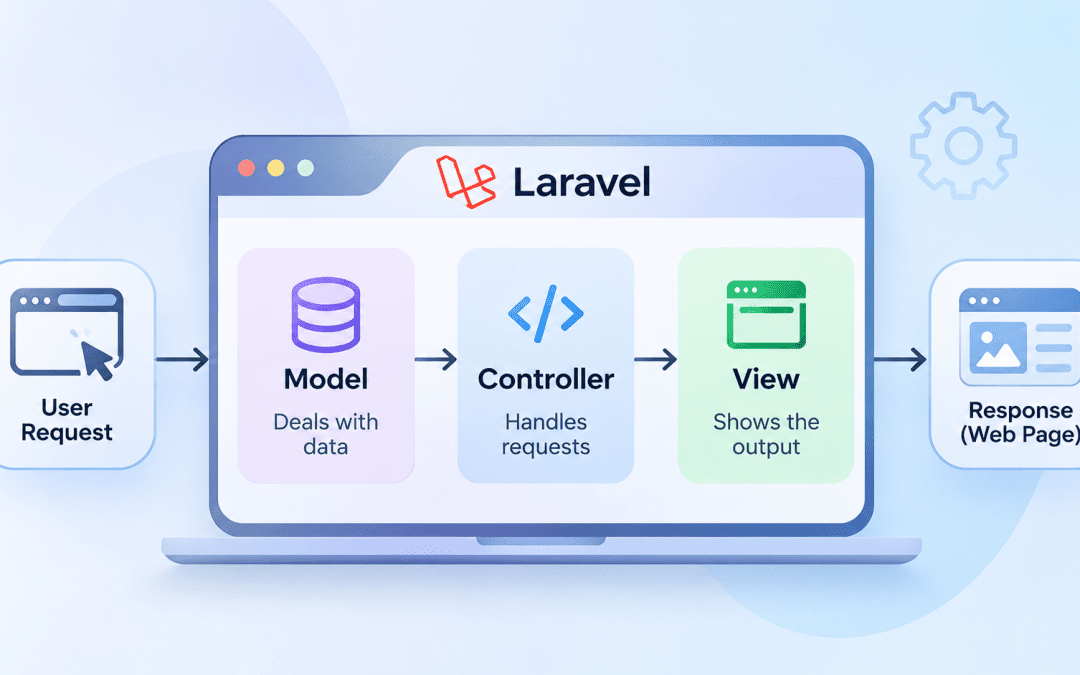
MVC stands for Model, View, and Controller.
The definitions are simple, but the reasons behind them matter more.
A Model deals with application data.
A View is responsible for what users see.
A Controller handles the request and decides what should happen.
The important part is not memorizing these definitions. It is knowing where a piece of code should live.
Imagine a product page.
The product details come from the database. The page needs a design. A user request needs to be processed before anything can be displayed.
Instead of putting all of that together, Laravel separates those responsibilities.
The model works with product data.
The view handles how that data is displayed.
The controller connects the request with the information the view needs.
This does not make much difference when you have one page. It can make a huge difference when you have hundreds.
What Actually Happens When a User Opens a Page?
A simple request goes through more steps than most users realize.
Suppose someone visits:
/productsLaravel first checks the routes to determine what should handle that URL.
The route might point to a method inside
.ProductControllerBefore the controller runs, middleware can perform checks. The user may need to be logged in, or they may need a particular permission.
The controller then takes over.
It might request product information from the model:
$products = Product::latest()->paginate(10);After receiving the data, the controller sends it to a Blade view.
The view creates the page that appears in the browser.
From the user’s perspective, they clicked a link and saw a page.
From Laravel’s perspective, the request moved through several different parts of the application, each handling a specific responsibility.
Understanding this flow helps with debugging. Instead of checking random files, you can follow the request path and identify where the problem occurs.
Models Are Where Data Logic Lives
At first, it is easy to think of Laravel models as simply a nicer way to work with databases.
They are that, but they can also represent how your application works with a specific type of data.
For example:
class Product extends Model { protected $fillable = [ 'name', 'price', 'description' ]; public function category() { return $this->belongsTo(Category::class); } }This model describes a product and its relationship with a category.
Small decisions like this become important as the application grows.
Without a clear place for data-related logic, the same queries and rules can start appearing in multiple files. Making one change then means remembering every place where that logic was copied.
Keeping related logic together makes future changes easier to manage.
Why Controllers Become Messy
Controllers are often where Laravel projects start getting complicated.
Not because controllers are bad, but because they are convenient.
A new feature needs to be added, and the controller already has the request. So it feels natural to put the logic there.
At first, it looks fine.
Then the controller starts doing everything:
- Validating input
- Uploading files
- Sending emails
- Calculating values
- Updating database records
The problem is not necessarily that the code stops working.
The problem is that the controller becomes difficult to understand and maintain.
A useful way to think about controllers is as the middle point between the request and the application. They should guide the request rather than become the place where every decision and calculation happens.
Keeping controllers focused makes the rest of the application easier to work with.
Laravel Removes a Lot of Repetitive Work
One reason Laravel feels productive is that it handles many common development tasks for you.
Creating a model and migration:
php artisan make:model Product -mCreating a resource controller:
php artisan make:controller ProductController --resourceCreating CRUD routes:
Route::resource('products', ProductController::class);A controller method can remain simple:
public function index() { $products = Product::latest()->paginate(10); return view('products.index', compact('products')); }There is not much code here, and that is a good thing.
The controller gets the information and passes it along. Laravel provides the repetitive structure so developers can focus on the parts that are unique to their applications.
Simple Habits That Make Laravel Projects Better
Most maintainability problems do not happen because of one bad decision.
They happen because small shortcuts keep adding up.
A few habits can help avoid that.
Use Form Requests for Validation
When validation starts filling up controllers, Form Request classes can keep that responsibility separate.
Instead of placing a long set of validation rules inside a controller method, the validation logic can live in its own class.
Use Eloquent Relationships
Use Eloquent relationships when your models have related data instead of repeatedly writing the same database queries.
For example, the Product model can define its relationship with Category, as shown earlier.
This makes accessing related data easier to understand.
Move Complex Logic Out of Controllers
A controller method should not become a dumping ground for complicated business logic.
When a piece of logic becomes difficult to follow, consider moving it into a separate class or another appropriate part of the application.
The goal is not to build the most complicated architecture possible. The goal is to make the project easy to understand when it changes.
MVC Is Something You Appreciate Later
When you are building your first Laravel project, MVC can feel like extra work.
You have more files to manage. You have to think about where code belongs.
But software is not difficult because of the first version.
It becomes difficult when the application grows, and nobody knows where anything is anymore.
That is where Laravel’s MVC approach helps.
It gives you a structure that can still make sense after months of changes.
You do not really understand MVC by memorizing what each letter means. You understand it after building something, making mistakes, and seeing why separating responsibilities makes development easier.
That is when Laravel starts feeling less like a framework with rules and more like a framework that helps you write better-organized code.
Conclusion
Laravel’s MVC architecture is not about creating more files for the sake of organization.
It is about giving different parts of an application clear responsibilities.
Models work with application data. Views handle presentation. Controllers coordinate requests and connect the different parts.
The best way to understand Laravel MVC is to build with it. Once you see how a request moves from a route through middleware and a controller to a model and view, the folder structure starts making much more sense.


