


Solve API Query errors in Headless CMS with expert fixes from our Headless CMS Support team that keeps your platform reliable.
Handling API Query Errors in Headless CMS
When an API fails, the first reaction is rarely patience. Teams look straight to support or engineering for answers, and this is where real expertise stands out. A single response code can tell the full story to someone who knows what to look for. Understanding that message, tracing the cause, and fixing it with clarity shows more than technical skill. It shows authority, and users trust products backed by people who can solve problems at their source.
What Is an API Error or Failure
An API error or failure happens when an application sends a request to an API and the API cannot complete it. Instead of returning the expected data, it responds with an error message. This usually occurs due to wrong inputs, expired or incorrect API keys, server issues, or network interruptions.
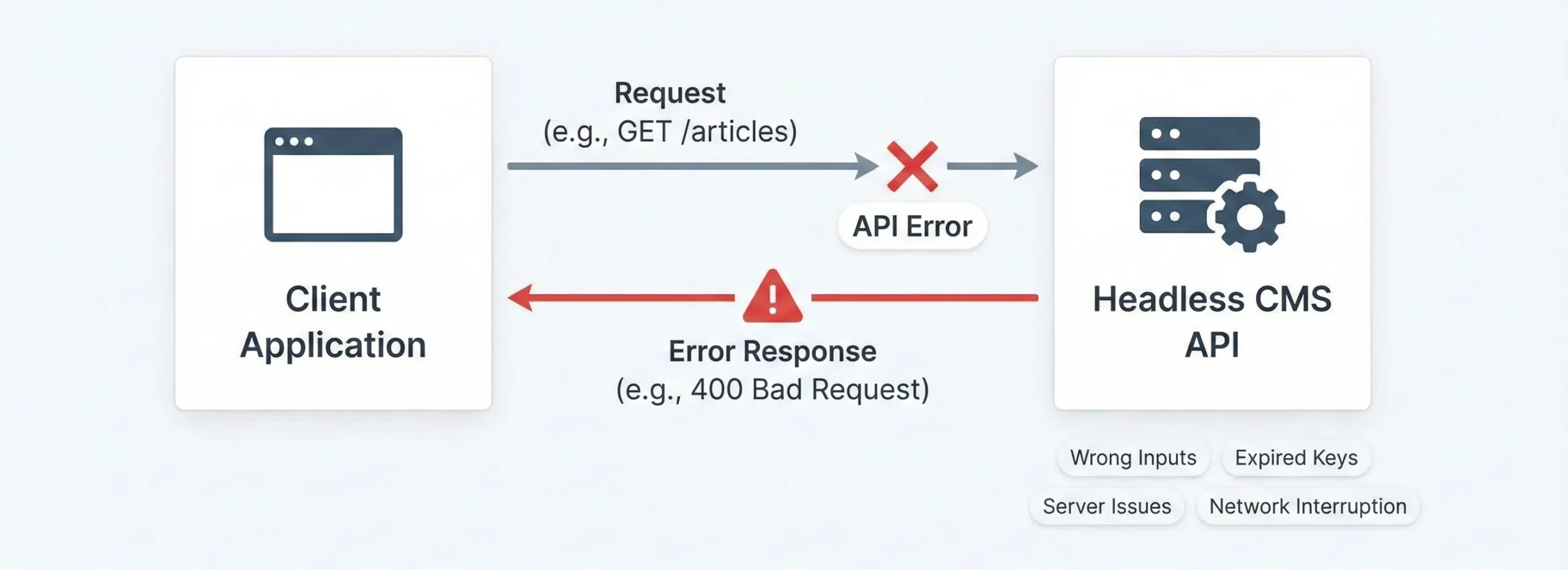
The API responds with an HTTP status code like 400 for a bad request, 404 when something is missing, or 500 for a server problem. These messages help identify what went wrong so the request can be fixed and the data exchange can work correctly again.
Common API Issues, Causes, and Solutions
Common API Error |
What Causes It |
Easy Fix |
Important Codes |
| HTTP and HTTPS issues | Wrong protocol used in the request (http instead of https or vice-versa) | Check the documentation and use the correct protocol, usually https | 403 Forbidden, 404 Not Found, 505 Internal Server Error |
| Unclear or confusing error messages | The error response does not explain the issue | Use clear messages with hints and links to documentation | 200 OK, 400 Bad Request, 401 Unauthorized, 403 Forbidden, 404 Not Found, 429 Too Many Requests, 5xx Server Errors |
| Method mixups (GET, POST, PUT, DELETE, PATCH) | Using a request method that the endpoint does not support | Confirm the correct method in the documentation | 405 Method Not Allowed, 500 Server Error, 403 Forbidden, 404 Not Found |
| Missing Content-Type or Accept headers | API does not know what format is being sent or received | Add proper Content-Type and Accept headers | 406 Not Acceptable |
| Authorization problems | Wrong or missing API key, token, username, or password | Verify credentials and format the authorization header correctly | 401 Unauthorized, 403 Forbidden |
| Data formatting issues | API sends or receives data in an unexpected format (HTML instead of JSON) | Set the Accept header correctly and reject unsupported formats | 415 Unsupported Media Type |
Tired of slow responses from API requests?

Troubleshooting API Errors in a Headless CMS
API errors can interrupt content delivery and affect how your Headless CMS works. A simple and clear troubleshooting flow helps you find the real cause faster and fix what is stopping the request. The steps below show how to detect and solve common API query issues in a way that is easy to follow.

Understand the Error Response
A Headless CMS usually returns a message that explains what caused the failure. The status code and short message give a direct hint. Reading them fully saves time and helps you respond correctly.
Example
{

"error": {

"code": 400,

"message": "Invalid query parameter category"

}

}
Focus on
- Status code
- Message shared by the API
- Error code if provided
This helps you decide whether the request failed from your side or the CMS server.
Check the Endpoint and Method
An incorrect endpoint causes ‘page not found’ errors. Using the wrong method also leads to rejection. Confirm the path and method exactly as the CMS expects them to be.
Example
- Correct: requesting the article list using the CMS version path
- Incorrect: using a different version path or a missing resource name
Confirm
- Version in the URL path
- Correct request type, such as GET or POST
- Exact path format
Fix Authentication and Permissions
If the Headless CMS uses a key or token, an invalid or expired one blocks access. Missing permission also causes denied access even with a valid key.
Example
Authorization: Bearer your_api_token_hereChecklist
Validate Parameters and Payload
Incorrect formats or missing values cause bad request responses. Pay attention to required data types, valid values, and correct structure.
Example
{

"title": "New Article",

"category": "Technology",

"tags": ["API", "Headless CMS"]

}
Quick checks
- Make sure required fields are present
- Match expected data types
- Validate JSON using tools like JSONLint
- Encode special characters in parameters if needed
Confirm Header and Content Type
The request body must match the content type mentioned in the headers. If they do not match, the CMS rejects the request.
Common format
Content-Type: application/jsonMatch the payload and content type clearly and avoid sending data without proper headers.
Check Rate Limits
Some Headless CMS services limit how many requests can be made. Exceeding this count triggers a status code 429.
Example
X-RateLimit-Limit: 1000

X-RateLimit-Remaining: 750
Avoid hitting limits by
- Caching repeated data
- Reducing unnecessary requests
- Spacing heavy requests
Check Network Issues and CORS Errors
Network errors stop requests before they reach the CMS. CORS issues happen when browser restrictions block calls from another domain. These messages appear inside the browser developer tools.
Quick checks
- Test the connection
- Ping the CMS host
- Review CORS rules
- Check proxy or firewall settings
Example command
ping api.yourheadlesscms.comTest With Debugging Tools
Debugging tools help you inspect requests without relying on your application. They make it easier to check payloads, headers, and responses.
Useful tools
- Postman
- Insomnia
- Browser Network tab
- Sentry or Rollbar for tracking
Simple Postman steps
- Enter the endpoint
- Pick the request method
- Add required headers
- Add parameters or payload
- Send and read the response
[Need assistance with a different issue? Our team is available 24/7.]
Conclusion
API Query Errors in Headless CMS systems are easier to solve when you understand what the response is telling you. Fixing them quickly builds trust and keeps the platform running the way it should.
Stay alert to errors, handle them with clarity, and your system will stay dependable for the people who use it.

