


Learn how to set up Headless WordPress with Docker Compose & Docker. Our WordPress Support team is here to help you with your questions and concerns.
Headless WordPress Docker Compose
Did you know that a headless WordPress site is a WordPress installation that is decoupled from the front end?
It lets developers use any front-end technology, like React or Vue.
Today, we will take a closer look at setting up a headless WordPress site locally using Docker and docker-compose, and then integrating it with a NextJS application.
Setting Up a Headless WordPress Site with Docker
To get started, we need Docker and docker-compose. Docker is a containerization platform, while docker-compose is a tool for defining and running multi-container Docker applications.
Now, we have to create a docker-compose.yml file with configurations for MySQL and WordPress services. This file will define the containers, their dependencies, and environment variables.
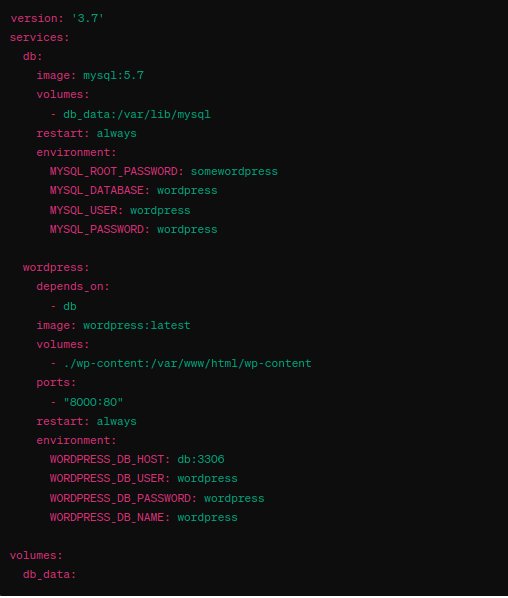
This docker-compose file sets up a MySQL database and a WordPress container. We can adjust the environment variables as needed. To start the containers, head to the directory with the docker-compose.yml file and run the command `docker-compose up -d`.
We can access our WordPress site at http://localhost:8000.
How to Use Docker for Local Development with NextJS
Now, it is time to integrate the headless WordPress site with a NextJS application.
- We start by creating a Next app using the WordPress preset:
yarn create next-app --example cms-wordpress cms-wordpress-app - Then, set up a local WordPress site with minimal configuration via @wordpress/wp-env.
- Next, install the package:
yarn add @wordpress/env - We can create a .wp-env.json config file for the local Docker site:
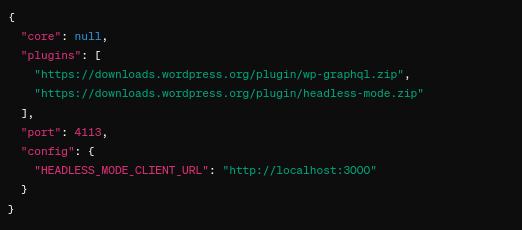
- We can make sure the WordPress site is working by running:
yarn wordpress - Then, configure NextJS to work with WordPress by creating a .env file:
WORDPRESS_API_URL=http://localhost:4113/graphql - Now, start the NextJS application:
yarn && yarn devOur NextJS front-end should be accessible at http://localhost:3000/.
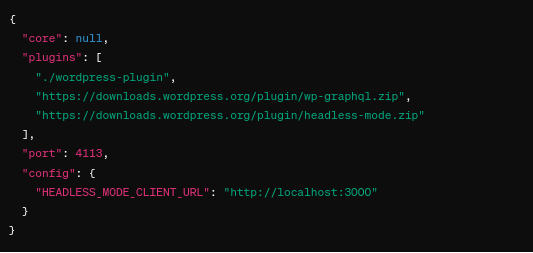
Furthermore, we can add a plugin or mu-plugin for custom code. This involves creating a directory named “wordpress-plugin” and adding a file inside it. We have to update the “plugins” section of .wp-config.json to include this directory:
[Need assistance with a different issue? Our team is available 24/7.]
Conclusion
In brief, our Support Experts demonstrated how to set up Headless WordPress with Docker Compose & Docker.
PREVENT YOUR SERVER FROM CRASHING!
Never again lose customers to poor server speed! Let us help you.
Our server experts will monitor & maintain your server 24/7 so that it remains lightning fast and secure.

