


Looking for speed and flexibility? Our Headless CMS Support team helps you build powerful websites with a headless CMS for Next.js.
Is Headless WordPress Right for You? Discover How It Works with Next.js
Customers expect fast, modern websites, and headless WordPress with Nextjs delivers exactly that. WordPress handles the content, while Nextjs takes care of the frontend for speed and a richer browsing experience.
This guide explains how WordPress and Nextjs work together, along with the benefits, challenges, and setup steps.
- Understanding Headless WordPress
- Key Characteristics of Headless WordPress
- Things to Know Before Choosing Headless WordPress
- Top Benefits of Headless WordPress
- Challenges You Should Know Before Choosing Headless WordPress with Nextjs
- How to Connect WordPress and Nextjs
- Steps to Connect WordPress and Nextjs Using WPGraphQL
Understanding Headless WordPress

Headless WordPress lets you manage content in WordPress while using a separate, modern frontend to show that content to your audience. You keep the familiar WordPress dashboard for writing and editing, and your website or app gets built with fast, powerful tools like React or Nextjs.
This setup suits brands that care about speed, smooth browsing, and a strong digital presence. Content teams keep working in WordPress, while developers build a frontend designed for better performance, better customer experience, and more reach across different devices.
Key Characteristics of Headless WordPress
Headless WordPress works differently from a regular WordPress website. Here’s how it stands out for businesses focused on growth and customer experience
- Independent backend and frontend: WordPress handles your content. A separate frontend handles the look, feel, and browsing experience your customers see.
- Simple content management for your team: Writers continue using WordPress as usual. No new tools to learn, no change in workflow.
- Freedom to design a modern interface: Your website is not tied to WordPress themes. Developers can create unique layouts, faster pages, and customer-focused experiences using modern tools.
- Reach more than just websites: Your content is not limited to a website. The same content can appear on apps, digital displays, and smart devices, helping your brand deliver information wherever your audience is.
Make your WordPress faster than ever.

Things to Know Before Choosing Headless WordPress
Headless WordPress brings strong advantages for customer-focused brands. Still, it needs thoughtful planning before you choose it
- Requires skilled developers: Headless websites use advanced technologies. Businesses need the right team to build and manage them correctly.
- Two systems to maintain: Your content and frontend are separate. This offers flexibility but also means more work for development and upkeep.
- Some visual editing tools may work differently: Features that show live previews or drag-and-drop layouts might not work the same until the developers integrate them on the frontend.
Top Benefits of Headless WordPress
- Better Speed and Performance: A headless setup makes websites load faster because the frontend is built with lightweight frameworks. A fast website creates a smooth browsing experience and supports stronger search visibility since speed plays a key role in ranking.
- More Design Freedom: Your website is not limited by WordPress themes. Developers can design unique layouts that match your brand identity and customer needs. The result is a modern interface that feels tailored to your audience.
- Content for Every Platform: Headless WordPress lets you share the same content across multiple platforms such as websites, mobile apps, and smart devices. Your team creates content once, and it reaches every channel without extra effort.
- Stronger Security: The WordPress backend stays hidden from the public, reducing common risks and attacks. Since the backend and frontend work separately, each part can be updated or secured without affecting the other.
- Scales With Your Business: Growing traffic or adding more features does not slow down the system. The backend and frontend scale independently, making it easier to support bigger audiences and new digital ideas.
- Easier Work for Developers: Developers get to work with their favorite tools and can integrate other services without restrictions. This speeds up the development process and supports long-term improvements for your website.
Challenges You Should Know Before Choosing Headless WordPress with Nextjs
Headless WordPress paired with Nextjs can transform user experience, site speed, and flexibility. Still, there are a few challenges businesses should understand before picking this setup.
Needs Skilled Developers: A headless site is built with two different systems. Your team needs strong knowledge of WordPress for content management and modern frontend tools like Nextjs. They must know how to work with APIs, caching methods, and data fetching. This approach needs greater technical skills than a regular WordPress site.
Plugin Limits and Feature Gaps: Not every plugin works the same way in a headless environment. Tools like visual page builders, form plugins, and SEO plugins that rely on WordPress themes may not function the way they normally do. Features like live previews and theme settings also do not come ready. Developers often create custom solutions to bring these features back.
Higher Setup and Maintenance Costs: Businesses may spend more at the start because headless projects need experienced developers. There are two systems to maintain, which means more updates, testing, and security checks. Hosting might also need separate setups for the backend and frontend, adding more work over time.
SEO Needs More Attention: Nextjs supports organic visibility, but SEO tasks such as meta tags, sitemaps, and canonical URLs need to be handled manually. Businesses cannot rely only on familiar WordPress SEO plugins. The development team must build these features into the frontend.
Editorial Workflow Needs Adjustments: Editors may not see a true preview of how the content looks before publishing. The regular drag-and-drop editing experience is missing unless developers build custom previews. Some brands use special headless tools to help editors get a smoother workflow, but these need to be set up separately.
How to Connect WordPress and Nextjs
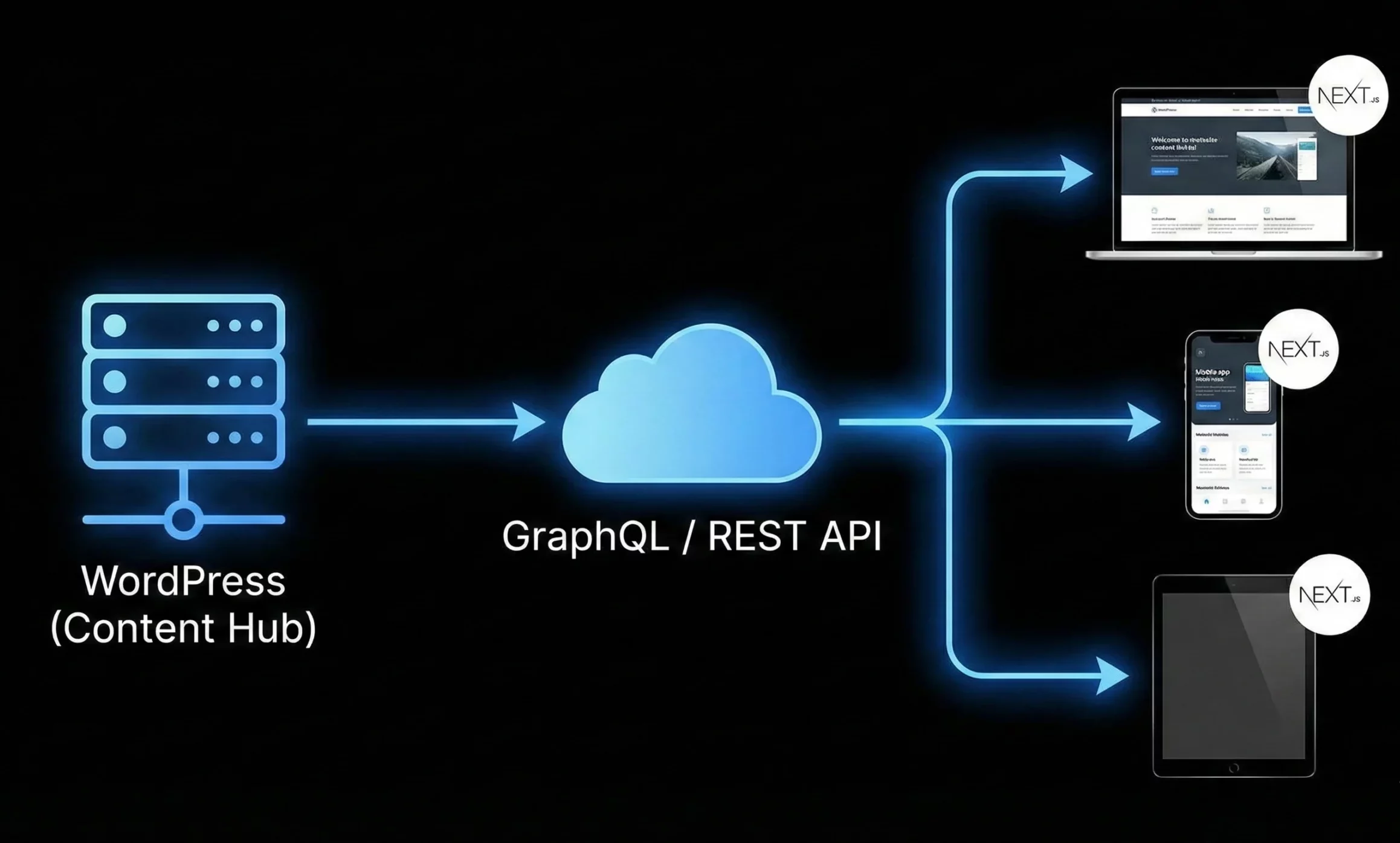
When using WordPress as a headless CMS, your Nextjs website needs a way to pull content from WordPress. There are two popular methods to make this connection.
Using the WordPress REST API
WordPress already comes with a REST API that shares content in JSON format. Your Nextjs site can request posts, pages, categories, users, or media directly through these endpoints. It works without extra plugins for basic content, which makes it a quick option.
If your site needs custom content types or complex fields, tools like Advanced Custom Fields can help WordPress send more structured data.
Using GraphQL With a Plugin
WordPress can also connect through GraphQL by adding a plugin like WPGraphQL. GraphQL lets your Nextjs site request only the exact data it needs. This reduces unnecessary data transfer and keeps the content loading experience smooth.
Developers can use libraries such as Apollo Client or graphql-request in Nextjs to send GraphQL queries and receive clean, structured data.
Steps to Connect WordPress and Nextjs Using WPGraphQL
In this setup, WordPress handles your content, and Nextjs handles how everything looks on the screen. WPGraphQL acts as the bridge between the two, letting your Nextjs site request data from WordPress.
Step 1: Prepare Your WordPress Site
Install WordPress on a server or a local machine. After logging in, visit the Permalinks settings and choose the option that uses the post name structure. This keeps your URLs clean and easy to read.
Step 2: Add the WPGraphQL Plugin
Go to the Plugins section in WordPress and search for WPGraphQL. Install and activate it. After activation, a GraphQL panel appears in the WordPress dashboard. You can use it to test queries for posts, pages, and other content. If your WordPress site and Nextjs project run on different domains, install the WPGraphQL CORS plugin to allow data access.
Step 3: Create the Frontend Using Nextjs
Install Node and open a terminal. Create a Nextjs project with the following command:
npx create-next-app my-headless-siteThis creates the folder where your site’s frontend code lives. Here you will display all the content coming from WordPress.
Step 4: Fetch Content from WPGraphQL
Install a GraphQL library inside your Nextjs project by running:
npm install graphql-requestCreate a file called .env.local and add your WordPress GraphQL endpoint:
NEXT_PUBLIC_GRAPHQL_ENDPOINT=https://your-wordpress-site.com/graphqlNow you can fetch posts with a small piece of code. For example:
import { GraphQLClient, gql } from 'graphql-request';

const endpoint = process.env.NEXT_PUBLIC_GRAPHQL_ENDPOINT;

const client = new GraphQLClient(endpoint);

export async function getStaticProps() {

const query = gql`

query Posts {

posts {

nodes {

id

title

content

}

}

}

`;

const data = await client.request(query);

return {

props: {

posts: data.posts.nodes

}

};

}
Display the results in your page component, and the content from WordPress appears on your Nextjs site.
Step 5: Start the Project
Run the following command to start your development server:
npm run devOpen the browser, visit localhost, and your content should show on the screen.
Step 6: Keep Content Fresh with ISR
Nextjs supports Incremental Static Regeneration. It updates static pages when content in WordPress changes. For example:
revalidate: 60This refreshes data every 60 seconds, keeping your pages updated without rebuilding the whole site.
Step 7: Deploy Your Nextjs Site
Choose a hosting service like Vercel or Netlify. Push your project and deploy it. Once live, your WordPress content can be viewed on your frontend globally, with fast performance and modern browsing behavior.
[Need assistance with a different issue? Our team is available 24/7.]
Conclusion
A headless CMS for Next.js brings fast performance, flexible design, and a better editing workflow using WordPress. It’s a smart choice for brands that want a modern, future-ready website. Want to build with confidence? Let our team help you set up headless WordPress the right way.

