


Learn how to design a highly available AWS architecture using Availability Zones, ELB, Auto Scaling, Amazon RDS Multi-AZ, Amazon S3, and CloudWatch.
Failures are inevitable in any IT environment. Servers can fail, networks can experience issues, and traffic can increase unexpectedly. The goal of a highly available architecture is to keep applications running despite these events by reducing downtime and maintaining a consistent user experience. AWS provides several services that help organizations build resilient architectures capable of handling failures automatically. Bobcares offers AWS Consulting services to help businesses design and implement highly available AWS environments.
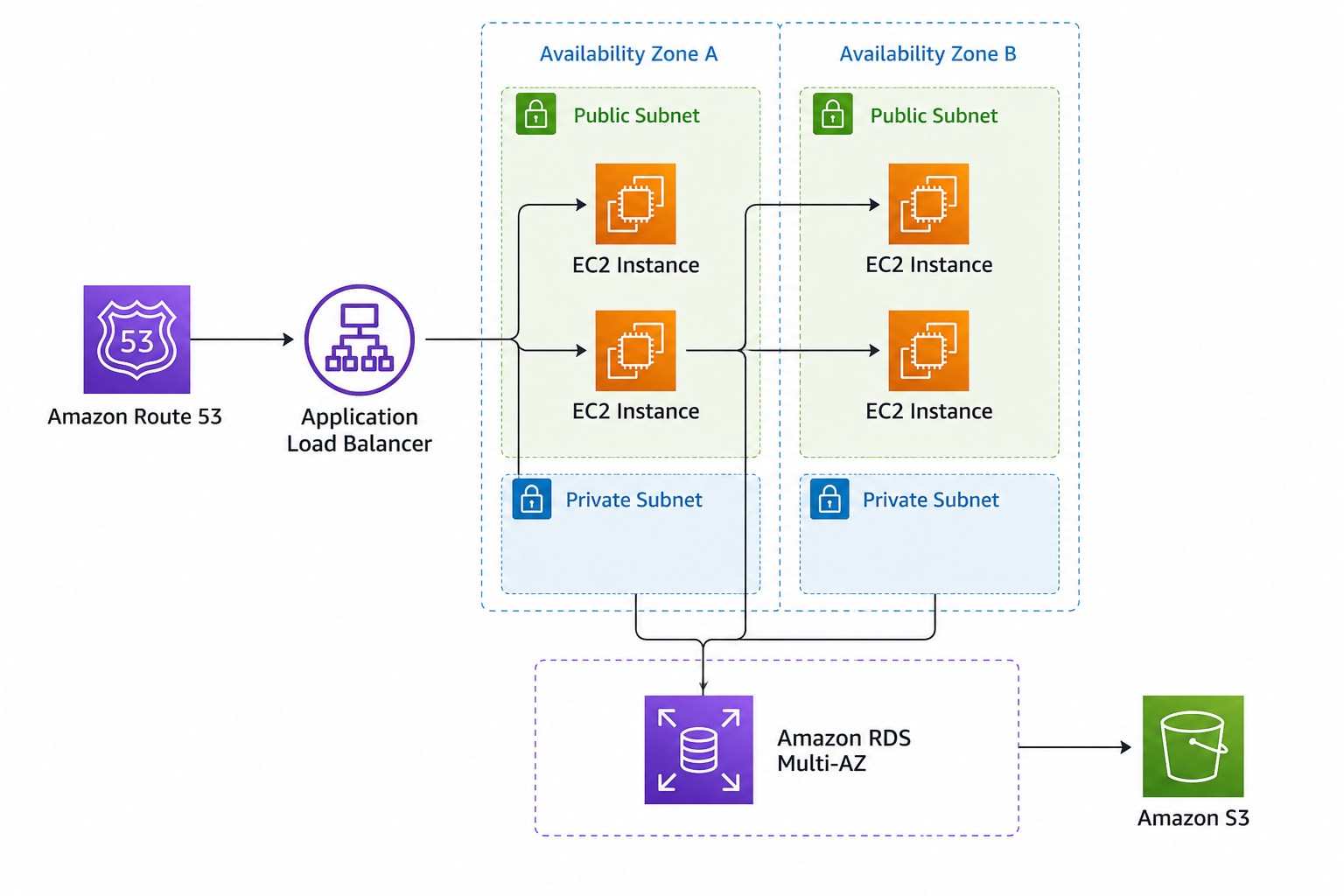
An Overview
- What Is High Availability?
- Why High Availability Matters
- Eliminating Single Points of Failure
- Using AWS Availability Zones
- Distributing Traffic with Elastic Load Balancing
- Automating Recovery with Auto Scaling
- Creating a Resilient Database Layer
- Building Durable Storage with Amazon S3
- Putting It All Together
- High Availability Is About Recovering from Failure
What Is High Availability?
High availability is often associated with 100 percent uptime, but no system is completely immune to failure. Instead, high availability focuses on designing systems so that the failure of one component does not bring down the entire application.
Traffic is automatically redirected, backup resources become available, and users continue accessing the application with little or no service interruption. Building a highly available AWS environment helps applications remain available even when servers, storage systems, or entire Availability Zones fail.
Why High Availability Matters
Even a short period of downtime can have a significant impact on a business.
Consequences of Downtime
- Loss of customer confidence
- Missed sales opportunities
- Lower employee productivity
- Damage to reputation
- Increased recovery and operational costs
Consider an e-commerce website during a holiday sale. If the application runs on a single server and that server fails, the website becomes unavailable until it is restored.
However, an application running across multiple AWS servers with failover, Auto Scaling, and load balancing continues serving customers even if one server becomes unavailable.
Eliminating Single Points of Failure
One common mistake is hosting all application components on a single EC2 instance.
A single server may host:
- Web application
- Database
- Application files
- User traffic
Although this approach appears simple and cost-effective, it creates a Single Point of Failure (SPOF). If the server fails, the entire application becomes unavailable.
The objective of a highly available architecture is to identify and eliminate every Single Point of Failure.
Using AWS Availability Zones
An AWS Region consists of multiple Availability Zones, each operating as an independent data center with its own:
- Power supply
- Networking
- Cooling systems
Instead of deploying all resources in one Availability Zone, applications can be distributed across multiple zones.
If one Availability Zone experiences an issue, applications running in the remaining zones continue operating. As a result, the likelihood of a complete service outage is significantly reduced.So, avoid placing all critical application components within a single Availability Zone.
Distributing Traffic with Elastic Load Balancing
As application traffic increases, relying on a single server affects both availability and performance.
AWS Elastic Load Balancing (ELB) distributes incoming traffic across multiple EC2 instances so requests can be handled efficiently.
Some of the benefits of ELB include:
- Improved performance
- Better fault tolerance
- Reduced server overload
- Automatic removal of unhealthy instances
If one server becomes unavailable, ELB automatically redirects traffic to healthy instances, allowing users to continue accessing the application.
Automating Recovery with Auto Scaling
Replacing failed servers manually is neither efficient nor scalable.
AWS Auto Scaling Groups continuously monitor EC2 instance health. When an instance becomes unhealthy:
- AWS detects the failure.
- The failed instance is terminated.
- A replacement instance is launched automatically.
- The new instance is added back to the application environment.
Additionally, this self-healing capability helps maintain application availability during infrastructure failures.
Creating a Resilient Database Layer
Application servers can be replaced relatively easily, but database failures affect the entire application.
Amazon RDS Multi-AZ deployments address this challenge.
Multi-AZ Architecture
- Primary database handles production traffic.
- Standby database runs in another Availability Zone.
- Replication occurs automatically.
- Automatic failover occurs if the primary database becomes unavailable.
This approach reduces downtime and improves application reliability.
Building Durable Storage with Amazon S3
Applications that rely on local server storage risk losing data when a server fails.
AWS recommends storing static content in Amazon S3, including images, videos, documents, backups and application assets.
The benefits of Amazon S3 include:
- High durability
- High availability
- Scalability
- Separation of storage and compute resources
Therefore, storing static assets in Amazon S3 improves resilience and supports application scalability.
Putting It All Together
A typical highly available AWS architecture includes:
Additional AWS services include:
- Auto Scaling for automatic recovery and scaling
- Amazon S3 for static content storage
- Amazon CloudWatch for monitoring and alerts
- Amazon CloudFront for global content delivery
Failure Scenarios
- Auto Scaling replaces failed EC2 instances.
- Traffic shifts to healthy Availability Zones if one zone becomes unavailable.
- The standby database automatically becomes active if the primary database fails.
- This design helps keep applications available during infrastructure failures.
High Availability Is About Recovering from Failure
A common misconception is that highly available systems never fail. In reality, failures remain unavoidable.
Common failures include server failures, application bugs, network failures and hardware failures.
Highly available architectures are designed to recover from failures and minimize their impact rather than eliminate every possible risk.
Conclusion
Designing a highly available AWS architecture involves more than deploying additional servers. Eliminating Single Points of Failure, distributing workloads across Availability Zones, implementing load balancing, enabling Auto Scaling, using Multi-AZ databases, storing static content in Amazon S3, and monitoring the environment all contribute to application availability. These services help applications continue operating when unexpected failures occur. Bobcares supports businesses with AWS Consulting services to design and manage highly available AWS environments.

