


Node.js applications can handle demanding workloads, but memory limits can interrupt builds and long-running processes. A JavaScript heap out of memory error usually appears when the process reaches V8’s default heap limit, causing it to terminate before completing the task.
The error typically appears as:
FATAL ERROR: MarkCompactCollector: young object promotion failed
Allocation failed - JavaScript heap out of memory
This error usually appears without much warning, causing the process to terminate before the task completes. If you’re experiencing Node.js performance issues, our engineers help optimize build pipelines, troubleshoot memory-related failures, and improve application reliability.
Why This Error Occurs
Node.js uses the V8 JavaScript engine, which limits the amount of heap memory available to each process. The default limit is typically around 1.5 GB, depending on the Node.js version and system architecture. If you’re managing Node.js applications at scale, Bobcares’ Node.js Support Services help troubleshoot memory issues, improve application performance, and resolve build failures.
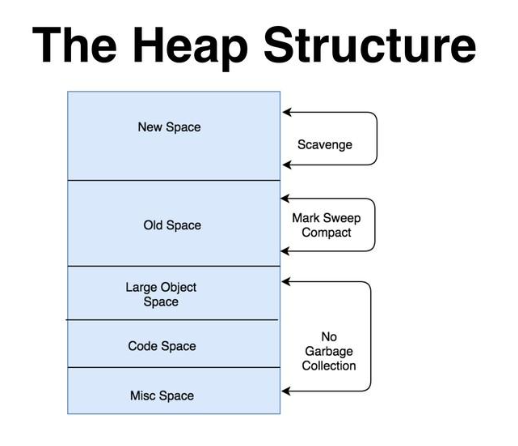
When an application or build process exceeds this limit, V8 cannot allocate additional memory. Garbage collection fails, and the process crashes with a JavaScript heap out of memory error.
This issue commonly occurs when working with:
- Large datasets
- Webpack or Vite builds
- Monorepos
- Memory-intensive processing tasks
How to Fix It
In most cases, the application code does not need to change. Increase the available heap memory by setting the following environment variable:
NODE_OPTIONS=--max-old-space-size=4096This setting allows V8 to use up to 4 GB of heap memory, which is sufficient for most memory-intensive workloads.
Linux and macOS
export NODE_OPTIONS=--max-old-space-size=4096Windows (Command Prompt)
set NODE_OPTIONS=--max-old-space-size=4096package.json
{

"scripts": {

"build": "NODE_OPTIONS=--max-old-space-size=4096 next build"

}

}
Why This Approach Works
Setting NODE_OPTIONS at the environment level, the memory limit applies to every Node.js process running in that environment. This includes development servers, build pipelines, and CI containers, removing the need to modify individual scripts.
This approach is also easy to roll back if needed.
A value of 4096 MB is a practical starting point for most workloads. If the error continues after increasing the memory limit, the application may have a memory leak that should be investigated instead of allocating additional memory.
Conclusion
The JavaScript “heap out of memory” error usually occurs because the Node.js process exceeds V8’s default heap limit. Increasing the available heap NODE_OPTIONS resolves the issue in many cases without requiring code changes. Persistent failures after increasing the limit may indicate a memory leak that requires further investigation. Bobcares helps businesses troubleshoot Node.js performance issues, identify memory bottlenecks, and resolve build failures across development and production environments. Our engineers can also review your application and infrastructure to improve reliability and support demanding workloads.

