


Explore hybrid cloud management for secure, scalable infrastructure, unified visibility, automated security, and cost control across cloud environments.
Switching 100% to the public cloud is not an ideal solution for every business. It doesn’t make sense to replace your own servers for many teams. Maybe you have strict data privacy requirements, or perhaps you have an old, reliable application that would cost a fortune to rewrite for the cloud.
This is where the hybrid cloud comes in.
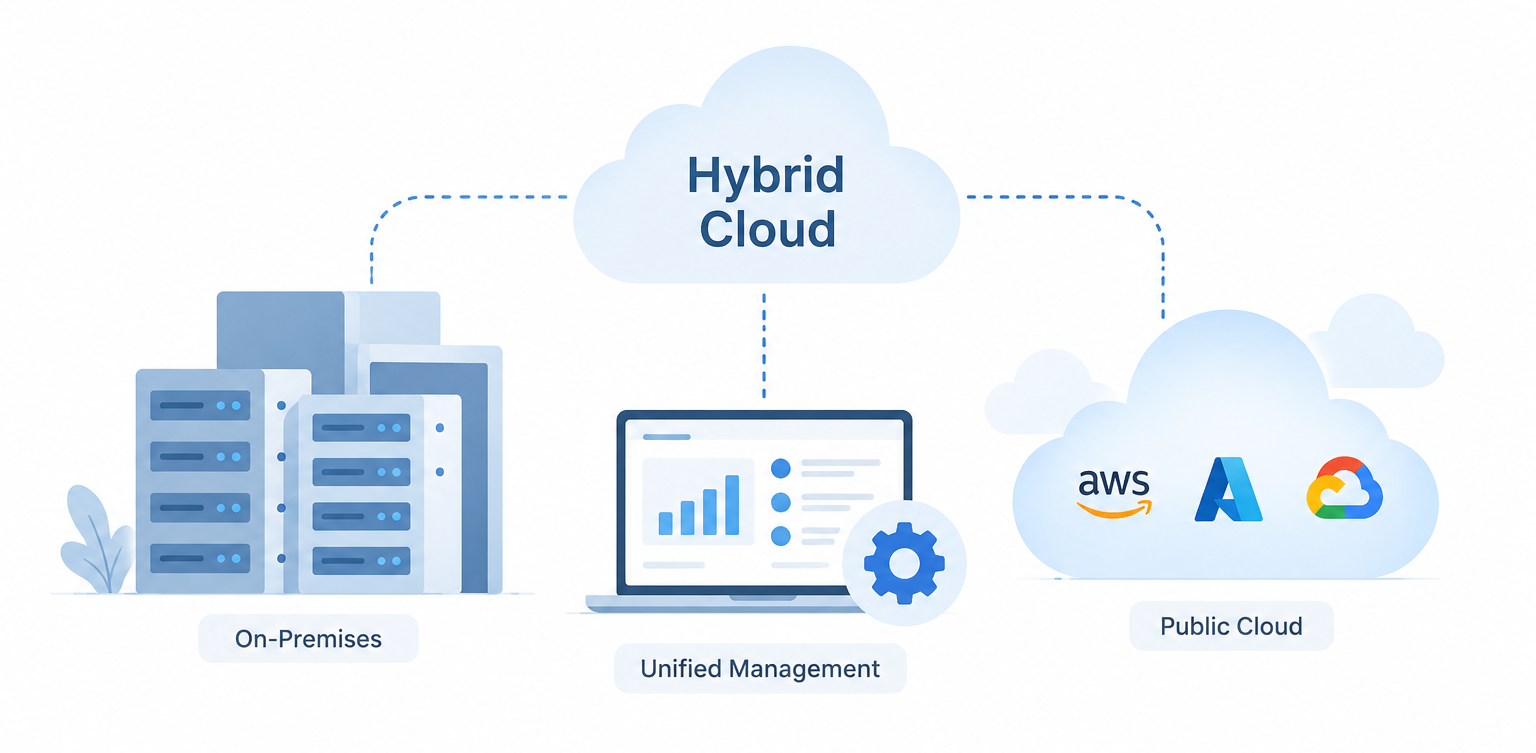
A hybrid cloud is exactly what it sounds like: a mix. You keep some of your technology on your own private servers (on-premises) and put the rest in a public cloud such as AWS, Google Cloud, or Azure.
It seems like the ideal option, but running two environments can easily become a headache if you’re not careful. Let’s break down why many teams are going the hybrid route and offer some tips on how to maintain a smooth operation.
Why Go Hybrid? The Real-World Benefits
Why have to deal with the additional hassle of having two environments? When done right, the payoff can be great.
1. You Control Where Your Data Lives
As a healthcare worker, finance professional, or government employee, you are well aware of the importance of data protection and storage. You know how important it is to protect and store data as a healthcare worker, finance professional, or government professional. A hybrid solution can allow you to store very sensitive customer information on your own network while serving your website or customer-facing apps in the public cloud.
This allows organizations to have greater control over where certain workloads and data are stored, while still leveraging public cloud services.
2. The “Burst” Factor
Imagine you run an e-commerce site. Most of the year, your own servers handle the traffic just fine. But on Black Friday, your traffic spikes by 500%. Instead of buying expensive new servers that may sit underutilized for much of the year, a hybrid setup can let you burst into the public cloud and use additional computing capacity when demand increases.
Once the traffic returns to normal, you can scale those cloud resources back down.
Optimize Your Hybrid Cloud.

3. More Flexibility for Reliability and Resilience
Running workloads on both on-premises infrastructure and a public cloud can offer more options for designing resilient systems. For instance, an organization can put some workloads or backups in an isolated environment, where if one environment fails, the other does not.
Just having infrastructure in two environments, however, does not mean that HA is guaranteed. There are still adequate measures of redundancy, backup plans, network connectivity, failover, and recovery to be implemented in the architecture.
4. Cost Control
While public clouds are excellent, it can become very costly to run large, predictable workloads in the cloud 24/7. A hybrid model enables organizations to assess the individual workloads and decide where they can be best run in terms of financial and operational costs.
For instance, an organisation might have a consistent, resource-heavy workload on the current infrastructure and move the workload that has unpredictable needs or needs to scale quickly to the cloud.
It’s the total cost of ownership, including hardware, maintenance, licensing, power, staffing and cloud costs, that matters, not whether the cloud or on-premises infrastructure is always the cheaper choice.
Best Practices: Keeping the Chaos Contained
Running a hybrid environment means that your IT staff is in the middle of two worlds. Here are some ways to make it not go out of hand.
Get a “Single Pane of Glass”
One of the most frequent pitfalls teams encounter is having different sets of tools to manage their private servers and other sets for their cloud infrastructure. This can result in disjointed visibility, security issues and increased engineering workload.
A centralized management platform that is centralized can help. Having a common management and monitoring layer, whether it’s Google Anthos, Azure Arc or a third-party tool, can provide your team with improved visibility between on-premises and cloud environments.
The goal isn’t necessarily to manage every component from one dashboard, but to create consistent visibility, policies, and operational processes across environments.
Standardize with Containers
When you want to deploy an application to your private infrastructure or the cloud, it can be easier to deploy if you package it in a consistent format.
Portability of applications across environments and consistency of deployments can be enhanced by containerization. But some infrastructure dependencies such as networking, storage, security, identity, database, etc. may still need to be changed when moving an application between environments.
Automate Your Security Rules
If you’re transferring data between your servers and the public cloud, you can’t expect to be monitoring each security setting manually. Automated policies and controls need to be set up.
If a developer tries to spin up a new database in the public cloud, your automated system should instantly check it against your security rules. Does it have the right encryption? Is it accidentally exposed to the public internet? Does it meet your organization’s access requirements?
If it fails the required checks, the system can block the deployment or flag it for review automatically.
Watch Your Wallet Closely
It is very easy to lose track of spending in a hybrid environment. Someone spins up a cloud server for a quick test, forgets about it, and you get hit with a larger-than-expected bill at the end of the month.
Set up automated cost alerts. Tag resources so you know exactly which team or project is spending money. Track cloud usage alongside the cost of maintaining your private infrastructure.
You should always have a clear picture of what your cloud “rental” is costing you compared with the total cost of running your own infrastructure.
Conclusion
A hybrid cloud setup doesn’t have to be a stepping stone towards a “pure” cloud environment – for many businesses it can be the ultimate goal. It provides you with the agility to be able to move at speed and maintain control over workloads that need to be on private infrastructure.
The key is to consider it as a single unit and not two distinct headaches. Normalize application packaging, provide visibility across environments with the right tools, and automate your security and operational policies.
Once you’ve got the basics down, a hybrid solution can provide the flexibility, control and scalability your organisation requires without having to commit to one environment or the other.

