


Facing Proxmox decoding error 36 due to a corrupted block? Get clear causes, quick fixes, and expert help from our Proxmox Support team.
Proxmox Decoding Error 36 and Backup Failures
Backup problems often appear at the worst time. Decoding Error 36 in Proxmox points to damage inside a backup file and can stop a restore when data is needed most. This article explains the error, its impact on backups, and simple ways to lower the risk.
Decoding Error 36 in Proxmox and What It Means for Your Backups
A Decoding error 36 Corrupted block detected in Proxmox means the backup file is damaged. This often happens due to faulty RAM disk issues or interruptions during backup creation or transfer.
The error comes from zstd, which Proxmox uses for compression. During restoration, it detects broken data and stops to protect your system.
Sometimes the restore can continue by skipping checks using options like no check with zstd or keep with vzdump. This works only if the damage is limited.
If you use Proxmox Backup Server, its repair and verification tools can help recover usable data.
For long-term safety, check your hardware and create fresh backups after fixing the issue.
Protect your Proxmox backups today

Impacts of This Error
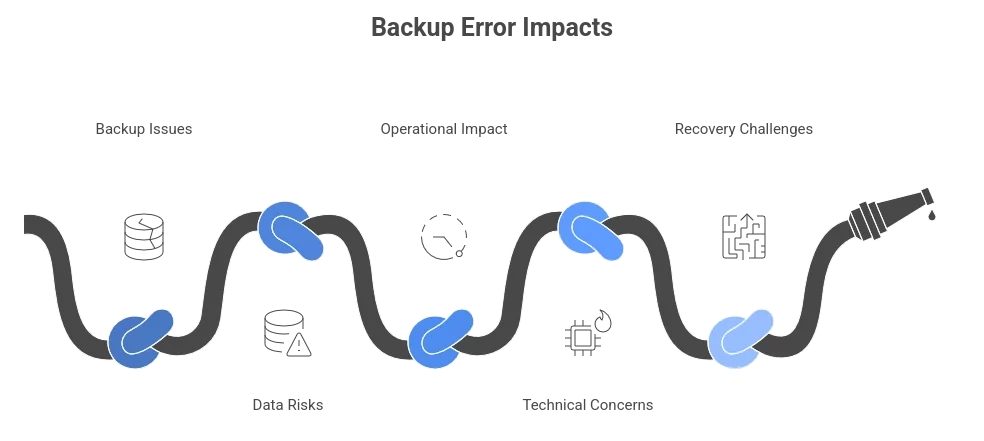
This error can affect your backups and systems in several ways. Below is a clear and simple breakdown.
Backup and Restore Issues
- Failed restores stop you from recovering virtual machines or containers
- Unusable backups block access to critical system or app data
- Partial data loss occurs when some backup parts turn unreadable
Data Risks
- Permanent data loss happens if the full backup gets damaged
- Corrupted blocks make some files missing or broken
- Backup chains break when the same issue appears again and again
Operational Impact
- Longer downtime during recovery attempts
- Disruption in backup planning and reliability
- Extra time spent on checks and fixes
Technical Concerns
- Storage or RAM issues often sit at the root of the problem
- Compression conflicts may appear due to a software mismatch
- Integrity checks fail, which weakens data trust
Recovery Challenges
- Fewer restore options remain available
- Recovery steps grow complex and time-consuming
- Full system rebuild becomes necessary in rare cases
Common Causes and Prevention
The Proxmox Decoding error 36 Corrupted block detected usually points to hardware faults or backup stress caused by slow storage or network links. ZFS setups and long backup transfers often expose these issues.
Common Causes
Hardware and Storage Issues
- Faulty RAM can change data during backup
- Weak or failing disks store damaged blocks
- Unhealthy ZFS pools increase corruption risk
- Long-running memory errors stay hidden without tests
Network and Backup Stress
- Slow or unstable networks break backup data
- Direct remote backups increase failure chances
- Virtio driver stress during heavy transfers
Software Gaps
- Guest data not flushed before backup
- Old Proxmox or zstd versions
- No backup verification after creation
Fixes and Checks with Commands
Verify Backup Integrity
zstd -t backup_file.vma.zstCheck Disk Health
smartctl -a /dev/sdX

smartctl -H /dev/sdX
Test Memory
memtest86+Check ZFS Pool Status
zpool statusReview Backup Related Logs
journalctl -xePrevention Strategies
Backup Safety
- Test restores at regular intervals
- Keep more than one backup copy
System Care
- Monitor disk and memory health
- Use fast and stable storage for backups
Software Hygiene
- Keep Proxmox and zstd updated
- Use the same compression settings across systems
Monitoring
- Enable backup alerts
- Track slow I/O or reset warnings in logs
These steps reduce backup failures and protect data when recovery time matters most.
[Need assistance with a different issue? Our team is available 24/7.]
Conclusion
Proxmox decoding error 36 corrupted block detected means a backup is damaged and may fail during restore. Identify and address the root cause early, and create fresh backups to prevent data loss when recovery is necessary.

