


Explore Mobile app development for real-time heart rate monitoring with Apple Watch, iOS, Node.js, and Android.
These days, tracking workouts is fairly easy with the ability to monitor real-time heart rate data. For ReformRx, we designed a system to connect an Apple Watch to an Android tablet to provide resistance training workout data.
As Apple Watch and Android Operating Systems do not communicate natively, we designed a system to work through iPhone Communication and Node.js server.
An Overview
How the System Works
The information flows through the following components:
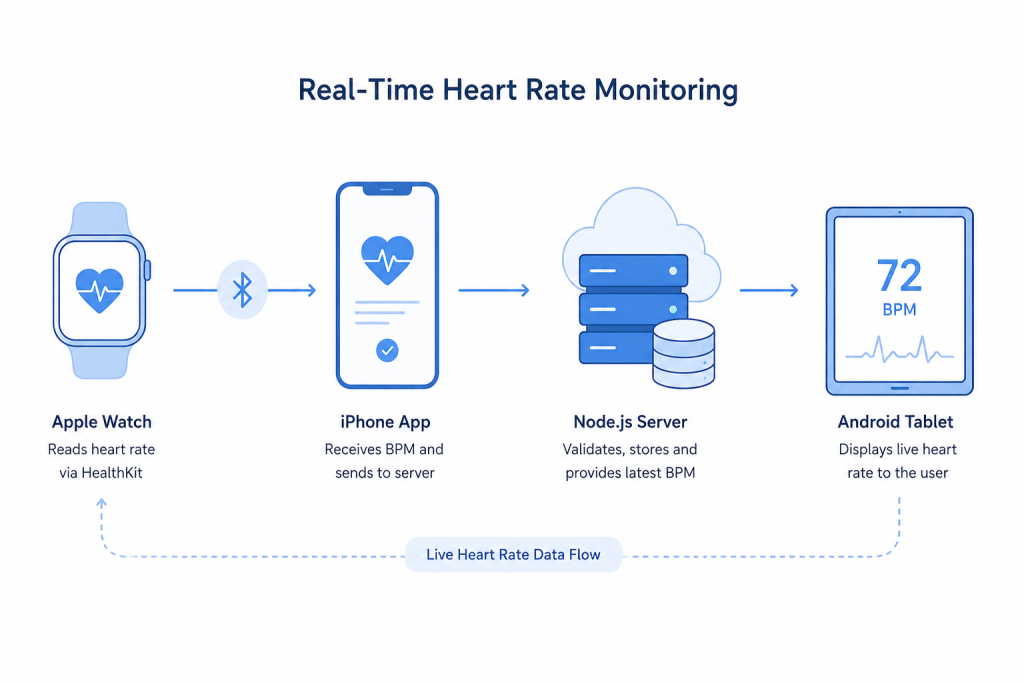
Apple Watch → iPhone → Node.js Server → Android Tablet
| Component | Role |
|---|---|
| Apple Watch | Reads heart rate through HealthKit |
| iPhone app | Receives/sends BPM |
| Node.js server | Validates/ stores data |
| Android tablet | Displays the current BPM |
Each component has a designated function, simplifying the system for both testing and maintenance.
Reading Heart Rate From Apple Watch
The Apple Watch uses HealthKit to access heart rate data. The app requests permission at startup and uses HKAnchoredObjectQuery with a live results handler to receive new readings.
Each reading arrives as an HKQuantitySample. The app extracts the BPM value and sends it to the iPhone. If the user denies HealthKit access, the app handles it without crashing.
Build Your Mobile App Today.

Sending Data From Apple Watch to iPhone
WatchConnectivity connects the Apple Watch and iPhone.
Both apps activate WCSession at startup. We use sendMessage() because the heart rate data needs to reach the iPhone immediately when it is reachable.
If the iPhone is unavailable, the app catches the communication error instead of allowing it to disrupt the user experience.
iOS App: Login and Heart Rate Relay
This iOS app handles both the login function and data transfer.
The Swift UI login screen is used and is built to support “Remember Me” and save the login with a token stored in the iOS Keychain.
Once logged in, the dashboard confirms the connection.
Once a BPM reading is obtained via the iOS app, the value, along with a timestamp and user id are sent to the Node.js server through an HTTP POST request. URLSession handles the request, with one retry if it fails.
Node.js Backend
The Node.js and Express backend is responsible for the handling and response of heart rate data.
The endpoint POST /heartRate takes the timestamp and the user ID along with the BPM and stores the reading. Data for each user gets stored separately.
The Android application sends a GET request to the endpoint for the most recent reading. Both of the endpoints are protected by token-based authentication.
The backend has no complexity. It receives BPM data and stores and serves BPM data without altering any data.
Displaying Heart Rate on Android
The ReformRx tablet app uses the latest Ionic Angular to display the latest BPM.
An Angular service is responsible for making API calls and exposing the value via an Observable. The workout screen is updated with the latest reading.
A pulse animation indicates that the value is real-time. If a new reading is not made within the time constraints, the app displays the value as “No signal” instead of the outdated value.
Environment Setup
The project has separate Dev, Stage, and Prod environments.
| Environment | Use |
|---|---|
| Dev | Development and testing |
| Stage | Internal testing through TestFlight |
| Prod | Production |
Three .xcconfig files define the API base URL and bundle ID for each environment. Dev and Stage also use separate Node.js instances, keeping test data away from production.
Results
The system delivered heart rate from the Apple Watch to the Android tablet within about 1–1.5 seconds during testing.
It also provides:
- User-level data separation
- Separate Dev, Stage, and Prod environments
- TestFlight distribution for Stage
- Error handling when the Watch connection drops
- A “No signal” state when fresh data is unavailable
- Independent components that can be updated separately
Technology Stack
| Technology | Purpose |
|---|---|
| watchOS + Swift | Reads and sends heart rate data |
| HealthKit | Provides heart rate readings |
| WatchConnectivity | Sends data from Watch to iPhone |
| iOS + SwiftUI | Handles login and data relay |
| Node.js + Express | Validates, stores, and serves readings |
| Ionic Angular | Displays BPM on Android |
Conclusion
The ReformRx system connects Apple Watch heart rate data to an Android workout tablet through an iPhone and Node.js server.
The Watch provides the reading, the iPhone sends it to the backend, and the Android app displays the latest BPM. This setup brings live heart rate feedback into the workout screen while keeping each part of the system simple and separate.

