


The “Referenced Sniff Drupal does not exist” error breaks CI checks. Our Drupal Support team explains why and how to prevent it.
How to Resolve Referenced Sniff Drupal Error
The “Referenced sniff Drupal does not exist” error occurs when PHP CodeSniffer cannot find Drupal coding standards, causing code checks and CI/CD pipelines to fail. This issue is usually triggered by configuration conflicts, missing dependencies, or version mismatches. In this guide, we explain the error, its impact, and the exact steps to fix and prevent it.
What the Error Means
The error “Referenced sniff Drupal does not exist” occurs when PHP CodeSniffer (PHPCS) cannot locate the Drupal coding standards that are required to analyze your code.
Although PHPCS runs successfully, it fails to load the Drupal ruleset because the coding standard is either not installed, not registered, or incorrectly configured.
Error Syntax
The error message typically appears in one of the following formats:
ERROR: Referenced sniff "Drupal" does not existor
ERROR: Referenced sniff "DrupalPractice" does not existWhen related to missing third-party standards (such as Slevomat), the syntax may appear as:
ERROR: Referenced sniff "SlevomatCodingStandard.ControlStructures.RequireNullCoalesceOperator" does not existImpacts of This Error
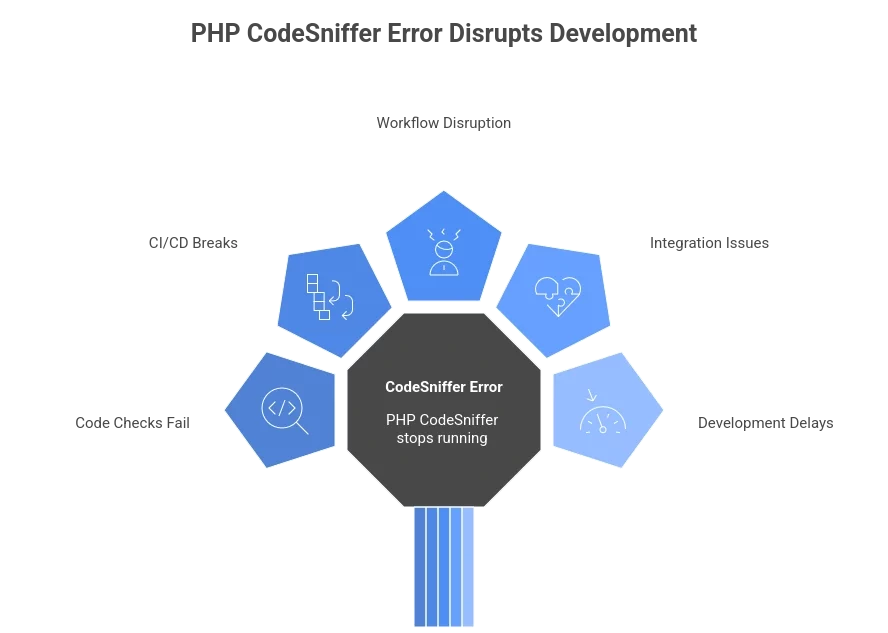
- Code checks fail: PHP CodeSniffer stops running, so Drupal coding rules are not checked.
- CI/CD pipelines break: Automated builds and validations fail, blocking deployments or merges.
- Workflow disruption: Developers cannot verify code quality locally.
- Integration issues: Tools that rely on these sniffs stop working.
- Development delays: Time is wasted fixing configuration issues instead of writing code.
Blocked by the referenced Sniff Drupal error?

Causes of the Error
1. Incorrectly installed_paths Configuration
The most common cause of this error is a manually configured or outdated installed_paths setting in PHP CodeSniffer.
Modern versions of drupal/coder automatically manage these paths using a Composer plugin. Manually setting them can create conflicts and prevent PHPCS from locating required sniffs.
2. Version Mismatch
Incompatibility between the installed versions of drupal/coder and PHP CodeSniffer can cause this error.
In some cases, specific drupal/coder versions (for example, 8.3.9) introduced temporary compatibility issues.
3. Missing Slevomat Coding Standard
The required Slevomat Coding Standard may not be installed, which causes errors such as:
Referenced sniff “SlevomatCodingStandard.ControlStructures.RequireNullCoalesceOperator” does not exist
4. Outdated Composer Cache or Vendor Directory
An old Composer cache or an outdated vendor directory can prevent coding standards from being registered correctly.
5. Composer Autoload Issues
Composer autoload files may not be refreshed after dependency changes, leading to missing class or sniff references.
6. Corrupted Installation
The installation of PHP CodeSniffer, drupal/coder, or related dependencies may be corrupted.
7. Global vs Local Installation Conflicts
Conflicts can occur when PHPCS is installed both globally and locally, causing the wrong executable or configuration to be used.
8. IDE-Specific Issues
In IDEs such as PHPStorm, PHPCS may be configured differently from the command-line version, leading to inconsistent results.
9. Configuration File Errors
Errors or invalid references in phpcs.xml or phpcs.xml.dist can prevent PHPCS from loading required sniffs.
Corresponding Fixes
1. Remove the manually installed_paths Configuration
Via command line:
phpcs --config-delete installed_pathsIn phpcs.xml or phpcs.xml.dist:
Remove any lines like:
<config name="installed_paths" value="..." />2. Enable the Composer Installer Plugin
Ensure your composer.json allows the required plugin:
{

"config": {

"allow-plugins": {

"dealerdirect/phpcodesniffer-composer-installer": true

}

}

}
After updating, run:
composer installComposer output should confirm that installed_paths were set automatically.
3. Install the Slevomat Coding Standard
If the Slevomat sniffs are missing, install them using Composer:
composer require --dev slevomat/coding-standard4. Manually Set Installed Paths (If Required)
If automatic detection fails, set the paths manually:
phpcs --config-set installed_paths /path/to/drupal/coder/coder_sniffer,/path/to/slevomat/coding-standardReplace the paths with the actual locations on your system.
5. Clear Cache and Reinstall Dependencies
Remove the vendor directory:
rm -rf vendorRemove the PHPCS configuration file (path may vary):
rm -rf vendor/squizlabs/php_codesniffer/CodeSniffer.confReinstall everything:
composer install6. Regenerate Composer Autoload Files
If dependencies were added or updated:
composer dump-autoload7. Downgrade or Upgrade drupal/coder
If a specific version is problematic, pin a known working version:
"drupal/coder": "8.3.8"After installing, you may upgrade to the latest version once the issue is resolved.
8. Reinstall PHPCS and Coder (Global Installations)
composer global remove squizlabs/php_codesniffer drupal/coder

composer global require squizlabs/php_codesniffer drupal/coder
9. Resolve Global vs Local Conflicts
To avoid conflicts, remove the global PHPCS installation and use the project-local one:
composer global remove squizlabs/php_codesnifferRun PHPCS using:
vendor/bin/phpcs10. Verify Installed Coding Standards
After applying fixes, verify the available standards:
phpcs -iThe output should include Drupal, DrupalPractice, and SlevomatCodingStandard.
11. CI and IDE Fixes
- CI/CD pipelines (Travis CI, etc.): Clear the build cache and rerun the pipeline.
- IDEs (PHPStorm, etc.): Configure the IDE to use:
vendor/bin/phpcs- Instead of a globally installed PHPCS.
12. Validate Configuration Files
Ensure your phpcs.xml contains valid rules, for example:
<ruleset name="MyProject"> <rule ref="SlevomatCodingStandard.ControlStructures.RequireNullCoalesceOperator"/> </ruleset>The “Referenced Sniff Drupal does not exist” error disrupts code checks and CI pipelines. The Drupal Support team explains causes and prevention.Prevention Strategies
- Do not set installed_paths manually: Modern versions of drupal/coder handle this automatically through Composer.
- Allow the Composer plugin: Make sure the dealerdirect/phpcodesniffer-composer-installer plugin is enabled in composer.json.
- Use Composer for installs: Always install and manage drupal/coder using Composer, not manual setups.
- Keep tools updated: Regularly update PHP CodeSniffer, drupal/coder, and related standards.
- Use a consistent setup: Keep the same environment across all developers and CI tools.
- Add automated checks: Run PHPCS in CI/CD pipelines to catch issues early.
- Follow clear setup guides: Ensure developers use the same documented configuration.
[Need assistance with a different issue? Our team is available 24/7.]
Conclusion
The error referenced, Sniff Drupal does not exist, is easy to fix with proper configuration and dependency management. Reach out for expert help if it continues to block your workflow.

