


Scale Your SaaS With Confidence
Explore SaaS development services to scale your platform, improve performance, optimize cloud costs, and support growing user demand with ease.
Increased customer demand on a SaaS platform means greater strain on the platform’s infrastructure and associated cloud costs. The team designed the architecture for 1,000 customers, but it will be insufficient at 10,000 and 100,000 customers.
The objective is to strike a balance between performance and cost, to be flexible and to meet customer demands.
An Overview
Why Rapid Growth Can Affect SaaS Performance
When teams do not plan for rapid growth, the application, database, and infrastructure face capacity constraints. As a result, this causes:
- Infrastructure bottlenecks: The application will slow down due to limitations on CPU/memory and/or connections;
- Increased cloud costs: Poor capacity planning and improper auto-scaling waste resources and increase cloud costs.;
- Lower performance: Increased latency and high error rates will lead to poor application performance;
- Database bottlenecks: Slow queries and limited database capacity will constrain application performance and growth;
- Poor visibility: Without any infrastructure monitoring, teams cannot identify performance issues.
Therefore, a platform should be able to dynamically change resources based on demand.
Key Strategies for Scaling a SaaS Platform
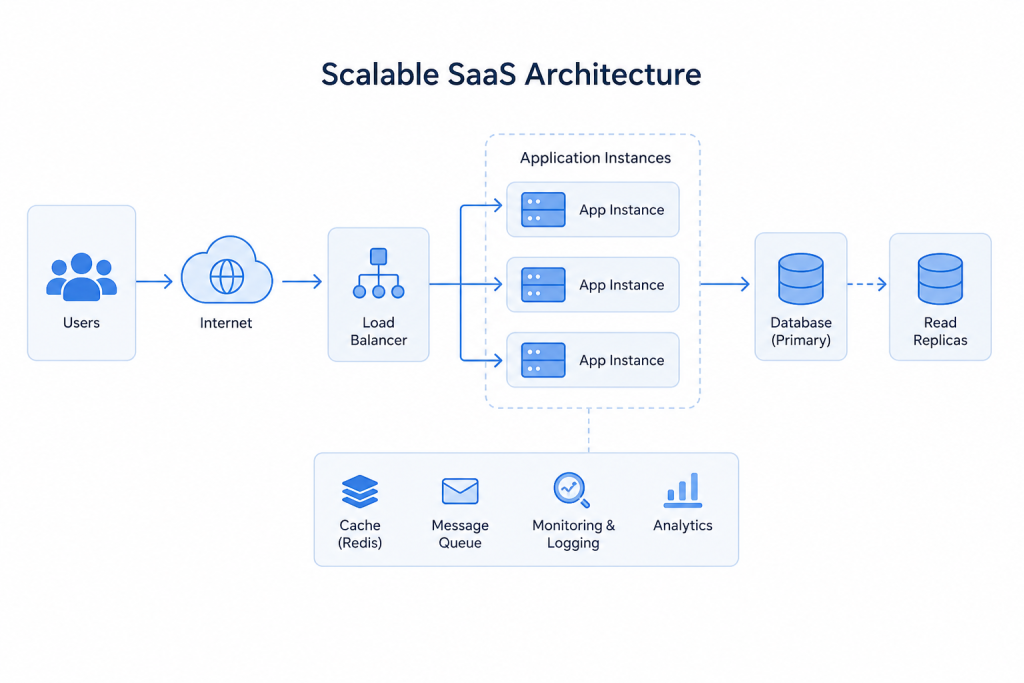
1. Choose the Right Scaling Approach
Scaling approaches must be determined and optimized to achieve the best results. Additionally, SaaS solutions must also be designed to accommodate increasing requests.
When teams need additional vertical scalability, they can use resource allocation on a single server during early-stage product development.
Alternatively, horizontally scalability is achieved by having multiple instances of the application to handle workload distribution. Teams can use Kubernetes and Docker to run workloads for stateless services.
Furthermore, application load-distribution services such as NGINX and AWS ALB (Application Load Balancer) to distribute workloads.
Scale Your SaaS With Confidence.

2. Scale the Database
The database can become a major bottleneck. Scaling machines is system resource intensive and should be avoided during high peak workloads.
Read replicas serve a good purpose as a scaling option to accommodate increasing read requests. Teams should deploy sharding when the data size exceeds the capacity of a single database instance.
Teams can use a multi-tenancy approach based on their budget, scope of work, and requirements.
For frequent access data and session data, use Redis or Memcached. Teams should choose alternative databases when the workload justifies using NewSQL or NoSQL.
Sharding should be considered in the design of the data access layer to avoid future scalability issues.
3. Use Microservices Where Needed
A monolithic application can cater to the initial requests of a user. However, independent scaling of individual components may become a requirement for high traffic components as the usage of a SaaS solution expands.
Therefore, don’t fall into a premature microservices architecture trap. A properly arranged modular monolith could very well be the right choice when the need for separate services has not yet arrived.
4. Monitor Performance and Usage
Good monitoring systems indicate issues.
Track:
- CPU and memory usage
- p95 and p99 latency
- Error rates
- Database query performance
- Queue depth
- Cloud costs
Additionally, some systems that help are: Prometheus, Grafana, Datadog, New Relic, CloudWatch, Azure Monitor. OpenTelemetry and Jaeger can aid in tracing the request through the different services.
Therefore, use them to set rules for autoscaling based on demand.
How to Control SaaS Cloud Costs
Increasing requests to a system will inevitably increase spending on cloud services. However, several levers can be used to limit spending.
Right-Size Resources
First, adjust workloads by modifying the resources being employed.
Use Auto-Scaling
Similarly, resources can be scaled based on demand within an environment with constrained resources.
Choose the Right Pricing Model
Match the pricing models to the type of workload:
- Serverless where workloads can be easily modified
- Spot Instances for workloads where failure is not an issue
- For predictable workloads use a Reserved Instance
- Move data to a more cost-effective storage solution
Manage Storage
Snapshots and backups can be removed to further reduce the cost of storage.
Track Cloud Spending
Set up a cloud spending budget. Charge responsible units for cloud spending. Evaluate spending regularly. Cloud spending can also be controlled with resource tags.
Remove Unused Resources
Deployments that are no longer used, test databases, and unused resources should be removed.
SaaS Scaling Roadmap
For each workload, the appropriate approach is different. This roadmap should help provide a beginner approach to the scalability of your SaaS application:
| User range | Main focus |
|---|---|
| Below 10k | Caching, query optimization, vertical scaling |
| 10k–50k | Load balancing, horizontal scaling, read replicas, and monitoring |
| 50k–100k+ | Microservices, sharding, multi-region, advanced auto-scaling, and cost optimization |
These ranges are only guidelines. Heavy workloads may require advanced scaling earlier.
SaaS Scaling Best Practices
Keep these practices in place as the platform grows:
- Tenant isolation
- Regular load testing
- Durable CI/CD pipelines
- Data protection and security
- Resource and cost tracking for each separate team
- Regular resource performance evaluations
Common SaaS Scaling Mistakes
Avoid these issues:
- Resources should not be over-provisioned.
- Development and staging environments should not be scaled and run for 24 hours if it is not needed.
- Scaling should not be done without monitoring.
- Waiting for users to spot performance issues.
- Taking the path of least architectural expense, regardless of future costs.
- Transitioning to microservices when it’s not necessary.
Conclusion
Scaling a SaaS platform means understanding the equilibrium of capacity, performance, and cost.
The main performance bottlenecks and cost bottlenecks are the first areas that need addressing. Most of the time, query optimization, caching, sizing, and auto-scaling solutions will result in the greatest improvement.
Analyzing cloud usage and checking the performance of the system will allow a SaaS platform to grow without ruining the budget or compromising the user experience.

