Bobcares Logo
Search Call 1-800-383-5193 Emergency Contact
Bobcares Logo
Search Call 1-800-383-5193 Emergency Contact
Emergency Contact

How we install Webmin OpenSSL and fix related errors

by Jilu Joseph | May 15, 2019 | Latest, Server Management | 0 comments

For secure websites, SSL is one of the standard security protocol.

Therefore, Webmin can be configured to use SSL with OpenSSL.

However, it may not work as we expect and cause errors due to disabled SSL option, outdated OpenSSL version and much more.

At Bobcares, we often get requests from our customers to resolve the problems with “Webmin OpenSSL” as part of our Server Management Services.

Today, we’ll see how our Support Engineers configure “Webmin OpenSSL” and solve related errors.


How we configure OpenSSL in Webmin

Now, let’s see how our Support Engineers configure OpenSSL in Webmin.

To install SSL, we took the following steps.

1. Initially, we log into the server as “root” user.

2. Then we download the OpenSSL library.

3. We install the OpenSSL library from the source. Then, we compile and install it with the following commands :

tar xvzf openssl-0.x.y.tar.gz
cd openssl-0.x.y
./Configure (or ./config in new OpenSSL versions)
make
make install

4. Next, we download and install the Net::SSLeay perl module on the server. This module enables perl scripts to call the OpenSSL library functions.

So, we use the following commands to install Net::SSLeay perl module :

tar xvzf Net_SSLeay.pm-x.yy.tar.gz
cd Net_SSLeay.pm-x.yy
perl Makefile.PL
make install

3. At last, we test OpenSSL correctly installed or not by using the following command,

perl -e 'use Net::SSLeay'

So, it doesn’t show any error message which means that OpenSSL is correctly installed.


How we fixed errors related to Webmin OpenSSL

Now, let’s see how our Support Engineers solved the related errors while installing OpenSSL.


1. Disabled SSL option

Recently one of our customers had an issue with OpenSSL installation. The Webmin was already installed on his server. However, SSL was not working on his websites after installing the SSL certificate.

1. Firstly, our Support Engineers checked the domain has a proper SSL certificate.

2. Then we logged into Webmin control panel.

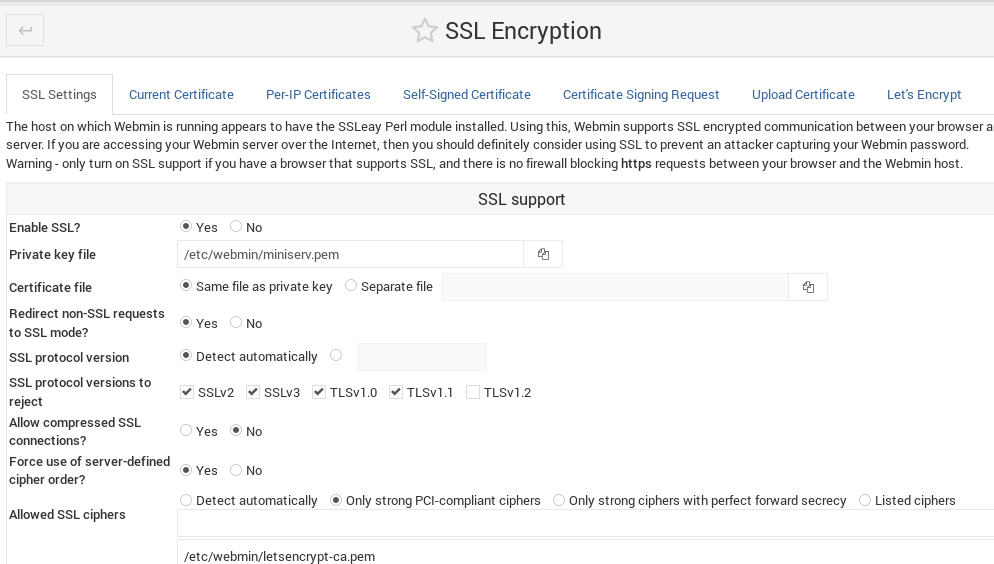
3. We selected  Webmin > Webmin Configuration > SSL Encryption 

4. At last, we found the SSL option was Disabled and then changed to Enabled.

That fixed the problem.
 

2. Outdated OpenSSL version

Sometimes, customers may get errors on their website due to outdated OpenSSL version. An example of this error due to outdated OpenSSL version is,

An error occurred during a connection to 10000. SSL received a record that
exceeded the maximum permissible length. (Error code:
ssl_error_rx_record_too_long)

So, our Support Engineers checked all installed RPMs by using the following command.

rpm -qa |grep openssl

Finally, we found that the version of OpenSSL was outdated on the server we upgraded it.


3. Incorrect SSL certificate

Similarly, another customer had an issue with Webmin SSL certificate. His Webmin URL https://yourhostname:10000 uses a self-signed SSL certificate instead of paid SSL certificate.

Then our Support Engineers executed the following command to solve the issue.

virtualmin install-service-cert --domain yourdomain.com --service webmin

Finally, we stopped and restarted the Webmin.

This is how we fixed the problem.


[Having trouble with Webmin OpenSSL? We’ll fix it for you.]


Conclusion

In short, Webmin has a powerful utility like OpenSSL to use SSL. Today, we saw how our Support Engineers configured Webmin OpenSSL and solved related errors.

Related posts:

    1. AWS elastic beanstalk nginx proxy
    2. The value buster-backports is invalid for APT | Resolved
    3. NGINX reverse proxy SSL letsencrypt
    4. Error symbol grub_calloc not found | Resolved

Submit a Comment Cancel reply

Your email address will not be published. Required fields are marked *

Recent Posts

  • A 15-Minute Self-Hosted RAG Stack Tutorial: From Zero to Production
  • Designing Data Pipelines That Prevent Outages Across Global Systems
  • Deployment Automation: Deploy With Efficiency and Consistency
  • What Is Proactive Monitoring? A Complete Guide
  • AI Use Cases: How Artificial Intelligence Is Used Across Industries

Categories

  • Advanced Vulnerability
  • AI Services
  • AI Support
  • AIOps
  • Amazon Web Services (AWS)
  • Apache
  • API Integration
  • Application Development
  • Azure
  • Cloud Cost Optimization
  • Cloud Management
  • Cloud-Native Application
  • Cloudflare
  • cPanel
  • cPanel migration
  • Cyberpanel
  • DDoS
  • Development Service
  • DevOps
  • DevOps Consulting
  • DevSecOps
  • Digital Transformation
  • DigitalOcean
  • DirectAdmin
  • Docker
  • Drupal
  • Ecommerce
  • Filezilla
  • FTP
  • Google cloud platform
  • HAProxy
  • Headless CMS Integration
  • Hosting Support
  • IIS
  • Infrastructure Management & Optimization
  • Kubernetes
  • KVM
  • Laravel
  • Latest
  • Linode
  • Litespeed
  • LXC/LXD
  • Magento
  • Mobile App Development
  • MongoDB
  • Moodle
  • MySQL
  • NFS
  • Nginx
  • OnApp
  • Outsourced Support
  • OVH
  • ovirt
  • pfsense
  • Plesk
  • PostgreSQL
  • PowerDNS
  • Product Engineering
  • Proxmox
  • RedHat
  • Redis
  • Sendmail
  • Server Administration
  • Server Management
  • Software Development
  • SQLServer
  • Technical Support
  • UI/UX
  • Virtualizor
  • VMware
  • VPN
  • Vulnerability Scanning
  • Vultr
  • Web Development
  • Windows
  • WordPress
  • WordPress Hosting
  • WordPressHA

Subscribe to our newsletter

Footer newsletter

Email sales@bobcares.com | Phone 1-800-383-5193

Product Engineering

  • MVP Build
  • MVP to Scale
  • Product Maintenance

Digital Transformation

  • Process Digitization & Automation
  • Systems Integration & Workflow Orchestration
  • Data Enablement & Decision Support
  • Application & Platform Modernization
  • Transformation Execution & Delivery Enablement

AI Services

  • AI Readiness & Use-Case Discovery
  • AI Integration & Application Enablement
  • Intelligent Automation & AI Workflows

Infrastructure Management

  • Always-On Infrastructure Management
  • Proactive Monitoring & Incident Prevention
  • Cloud Cost Control & Optimization (FinOps)
  • Outsourced IT & End-User Support
  • Managed Infrastructure Execution Support

DevOps & Automation Services

  • CI/CD & Release Automation
  • Infrastructure as Code & Platform Standardization
  • Reliability Engineering & Observability
  • DevSecOps Enablement
Product Engineering +
Web Development MVP to Scale Builds Microservices Architecture Agile & Dev Team Augmentation Mobile Apps Ecommerce UI/UX Design QA & Test Automation
Digital Transformation +
Legacy Modernization Workflow Automation Data-Driven Dashboards CRM / ERP Integration Business Process Re-engineering
AI Services +
AI & Machine Learning AIOps Intelligent Automation Business Intelligence & Analytics AI Installation & Compute
Infrastructure Management +
Cloud Setup Cloud Migration Managed Cloud Services Server & Hosting Cost Optimization Performance Optimization Outsourced Support
DevOps & Automation Services +
CI/CD Setup Kubernetes & Docker Infrastructure as Code Cloud-Native Migration DevSecOps
Cybersecurity & Compliance Services +
Security Hardening VAPT Incident Response Backup & DR

© 2026 Bobcares. All Rights Reserved.

  • Careers
  • |
  • Cookie Policy
  • |
  • GDPR
  • |
  • Privacy Policy
  • |
  • Terms and Service
  • LinkedIn
  • YouTube
  • Instagram
  • Facebook

Preview of the new Bobcares experience
NEW UPDATE
See What’s New
at Bobcares

Discover a faster, clearer view of our services and expertise.


Explore the New Experience
Arrow Right