


Gain clarity on Cluster Autoscaler Version Compatibility and its impact on scaling accuracy and cloud management efficiency in Kubernetes environments. Optimize scaling workflows with tailored Cloud Management solutions.
Cloud management strategies often revolve around controlling capacity, boosting efficiency, and keeping applications responsive during demand spikes. Kubernetes simplifies this by offering several autoscaling tools that help teams keep clusters balanced. Among these tools, Cluster Autoscaler plays a major role in helping cloud environments adjust node capacity without manual oversight. When configured well, it becomes a key part of scaling operations in managed platforms like AWS EKS.
Overview
How Autoscaling Works in Kubernetes
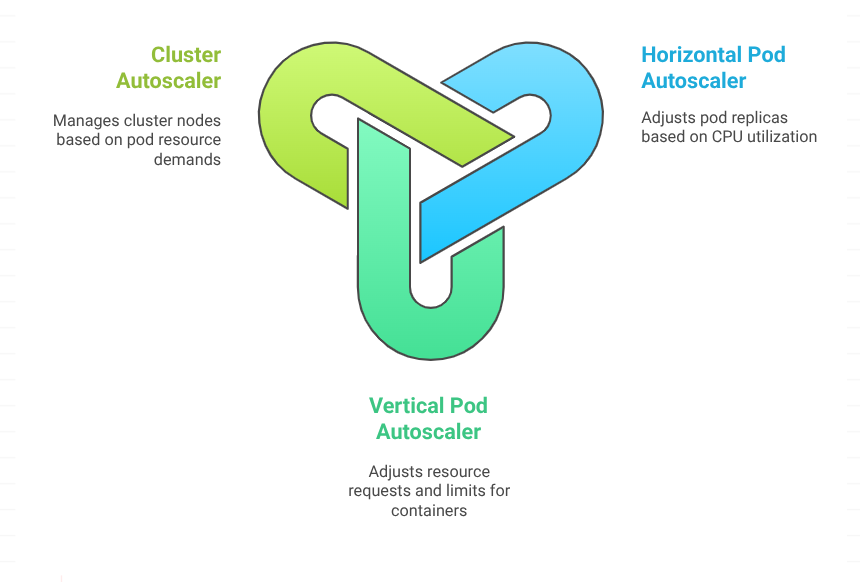
Kubernetes supports autoscaling across three different layers of application infrastructure. Each handles scaling in a separate way and influences overall cloud management efficiency.
Horizontal Pod Autoscaler
This feature adjusts the number of application replicas. It is focused on scaling pods in and out to maintain performance targets defined in metrics.
Vertical Pod Autoscaler
VPA updates container resource requests and limits. It helps a running workload gain or release CPU and memory so it fits available node capacity.
Cluster Autoscaler
This component adjusts the number of nodes in the cluster. It reacts when pods stay in a pending state or when nodes show low utilization. In simple terms, HPA and VPA manage resources at the pod level, while CA manages capacity at the cluster level.
What is Cluster Autoscaler
Cluster Autoscaler evaluates the cluster every few seconds to detect pods stuck in pending status. Pending pods indicate that the scheduler has no place to run them due to insufficient resources. Once CA notices this pattern, it begins the expansion process by triggering node creation within the limits configured by the administrator.
The same logic applies in reverse during scale-down. If the cluster has underused nodes, CA attempts to move pods to other nodes and release those machines. Adopting proactive cluster autoscaling strategies can help prevent resource shortages, maintain application performance, and ensure your Kubernetes environment scales smoothly as demand grows.
How Cluster Autoscaler Performs Scaling
The decision process involves several clear steps that help synchronize cloud management operations with Kubernetes scheduling logic.
1. CA scans the cluster for unschedulable pods
A scan cycle runs every few seconds and checks if new workloads require additional space.
2. CA requests node creation through the cloud provider
If the cluster lacks capacity, CA sends a scale request to the provider. Managed environments like AWS EKS rely on Auto Scaling groups to add virtual machines that join the cluster.
3. The new node becomes part of the cluster
Once the cloud provider launches the instance, Kubernetes registers it with the control plane.
4. The scheduler assigns pending pods
The scheduler places previously blocked workloads on the newly added node, restoring application performance as capacity increases.
Limitations to Consider
Cluster Autoscaler strengthens cloud management strategies, but there are boundaries to its behavior.
Resource request-based decisions
CA evaluates CPU and memory requests set in pod specifications. It does not rely on actual utilization. Wasteful configurations can create excess capacity that CA cannot detect.
Scaling delays
Even though CA sends scale requests within seconds, the cloud provider may take minutes to bring nodes online. During heavy workloads, applications may experience performance drops until new capacity arrives.
Boost scaling with Cloud Management help.

Why Cluster Autoscaler Matters for Cloud Management
Organizations aiming to refine cloud operations depend heavily on the right scaling strategy. Cluster Autoscaler helps maintain balanced clusters, reduces manual intervention, and supports capacity planning across large workloads. When combined with HPA and VPA, teams can create an autoscaling strategy that fits cloud-native growth patterns while improving overall Kubernetes efficiency. Proper tuning also helps optimize autoscaling behavior on K8s clusters and enhances infrastructure reliability. A closer view of how scaling choices influence cloud bills is available in our Kubernetes cost optimization for cloud savings guide.
Conclusion
Cluster Autoscaler plays a central role in keeping Kubernetes clusters ready for shifting workloads and cloud growth. It supports efficient capacity planning, strengthens autoscaling behavior, and helps teams keep applications responsive during changing demands. When paired with pod-level autoscaling tools, it forms a scaling strategy that improves cloud management and maintains steady performance across environments.

