


Please Note: This article is part of our historical archive. Because it was published a while ago, some of the information, links, or context may now be outdated.
Let us take closer look at how to Install rspamd and redis on DirectAdmin. With the support of our DirectAdmin support services at Bobcares we will now learn how to set this up.
How to Install rspamd and redis on DirectAdmin?
Centos8 is the basis for this. It may be able to do the same adjustments on Centos7 using epel-release. To do this follow the instructions given below:
Rspamd, which replaces spamassasin, is a substantially quicker anti-spam system. Although Directadmin supports rspamd, custombuild does not install redis, which is required for rspamd.
To begin the installation, use yum to install redis. Typ ein the following command lines for this:

Do not begin redis yet. After that, replace /etc/redis.conf with
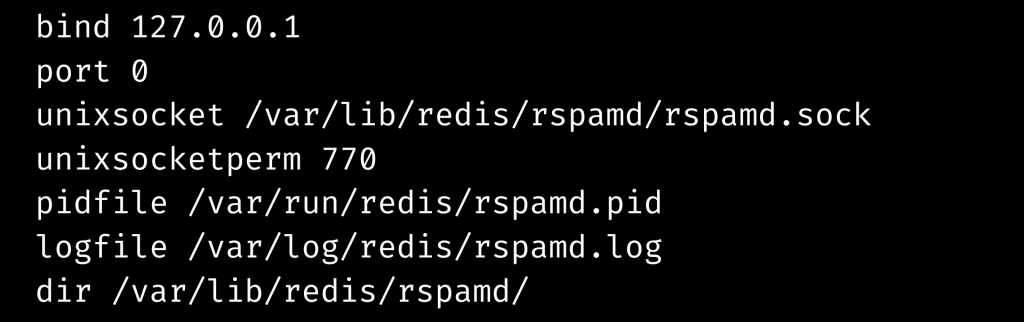
Create the database directory and assign permissions.

We will next install rspamd using custombuild.
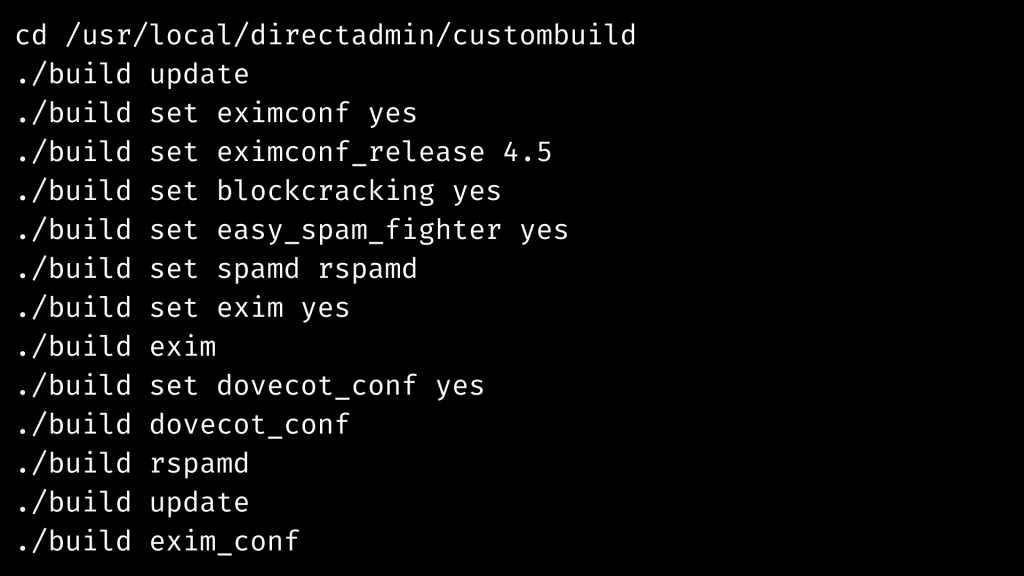
rspamd must have Redis Setup. Add to the following:

Check the configuration and restart as shown in the command line given below:

This is the final step to Install rspamd and redis.
[Need assistance with similar queries? We are here to help]
Conclusion
To sum up we have now seen how to Install rspamd and redis on DirectAdmin. With the support of our DirectAdmin support services at Bobcares we have now seen the whole setup process.
PREVENT YOUR SERVER FROM CRASHING!
Never again lose customers to poor server speed! Let us help you.
Our server experts will monitor & maintain your server 24/7 so that it remains lightning fast and secure.


Hello testing on local debian 11 without directadmin. Followed all the steps, rspamd was installed by apt. Getting this error in rspamd.log
2023-11-16 16:27:20 #4474(normal) lua; lua_redis.lua:1269: cannot execute redis request to load script on /var/lib/redis/rspamd/rspamd.sock
2023-11-16 16:27:20 #4474(normal) redis_async_new: cannot connect to redis /var/lib/redis/rspamd/rspamd.sock (port 0): Permission denied
2023-11-16 16:27:20 #4474(normal) rspamd_lua_redis_prepare_connection: cannot connect to redis (OS error): Permission denied
2023-11-16 16:27:20 #4474(normal) lua; lua_redis.lua:1269: cannot execute redis request to load script on /var/lib/redis/rspamd/rspamd.sock
2023-11-16 16:27:20 #4474(normal) redis_async_new: cannot connect to redis /var/lib/redis/rspamd/rspamd.sock (port 0): Permission denied
2023-11-16 16:27:20 #4474(normal) rspamd_lua_redis_prepare_connection: cannot connect to redis (OS error): Permission denied
2023-11-16 16:27:20 #4474(normal) lua; lua_redis.lua:1269: cannot execute redis request to load script on /var/lib/redis/rspamd/rspamd.sock
2023-11-16 16:27:20 #4474(normal) redis_async_new: cannot connect to redis /var/lib/redis/rspamd/rspamd.sock (port 0): Permission denied
2023-11-16 16:27:20 #4474(normal) rspamd_lua_redis_prepare_connection: cannot connect to redis (OS error): Permission denied
2023-11-16 16:27:20 #4474(normal) lua; lua_redis.lua:1269: cannot execute redis request to load script on /var/lib/redis/rspamd/rspamd.sock
any help would be appricated
Hi,
Our experts can help you with the issue.we will be happy to talk to you through our live chat(click on the icon at right-bottom).