Bobcares Logo
Search Call 1-800-383-5193 Emergency Contact
Bobcares Logo
Search Call 1-800-383-5193 Emergency Contact
Emergency Contact

TLS Negotiation failed the certificate doesn’t match the host in Plesk

by Nikhath K | Jan 27, 2022 | Latest, Plesk, Server Management | 0 comments

TLS Negotiation failed the certificate doesn’t match the host in Plesk server and not sure what to do? Read what our experts recommend.

At Bobcares, we offer solutions for every query, big and small, as a part of our Server Management Service.

Let’s take a look at how our Support Team is ready to help customers with the error: TLS Negotiation failed the certificate doesn’t match the host in Plesk.

TLS Negotiation failed the certificate doesn’t match the host in Plesk

Some of our customers have been unable to send out emails via Gmail and often face an error stating that TLS Negotiation failed and the certificate does not match the host.


After a study of the errors, our Support Engineers came to the conclusion that this error is due to the mismatch between the CN (common name) of the SSL certificate and the mail server name.

April 2, 2020, onwards Gmail verifies that the CN of the SSL certificate matches the mail server name, resulting in the following error if it does not.

TLS Negotiation failed, the certificate doesn't match the host

The first option to solve this error would be securing the mail server with the SSL certificate.

Alternatively, we can overcome the error with the following steps courtesy of our Support Team:

  1. First, log in to the Gmail account.
  2. Then we will navigate to Settings > See all settings > Accounts and Import > Send mail as.
  3. Next, we have to click the edit info button in the pop-up window and click the Next Step button.
  4. After that, we have to set the domain with the valid SSL certificate in the SMTP Server field:
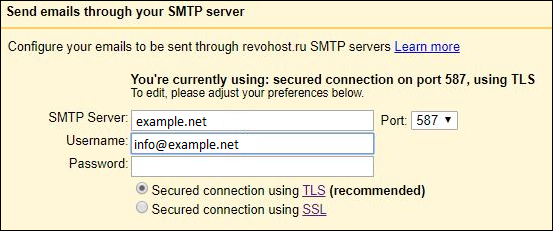
    TLS Negotiation failed the certificate doesn't match the host in Plesk

  5. Finally, save the changes made by clicking the Save Changes button.

In case we are not using an SSL certificate, we can resolve the error with these steps:

  1. First, log in to the Gmail account.
  2. Then, navigate to Go to Settings > See all settings > Accounts and Import > Send mail as.
  3. Next, we have to click the edit info button near the account with the issue.
  4. After that, click the Next Step button.
  5. Then, we will select 25 from the drop-down menu and click the Save Changes button to save the changes:

[Looking for a solution to another query? We are just a click away.]

Conclusion

To sum up, our skilled Support Engineers at Bobcares demonstrated how to deal with the error: TLS Negotiation failed the certificate doesn’t match the host in Plesk.

PREVENT YOUR SERVER FROM CRASHING!

Never again lose customers to poor server speed! Let us help you.

Our server experts will monitor & maintain your server 24/7 so that it remains lightning fast and secure.

GET STARTED

Related posts:

    1. Change maximum attachment size for webmail on Linux Plesk server
    2. Error adding domain Plesk: An easy solution
    3. Unable to create an additional domain or a subdomain in Plesk: Resolved
    4. Caught SIGTERM shutting down error in Plesk server | Fix it

Submit a Comment Cancel reply

Your email address will not be published. Required fields are marked *

Recent Posts

  • A 15-Minute Self-Hosted RAG Stack Tutorial: From Zero to Production
  • Designing Data Pipelines That Prevent Outages Across Global Systems
  • Deployment Automation: Deploy With Efficiency and Consistency
  • What Is Proactive Monitoring? A Complete Guide
  • AI Use Cases: How Artificial Intelligence Is Used Across Industries

Categories

  • Advanced Vulnerability
  • AI Services
  • AI Support
  • AIOps
  • Amazon Web Services (AWS)
  • Apache
  • API Integration
  • Application Development
  • Azure
  • Cloud Cost Optimization
  • Cloud Management
  • Cloud-Native Application
  • Cloudflare
  • cPanel
  • cPanel migration
  • Cyberpanel
  • DDoS
  • Development Service
  • DevOps
  • DevOps Consulting
  • DevSecOps
  • Digital Transformation
  • DigitalOcean
  • DirectAdmin
  • Docker
  • Drupal
  • Ecommerce
  • Filezilla
  • FTP
  • Google cloud platform
  • HAProxy
  • Headless CMS Integration
  • Hosting Support
  • IIS
  • Infrastructure Management & Optimization
  • Kubernetes
  • KVM
  • Laravel
  • Latest
  • Linode
  • Litespeed
  • LXC/LXD
  • Magento
  • Mobile App Development
  • MongoDB
  • Moodle
  • MySQL
  • NFS
  • Nginx
  • OnApp
  • Outsourced Support
  • OVH
  • ovirt
  • pfsense
  • Plesk
  • PostgreSQL
  • PowerDNS
  • Product Engineering
  • Proxmox
  • RedHat
  • Redis
  • Sendmail
  • Server Administration
  • Server Management
  • Software Development
  • SQLServer
  • Technical Support
  • UI/UX
  • Virtualizor
  • VMware
  • VPN
  • Vulnerability Scanning
  • Vultr
  • Web Development
  • Windows
  • WordPress
  • WordPress Hosting
  • WordPressHA

Subscribe to our newsletter

Footer newsletter

Email sales@bobcares.com | Phone 1-800-383-5193

Product Engineering

  • MVP Build
  • MVP to Scale
  • Product Maintenance

Digital Transformation

  • Process Digitization & Automation
  • Systems Integration & Workflow Orchestration
  • Data Enablement & Decision Support
  • Application & Platform Modernization
  • Transformation Execution & Delivery Enablement

AI Services

  • AI Readiness & Use-Case Discovery
  • AI Integration & Application Enablement
  • Intelligent Automation & AI Workflows

Infrastructure Management

  • Always-On Infrastructure Management
  • Proactive Monitoring & Incident Prevention
  • Cloud Cost Control & Optimization (FinOps)
  • Outsourced IT & End-User Support
  • Managed Infrastructure Execution Support

DevOps & Automation Services

  • CI/CD & Release Automation
  • Infrastructure as Code & Platform Standardization
  • Reliability Engineering & Observability
  • DevSecOps Enablement
Product Engineering +
Web Development MVP to Scale Builds Microservices Architecture Agile & Dev Team Augmentation Mobile Apps Ecommerce UI/UX Design QA & Test Automation
Digital Transformation +
Legacy Modernization Workflow Automation Data-Driven Dashboards CRM / ERP Integration Business Process Re-engineering
AI Services +
AI & Machine Learning AIOps Intelligent Automation Business Intelligence & Analytics AI Installation & Compute
Infrastructure Management +
Cloud Setup Cloud Migration Managed Cloud Services Server & Hosting Cost Optimization Performance Optimization Outsourced Support
DevOps & Automation Services +
CI/CD Setup Kubernetes & Docker Infrastructure as Code Cloud-Native Migration DevSecOps
Cybersecurity & Compliance Services +
Security Hardening VAPT Incident Response Backup & DR

© 2026 Bobcares. All Rights Reserved.

  • Careers
  • |
  • Cookie Policy
  • |
  • GDPR
  • |
  • Privacy Policy
  • |
  • Terms and Service
  • LinkedIn
  • YouTube
  • Instagram
  • Facebook

Preview of the new Bobcares experience
NEW UPDATE
See What’s New
at Bobcares

Discover a faster, clearer view of our services and expertise.


Explore the New Experience
Arrow Right