


Let’s discuss some of the steps to consider when the Ubuntu Server SSH disconnects. At Bobcares, with our Server Management Service, we can handle your issues.
Ubuntu Server SSH Disconnects: Why?
There are several possible conditions that can cause an SSH connection to an Ubuntu Server to stop and start frequently. They are network instability, SSH timeout configuration, firewall rules, and server resource limits. The following checks may be used to identify what is causing the instability in the SSH connection and to restore it.
1. Verify the connectivity to the network. Verify that there is a steady network connection between the client and the server. SSH issues may occur as a result of a shaky or unreliable connection. To check the stability of the network, use tools such as ping.
2. SSH connections can be blocked by firewalls on the client and server sides. Make sure that SSH traffic can reach the required ports, which are by default port 22. Using sudo ufw status on the server, we can check the firewall’s status and modify the rules as necessary.
3. Certain SSH servers are set up to cut off inactive links after a specific period of time. To change the ClientAliveInterval or remove it completely, edit the server’s sshd_config file. Restart the SSH service after that.
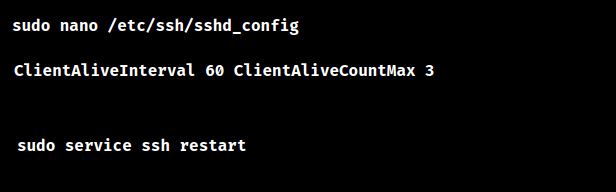
Here, ClientAliveInterval 60 sends a keepalive message every 60 seconds, and ClientAliveCountMax 3 allows the SSH server to receive three unanswered keepalive messages, and then the connection will be closed.
4. Disconnections may occur from authentication problems, such as using the wrong credentials. Verify the login details or key-based authentication twice.
5. SSH disconnects may be caused by limited resources or heavy server loads. Use tools such as top or htop to monitor the server’s use of resources (CPU, memory, and disk space). Fix any problems pertaining to resources.
6. Verify whether the SSH client configuration, such as that found in ssh_config, has any timeout settings on the client side. It could be beneficial to change the timeout numbers.
If it keeps dropping, use the SSH client to log in to the server and use verbose logging: ssh -vvv user@server. The output will give you detailed information regarding the connection process and can assist in determining where the SSH session is being interrupted.
7. Confirm that the SSH client and server are running the most recent versions. With the package manager, we can update them.

8. Connection issues may arise from incorrect MTU settings. Consider using automated MTU discovery or modifying the MTU parameters on the client and server.
[Need to know more? Click here to reach us.]
Conclusion
By checking the network connection, SSH configuration, server resources, and relevant logs, we can identify the cause of repeated SSH disconnections on an Ubuntu Server and apply the appropriate fix. Regularly monitoring these areas can also help prevent recurring connection issues.
PREVENT YOUR SERVER FROM CRASHING!
Never again lose customers to poor server speed! Let us help you.
Our server experts will monitor & maintain your server 24/7 so that it remains lightning fast and secure.

