Bobcares Logo
Search Call 1-800-383-5193 Emergency Contact
Bobcares Logo
Search Call 1-800-383-5193 Emergency Contact
Emergency Contact

Cloudflare Browser Isolation Setup

by Maheen Aboobakkar | May 17, 2022 | Cloudflare, Latest, Server Administration | 0 comments

cloudflare browser isolation setup secures browsing activity by isolating the process of loading webpages from the user devices that display the webpages.

As part of our Server administration services, Bobcares responds to all queries, big and small.

Let’s look at how to configure cloudflare browser isolation in more detail.

Cloudflare Browser Isolation

By executing active webpage content in a secure isolated browser, Cloudflare Browser Isolation adds to the Secure Web Gateway and Zero Trust Network Access solutions. By executing active content from the endpoint, it protects users from zero-day attacks and malware. Browser Isolation protects users from phishing attacks by preventing user input on dangerous websites and controlling data transmission to sensitive web applications, in addition to protecting endpoints.
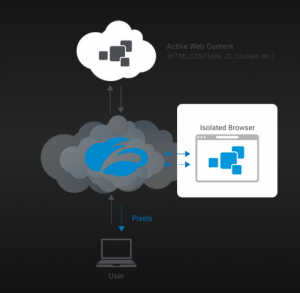
cloudflare browser isolation setup

The user is unaware that they are using remote browsing because they are continuing to use their preferred browser and habits. By default it will isolate every open tab and window. We can define policies to dynamically isolate websites based on identity, security threats, or content, just like we can define policies to filter traffic based on content categories or security threats with Gateway.

On the Zero Trust Dashboard, go to Policies > HTTP policies to create Browser Isolation policies. Select the Isolate or Do Not Isolate actions in the rule builder to enable or disable isolation for specific websites or content.

Benefits of browser isolation

  1. Downloads that are dangerous are removed.
  2. Scripts that are malicious do not run on a device or in a private network.
  3. It blocks browser-based zero-day exploits.
  4. Without having to block entire websites, It can block malicious web content..

Cloudflare Browser Isolation Setup

Secure Web Gateway HTTP policies enable browser isolation. Unless we add an Isolation policy to HTTP policies, It will not isolate any traffic by default. To begin isolating our traffic, we must do the following:

  1. Firstly, create a Cloudflare Zero Trust account and add Browser Isolation to either the Zero Trust Standard or Zero Trust Enterprise plan as an add-on.
  2. Then, get the most recent version of the WARP client.
  3. Then, create a Device enrollment rule .
  4. Finally, establish an isolation policy.

Cloudflare Browser Isolation works in tandem with our current web browser. Open our browser and navigate to any websites we normally use after connecting to Cloudflare WARP. Every tab is connected to an isolated browser running on Cloudflare’s edge.

How to check if a webpage is isolated

The simplest way to determine whether a webpage is proxied through Cloudflare is to look for the presence of a Cloudflare Root CA. In Chrome, select Certificate by clicking the padlock to the left of our address bar.

​​Normal Browsing

Non-Cloudflare Root CA:The absence of a Cloudflare for Teams root certificate indicates that Cloudflare did not proxy this page. ​​

Normal context menu:All standard options will be available in the right-click context menu. ​​
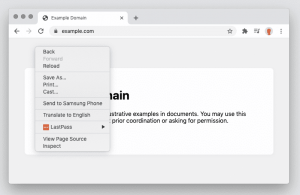
cloudflare browser isolation setup

​​Isolated Browsing

Cloudflare Root CA:Cloudflare for Teams + Gateway intermediate status indicates that traffic was routed through Cloudflare Gateway. ​​
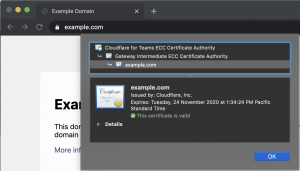
cloudflare browser isolation setup

Simplified context menu:Context menu on right-click is so simple. ​​​​
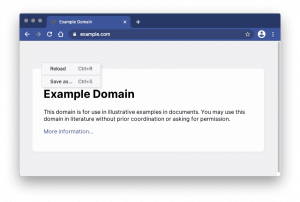
cloudflare browser isolation setup

Disconnecting Browser Isolation

If we want to disable Browser Isolation temporarily, we can do so by selecting the WARP agent and disconnecting the client. ​​

macOS
  1. Firstly, In the Menu Bar, click the Cloudflare logo. ​​
  2. Then, Toggle the blue Disconnected switch to the off position. ​​
  3. Finally, To return to the non-isolated page, refresh the page. ​​
Windows
  1. Firstly, click on the Cloudflare logo from the System Tray. ​​
  2. Then, toggle the blue Disconnected switch to the off position. ​​
  3. Finally, to return to the non-isolated page, refresh the page. ​​

[Looking for a solution to another query? We are just a click away.]

Conclusion

To sum up, our knowledgeable engineers demonstrated in greater detail how to configure cloudflare browser isolation.

PREVENT YOUR SERVER FROM CRASHING!

Never again lose customers to poor server speed! Let us help you.

Our server experts will monitor & maintain your server 24/7 so that it remains lightning fast and secure.

GET STARTED

Related posts:

    1. Fixing Cloudflare error 1020 access denied
    2. DMARC Policy Not Enabled Cloudflare
    3. Cloudflare CNAME Flattening
    4. Cloudflare error 522 connection timed out – How we make your site live

Submit a Comment Cancel reply

Your email address will not be published. Required fields are marked *

Recent Posts

  • A 15-Minute Self-Hosted RAG Stack Tutorial: From Zero to Production
  • Designing Data Pipelines That Prevent Outages Across Global Systems
  • Deployment Automation: Deploy With Efficiency and Consistency
  • What Is Proactive Monitoring? A Complete Guide
  • AI Use Cases: How Artificial Intelligence Is Used Across Industries

Categories

  • Advanced Vulnerability
  • AI Services
  • AI Support
  • AIOps
  • Amazon Web Services (AWS)
  • Apache
  • API Integration
  • Application Development
  • Azure
  • Cloud Cost Optimization
  • Cloud Management
  • Cloud-Native Application
  • Cloudflare
  • cPanel
  • cPanel migration
  • Cyberpanel
  • DDoS
  • Development Service
  • DevOps
  • DevOps Consulting
  • DevSecOps
  • Digital Transformation
  • DigitalOcean
  • DirectAdmin
  • Docker
  • Drupal
  • Ecommerce
  • Filezilla
  • FTP
  • Google cloud platform
  • HAProxy
  • Headless CMS Integration
  • Hosting Support
  • IIS
  • Infrastructure Management & Optimization
  • Kubernetes
  • KVM
  • Laravel
  • Latest
  • Linode
  • Litespeed
  • LXC/LXD
  • Magento
  • Mobile App Development
  • MongoDB
  • Moodle
  • MySQL
  • NFS
  • Nginx
  • OnApp
  • Outsourced Support
  • OVH
  • ovirt
  • pfsense
  • Plesk
  • PostgreSQL
  • PowerDNS
  • Product Engineering
  • Proxmox
  • RedHat
  • Redis
  • Sendmail
  • Server Administration
  • Server Management
  • Software Development
  • SQLServer
  • Technical Support
  • UI/UX
  • Virtualizor
  • VMware
  • VPN
  • Vulnerability Scanning
  • Vultr
  • Web Development
  • Windows
  • WordPress
  • WordPress Hosting
  • WordPressHA

Subscribe to our newsletter

Footer newsletter

Email sales@bobcares.com | Phone 1-800-383-5193

Product Engineering

  • MVP Build
  • MVP to Scale
  • Product Maintenance

Digital Transformation

  • Process Digitization & Automation
  • Systems Integration & Workflow Orchestration
  • Data Enablement & Decision Support
  • Application & Platform Modernization
  • Transformation Execution & Delivery Enablement

AI Services

  • AI Readiness & Use-Case Discovery
  • AI Integration & Application Enablement
  • Intelligent Automation & AI Workflows

Infrastructure Management

  • Always-On Infrastructure Management
  • Proactive Monitoring & Incident Prevention
  • Cloud Cost Control & Optimization (FinOps)
  • Outsourced IT & End-User Support
  • Managed Infrastructure Execution Support

DevOps & Automation Services

  • CI/CD & Release Automation
  • Infrastructure as Code & Platform Standardization
  • Reliability Engineering & Observability
  • DevSecOps Enablement
Product Engineering +
Web Development MVP to Scale Builds Microservices Architecture Agile & Dev Team Augmentation Mobile Apps Ecommerce UI/UX Design QA & Test Automation
Digital Transformation +
Legacy Modernization Workflow Automation Data-Driven Dashboards CRM / ERP Integration Business Process Re-engineering
AI Services +
AI & Machine Learning AIOps Intelligent Automation Business Intelligence & Analytics AI Installation & Compute
Infrastructure Management +
Cloud Setup Cloud Migration Managed Cloud Services Server & Hosting Cost Optimization Performance Optimization Outsourced Support
DevOps & Automation Services +
CI/CD Setup Kubernetes & Docker Infrastructure as Code Cloud-Native Migration DevSecOps
Cybersecurity & Compliance Services +
Security Hardening VAPT Incident Response Backup & DR

© 2026 Bobcares. All Rights Reserved.

  • Careers
  • |
  • Cookie Policy
  • |
  • GDPR
  • |
  • Privacy Policy
  • |
  • Terms and Service
  • LinkedIn
  • YouTube
  • Instagram
  • Facebook

Preview of the new Bobcares experience
NEW UPDATE
See What’s New
at Bobcares

Discover a faster, clearer view of our services and expertise.


Explore the New Experience
Arrow Right