


Securely manage sites by migrating VPS data with cPanel, CyberPanel, and DirectAdmin. Our DirectAdmin Support team is ready to assist you.
Comprehensive Guide to Migrating VPS Data with cPanel, CyberPanel, and DirectAdmin
Data migration is more than just moving information. It forms the foundation of every successful digital transformation. For modern businesses, transferring data between storage systems, formats, or computing environments ensures agility, security, and long-term scalability.
When done right, data migration enables companies to transition smoothly to cloud or Virtual Private Server (VPS) hosting without disrupting operations. It not only safeguards information but also unlocks new opportunities for growth and innovation.
If you are planning to upgrade or modernize your infrastructure, a well-structured migration strategy is your first step toward efficiency and resilience.
Importance of Data Migration
Businesses migrate data for several reasons, from upgrading outdated systems to merging databases after an acquisition. But beyond the technical purpose, migration brings measurable business advantages.
Business Benefits:
- Improved Analytics: Modern platforms like cloud warehouses and data lakes provide powerful insights through AI and integrated analytics tools.
- Enhanced Scalability: Migrating to the cloud or a VPS allows flexibility to handle growing workloads and evolving business needs.
- Cost Efficiency: With cloud and VPS hosting, you switch from high capital expenses to manageable operational costs.
- Operational Efficiency: Consolidating data in one place eliminates silos, simplifies access, and improves productivity. Using control panels such as DirectAdmin can further streamline data access and server management during migration.
- Stronger Security: Advanced encryption and access controls strengthen compliance and data protection.
- Future-Readiness: Modern infrastructure supports innovation, AI, and rapid adaptation to emerging trends.
VPS Transition
Transitioning to a Virtual Private Server marks a major step toward improved control, performance, and customization. A VPS offers dedicated resources within a secure, isolated environment, giving businesses greater flexibility than shared hosting.
Key Advantages:
- Better Security: Data is stored in a private partition, ensuring enhanced protection from external interference.
- Complete Control: With root access, you can configure the environment exactly as your business requires.
- Optimized Performance: VPS hosting guarantees stable performance unaffected by other users. For email routing and delivery, integrating a DirectAdmin Smarthost with Exim ensures reliable and authenticated outbound mail during and after migration.
Migrating to a VPS empowers you to tailor resources, optimize speed, and strengthen your hosting reliability.
Common Mistakes and How to Avoid Them
Even well-planned migrations can go wrong if crucial details are overlooked. The key is to anticipate risks and address them before they disrupt operations.
- Lack of Planning
Jumping into migration without a detailed roadmap often leads to unexpected downtime and data loss.
Solution: Conduct a full infrastructure audit, map dependencies, and plan phased execution. - Ignoring Security and Compliance
Unsecured data transfer can expose sensitive information.
Solution: Use encryption, restrict access, and comply with regulatory standards from the start. - Underestimating Downtime
Delays or downtime affect users and business continuity.
Solution: Migrate during off-peak hours and keep rollback plans ready. - Skipping Data Validation
Migrating unverified or duplicate data causes long-term errors.
Solution: Validate and clean data both before and after migration. - Neglecting Post-Migration Testing
Ignoring post-migration optimization can impact performance.
Solution: Test extensively, train users, and continuously monitor performance.
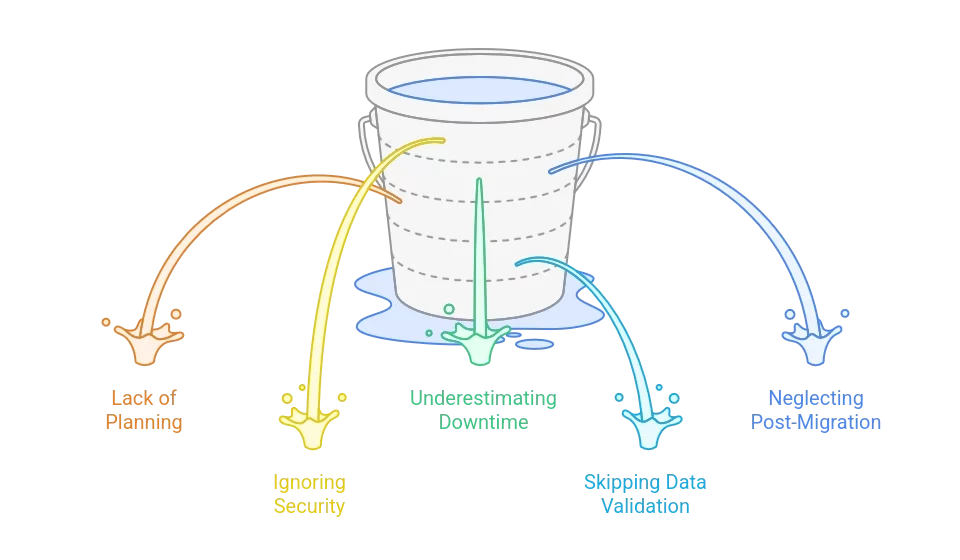
A well-prepared migration reduces risk and maximizes value. Partner with reliable hosting support to make your transition effortless and secure.
Hostinger Support and Kodee: Simplifying VPS Migration
Migrating to a VPS doesn’t have to be complicated. Hostinger provides expert human support along with its AI assistant, Kodee, to make migration smooth and stress-free.
Human Expert Assistance
Hostinger’s 24/7 Customer Success team offers hands-on help for complex technical challenges. Whether it’s configuration, troubleshooting, or guidance during migration, real experts are always available.
Kodee AI Assistant
Kodee simplifies VPS management through natural language commands. It can help you:
- Generate the right terminal commands instantly
- Troubleshoot server errors and configuration issues
- Monitor server performance and resource usage
- Manage backups and DNS records efficiently
Kodee acts as your on-demand technical partner, guiding you through every stage of the migration and even helping with post-migration management.
Planning a VPS migration? Let Hostinger’s experts and Kodee AI guide you every step of the way for a secure and optimized transition.
[Need assistance with a different issue? Our team is available 24/7.]
Conclusion
Careful planning ensures a smooth and secure transition when migrating VPS data with cPanel, CyberPanel, and DirectAdmin, keeping your services reliable and efficient.
In brief, our Support Experts demonstrated how to fix the “554 5.7.1 : Relay access denied” error.

