


Discover how to use cloud modernization services to evaluate, prioritize, modernize and optimize legacy workloads using a hands-on 7-step approach.
The benefits of cloud migration do not come for free. Moving an application does not automatically transform the problems that come with it. The servers may be out of the data centre. The application may now run on AWS, Azure, or Google Cloud. Deployments can still be too slow, legacy dependencies can still cause problems, and engineers may still have to spend a lot of time maintaining legacy software. Our Cloud Modernization Services help organizations address these issues by looking beyond the migration itself and identifying what needs to change in the application and its supporting infrastructure.
The servers may be out of the data centre. The application may now run on AWS, Azure, or Google Cloud. Deployments can still be too slow, legacy dependencies can still cause problems, and engineers may still have to spend a lot of time maintaining legacy software.
That is where cloud modernization services come in.
Modernization looks at more than where an application runs. It deals with the application, infrastructure, deployment process, and operating practices around it. One workload might only need a managed platform. Another may need code changes or a different architecture. A third may no longer be worth maintaining.
The first job is working out which situation applies to each workload.
An Overview
1. Assess the Existing Environment
Legacy environments rarely become difficult overnight.
Dependencies age. Documentation stops matching the code. Components that were once separate become dependent on one another. The people who know how the original system works may move to other projects.
Then a small change becomes a larger exercise.
Maintenance starts taking time away from development. Security can become harder too. Older systems were not necessarily designed around current security practices, modern threat models, zero-trust principles, or API-based integration. Adding those capabilities later can be complicated.
A cloud readiness assessment gives the team a better view of what is actually there.
Applications, infrastructure, dependencies, costs, and business importance can all be reviewed. That can reveal which systems are critical, which carry significant technical debt, which are redundant, and which may be better retired.
It also gives the modernization team something more useful than a generic cloud roadmap: a basis for deciding where investment is actually needed.
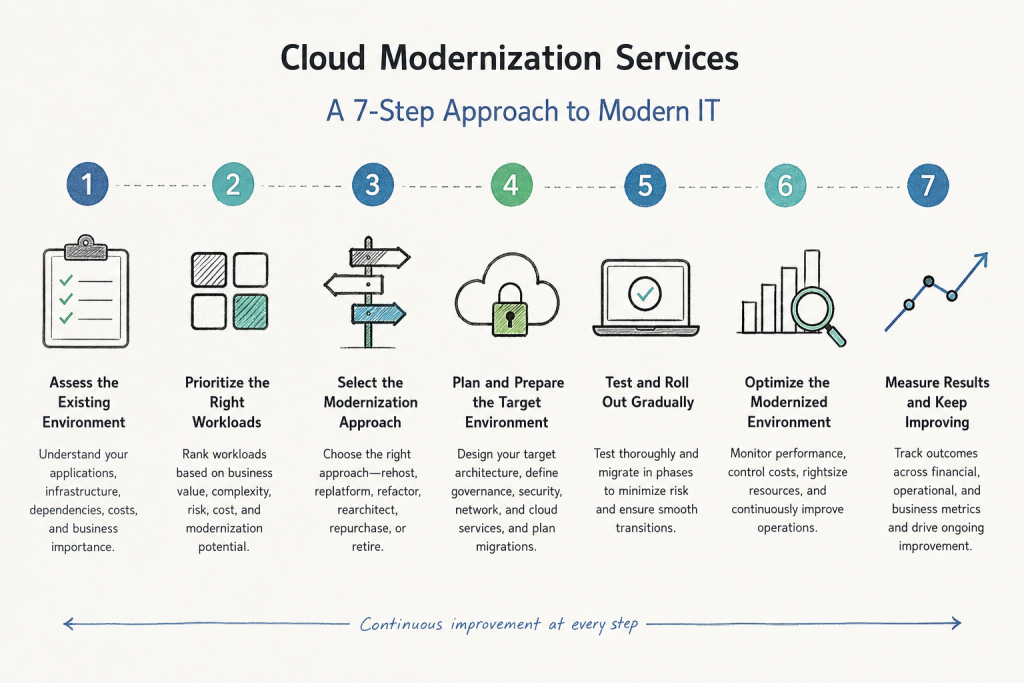
2. Prioritize the Right Workloads
Not every workload needs the same amount of work.
A stable application with limited strategic importance may not justify a major redesign. A critical system with serious scaling or maintenance problems could.
Workloads can be ranked according to business importance, complexity, risk, cost, dependencies, and the potential benefit of modernization.
That does not mean starting with the largest or most complicated application. A smaller system with fewer dependencies may be a better place to begin. It gives the organization an opportunity to test its approach before taking on a highly interconnected workload.
Some applications may need modernization. Others may only need a change to the platform. There may also be systems that no longer serve a useful business purpose.
Prioritization makes those differences visible before engineering effort is committed.
3. Select the Modernization Approach
Migration and modernization solve different problems.
Migration moves a workload. Modernization changes the workload or the way it operates.
A lift-and-shift approach can move an existing application into the cloud with very few modifications. That can be useful when compatibility or speed is the main concern.
But moving a legacy monolith to a cloud server does not turn it into a cloud-native application. Its deployment process may remain unchanged. Its performance limits may remain. Its operational overhead may remain too.
Modernization takes a deeper look at those limitations.
Teams might restructure the application, containerize it, connect it through APIs, or move it to managed cloud services. Infrastructure and deployment processes can also be automated.
AWS’s commonly used migration framework includes six approaches: rehost, replatform, refactor, rearchitect, repurchase, and retire.
These are different ways of dealing with existing applications, not six stages that every workload has to follow.
Rehost moves the application with minimal changes. Replatform involves moving it to an improved or managed platform with some adjustments. Refactor changes the application’s code structure, while rearchitect involves a more fundamental redesign.
There are also cases where rebuilding the application would be excessive. Repurchase involves replacing the existing system with a SaaS alternative, while retirement means removing an application that no longer provides enough business value to justify keeping it.
The choice should depend on the application and its role in the business.
Choosing between these approaches is not always straightforward. Our cloud engineers work with legacy applications, cloud infrastructure, and modernization projects, so they can assess the existing environment and help determine which approach makes sense for each workload. The recommendation can be different for every application, depending on its dependencies, business role, and technical condition.
Ready to modernize your cloud environment?

4. Plan and Prepare the Target Environment
Once the workloads and modernization approaches are clear, the target environment can be planned.
The organization may need to make decisions around cloud provider selection, multi-cloud requirements, landing zones, network topology, identity and access management, governance, and cost management.
Dependencies need attention at this point too. For example, one application may rely on a particular database, while another may depend on an identity service or network component. Moving those workloads in the wrong order can create unnecessary problems.
Establishing governance early makes the environment easier to manage. Security policies, access controls, tagging standards, and cost allocation should be defined before significant workloads are running.
Application changes may also be part of the preparation.
Depending on the workload, modernization could involve refactoring code, containerizing services, introducing API layers, or replacing custom-built components with managed cloud services.
For a new application or a substantial rebuild, cloud-native practices can be considered from the beginning. Containerized services, declarative configuration, automated scaling, and redundancy can be built into the design rather than added later.
The technology still needs to fit the application. Using Kubernetes, infrastructure as code, or deployment automation does not make a workload modern by itself.
5. Test and Roll Out Gradually
Build the proposed environment before making major production changes.
The team needs to check application behavior, integrations, performance, security, and recovery procedures. For significant changes, the team also needs a way back if the rollout does not behave as expected.
Phased delivery makes that easier to manage.
Where the architecture permits it, the existing and modernized environments can run alongside each other while traffic moves gradually. The team can then identify problems before they affect the entire environment.
It also gives the team something practical to work with. Lessons from one workload can inform the next.
The development process may need to change along with the technology. Moving from infrequent releases to weekly or daily delivery requires appropriate testing, tooling, deployment automation, and working practices.
A new architecture alone does not create a faster delivery process.
6. Optimize the Modernized Environment
Once workloads are running, actual usage provides better information about resource requirements.
Look at utilization, performance, scaling behavior, databases, storage, and spending. Rightsizing and automated scaling may be appropriate in some environments. Other systems may benefit from architectural changes.
Production visibility matters here.
A system can look fine during testing and still behave differently when real users generate traffic. Components can fail, capacity can change, and dependencies may become unavailable. Dashboards, alerts, runbooks, and useful production data give engineers a clearer view of what is happening.
The same information can uncover wasted resources.
Teams may find forgotten resources, unnecessary licensing, or workloads running on infrastructure larger than necessary. Depending on the environment, optimization may involve rightsizing, reserved or spot pricing, automated scaling, database refactoring, or caching.
Cloud cost needs to be considered alongside performance and reliability.
A lower bill is not an improvement if the reduction creates a production problem.
7. Measure Results and Keep Improving
Modernization does not stop when the workload reaches production.
The organization needs to know whether the changes achieved what they were intended to achieve.
Financial measures can include total cost of ownership, cloud cost efficiency, and the time required to bring new products or features to market.
Operational measures can include deployment frequency, mean time to recovery, and availability against service level objectives.
Business measures can include application performance, customer experience, user satisfaction, and revenue indicators connected to digital products and services.
The useful part is connecting those measurements.
A higher deployment frequency matters more when it helps the organization deliver something valuable sooner. Improved application performance matters when customers experience the difference.
Cloud spending also needs ongoing attention. Resource consumption changes over time, and architecture decisions can affect the bill directly. FinOps practices such as resource tagging, budgets, and alerts can give engineering teams better visibility into those decisions.
The same applies to reliability and performance. As requirements and traffic change, new problems can also appear.
The modernized environment therefore needs ongoing attention rather than another large transformation project every few years.
Conclusion
There is no universal modernization path.
Start with the existing environment. Identify the applications that matter, understand their dependencies and costs, and determine where legacy technology is creating the most pressure.
Then work through the seven steps: assess the environment, prioritize workloads, choose the right modernization approach, prepare the target environment, test and roll out changes, optimize the result, and keep improving it.
Some applications will need relatively little change. Others may need refactoring or rearchitecting. Some may be better retired.
The point is not to modernize everything in the same way. It is to make the changes that are justified by the application’s condition, business value, and technical requirements.
That is the purpose of cloud modernization services: helping organizations decide what needs to change, carry out that work in manageable stages, and keep the resulting environment useful in production.

