


Explore practical hybrid cloud strategies for workload placement, security, networking, automation, cost control, and reliable operations across cloud and on-premises environments.
A growing enterprise rarely has the luxury of running everything in one environment. An older application may still depend on infrastructure in the company’s data center. A newer customer-facing service may already run in a public cloud. A factory may have systems that need to process data locally, while business teams use SaaS applications for everyday operations. Bobcares’ Hybrid Cloud Management services help businesses manage these mixed environments with consistent operational practices across cloud and on-premises infrastructure.
Those systems do not necessarily need to be consolidated. In fact, forcing them into one environment can create unnecessary migration work or introduce new performance, security, and compliance problems. The more useful question is where each workload should run and what the organization needs to do to operate it reliably.
That is the practical role of a hybrid cloud strategy.
The infrastructure can remain distributed. What should not become distributed are the basic rules for managing it. Identity, security, monitoring, deployment, networking, backup, and cost controls need to work across the environments involved. Otherwise, every new branch, application, or cloud service adds another isolated environment for the IT team to maintain.
- Start With Where the Workload Actually Belongs
- Build the Hybrid Environment Around Common Controls
- Network Design Can Decide Whether the Architecture Works
- Do Not Treat Data Placement as an Afterthought
- Automation Should Cover Deployment and Recovery
- Bring Cost Into Workload Placement
- Give Teams a Common Operating Model
- Select Tools for the Problems You Actually Have
- Mistakes That Create Hybrid Cloud Problems
- Why Bobcares
- Conclusion
Start With Where the Workload Actually Belongs
Workload placement should be based on requirements, not on a general preference for public cloud or private infrastructure.
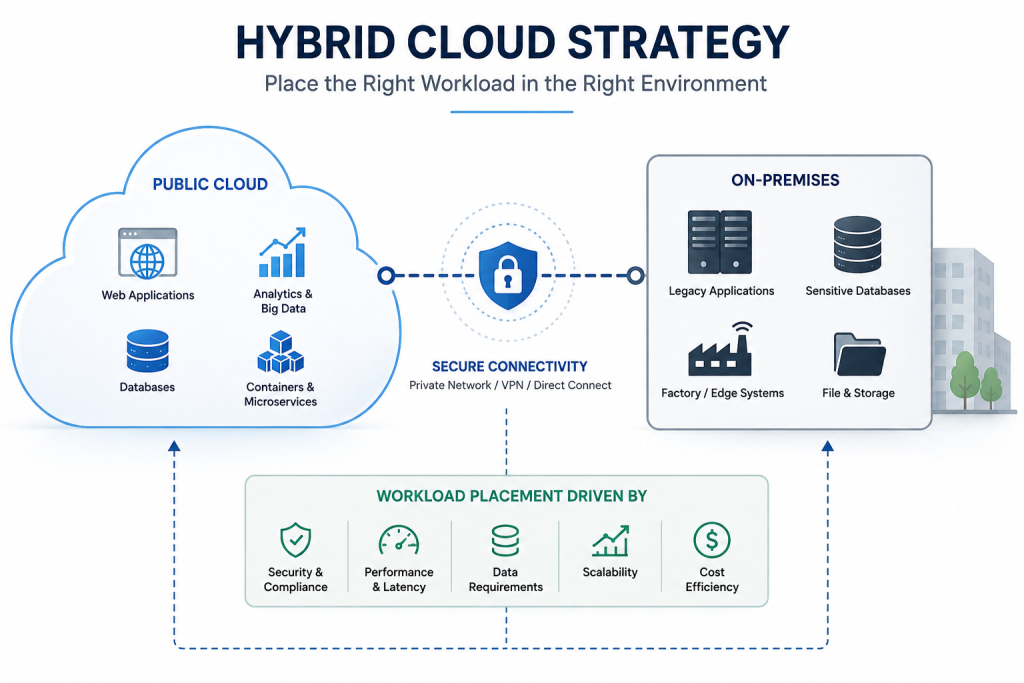
Start by looking at the application itself. How important is it to the business? How sensitive is its data? What latency can it tolerate? What does it depend on today? How quickly is its capacity expected to grow?
Dependency mapping can change the answer.
An application might appear to be an easy cloud migration candidate until the team finds that it relies on a database, internal API, file server, scheduled job, or firewall rule that remains on-premises. Moving the application without dealing with those dependencies simply creates a new network dependency between two environments.
Different workloads can also lead to different decisions.
A payment service may require tightly controlled access and predictable performance. A reporting platform may benefit from public cloud analytics capabilities. An archive database may have very different requirements, with durable and inexpensive storage taking priority over compute performance.
There is no requirement for all three to use the same landing zone.
This approach also makes incremental modernization possible. An enterprise can move or redesign parts of an application as their dependencies are addressed rather than treating modernization as a single migration event.
Build the Hybrid Environment Around Common Controls
Once workloads are spread across environments, inconsistent administration becomes a problem.
A cloud account may have one set of access rules while private servers follow another. One environment may have centralized logging while another keeps logs locally. Backup policies may also differ.
Some differences are unavoidable because the platforms are different. The underlying requirements should not be.
Define common standards for identity and access, tagging, encryption, backup, auditing, and configuration. Single sign-on, least-privilege access, and multifactor authentication should be applied wherever the environment supports them.
Tools such as Azure Arc, Kubernetes policy engines, cloud-native policy services, and configuration management platforms can help enforce or monitor these requirements.
The important part is deciding the policy first. A management platform does not create governance by itself.
The same principle applies to security. A cloud workload and a private server may use different security products, but both should have defined requirements for access control, vulnerability scanning, encryption, and logging.
Centralized visibility becomes particularly useful when an application crosses infrastructure boundaries. An application error in the public cloud might be related to a database problem or network event in the private environment. If those systems are monitored independently, the connection can be easy to miss.
Network Design Can Decide Whether the Architecture Works
Moving an application changes its network relationships.
That is easy to overlook when migration planning focuses mainly on compute and storage.
Before moving a workload, identify the systems it communicates with and map the paths between them. Review IP ranges, routing, DNS behavior, firewall rules, service discovery, network segmentation, and the connectivity method between locations.
VPNs and private circuits may provide the required connection, but the design also needs to consider failure. What happens if a tunnel drops? Which services become unreachable? Does the application fail immediately, or can it continue operating temporarily?
Latency deserves a similar level of attention.
Build a Hybrid Cloud Strategy That Actually Works

Suppose an application and its database currently run in the same data center. The application can make frequent database calls without introducing significant network delay. If the application is moved to a public cloud while the database stays where it is, those calls now cross the hybrid connection.
The application may still work. It may simply work more slowly.
That distinction matters because a migration can be technically successful while still producing a poor user experience.
Large data transfers can create another problem. Replication, backups, analytics pipelines, or file transfers between environments can consume bandwidth and increase network costs.
For that reason, network planning should happen before workloads move, not after connectivity problems appear.
Do Not Treat Data Placement as an Afterthought
Where an application runs does not automatically determine where its data should live.
Some information may need to remain within a particular country because of regulatory or business requirements. A factory may need operational data available locally. At the same time, another copy may be sent to the public cloud for analytics.
Those decisions need explicit ownership.
Before introducing replication, identify the authoritative data source and determine which systems require copies. Establish who can access each copy, how long it should be retained, how often it should synchronize, and what happens when replication fails.
Data consistency needs to match the application as well. A reporting workload may tolerate delayed replication that would be unacceptable for another application.
The volume of data moving between environments matters too. Large and continuous transfers can affect both performance and cost.
Without a clear data strategy, hybrid infrastructure can gradually accumulate duplicate databases and storage copies. Eventually, teams may no longer know which copy is authoritative or whether an old copy can safely be removed.
Automation Should Cover Deployment and Recovery
Manual configuration becomes harder to control as the number of environments increases.
Infrastructure as code can define repeatable infrastructure. CI/CD pipelines can standardize application deployment. Configuration management and automated patching reduce repetitive administration. Standard deployment templates allow teams to create approved environments without rebuilding the same configuration for every workload.
The recovery side is just as important.
A manually configured server can depend heavily on the administrator who originally built it. That knowledge may not be available during an outage. Rebuilding a hybrid workload can be even more complicated because the application may depend on resources in several environments.
Infrastructure definitions should therefore account for the parts that need to be recreated: cloud resources, private servers, network configuration, access policies, and dependent services.
Automation does not mean every operation becomes fully unattended. It means the organization is less dependent on undocumented manual steps when deploying or recovering a workload.
Bring Cost Into Workload Placement
FinOps should not begin after the first large cloud bill arrives.
Public cloud resources can be reviewed through tagging, budgets, rightsizing, reserved capacity planning, and cleanup of unused assets. Private infrastructure needs the same level of attention.
A virtual machine that has been allocated far more resources than it requires still consumes capacity. Hardware sitting idle represents an investment that is not being used. These costs may not appear in the same way as a cloud invoice, but they belong in the infrastructure review.
Data transfer can alter the calculation again.
A workload with modest compute requirements may generate substantial traffic between the public cloud and a private environment. The resulting transfer costs and latency can make an architecture less attractive than it appeared during the initial design.
Cost should therefore be considered alongside workload requirements, not treated as a separate exercise after deployment.
Give Teams a Common Operating Model
Technology alone will not keep a hybrid environment organized.
Infrastructure, security, development, finance, and business operations all have a role. Without clearly defined responsibilities, problems can move between teams without anyone owning the complete workload.
A platform team can define approved patterns and landing zones. Application teams can then use those patterns through self-service processes instead of designing their own infrastructure controls each time.
For example, landing zones can be prepared for common workload types such as web applications, databases, analytics, and disaster recovery.
Observability needs similar coordination. Logs, metrics, traces, and alerts from the relevant environments should provide enough information to troubleshoot an application end to end.
Ownership should be explicit as well. Each workload needs an owner, support contact, backup responsibility, and cost center.
This matters during incidents. If an application is running in the cloud but its database and authentication service remain on private infrastructure, someone needs to own the complete service rather than only one component of it.
Regular reviews then keep the model from becoming stale. Architecture, security, capacity, and cost requirements change as applications and businesses change.
Select Tools for the Problems You Actually Have
Hybrid cloud does not require a large collection of management platforms.
Azure Arc, Google Distributed Cloud, Red Hat OpenShift, VMware Cloud Foundation, Terraform, Ansible, and Kubernetes can support different hybrid requirements. They should be evaluated according to the environment in which they will operate and the problem they are expected to solve.
An organization with an established VMware environment may have different priorities from one standardizing its applications on Kubernetes. A team focused on repeatable infrastructure provisioning may need Terraform, while configuration automation may make Ansible useful.
Existing technical skills matter too. So do auditing, networking, automation, application modernization, and the ongoing effort required to operate the platform.
Adding a tool simply because it supports hybrid cloud does not necessarily simplify hybrid cloud. The additional management layer has to justify itself.
Mistakes That Create Hybrid Cloud Problems
Some failures are architectural rather than platform-specific.
- Moving a workload without mapping dependencies can leave it dependent on systems in the original environment.
- Applying different standards to different environments creates gaps in security and makes incident investigation more difficult.
- Ignoring latency and data transfer can turn an apparently successful migration into a performance or cost problem.
- Leaving ownership undefined makes troubleshooting slower when an application crosses cloud, private infrastructure, networking, and security boundaries.
- Treating a hybrid cloud as a completed project is another common mistake. Workload requirements change. New branches appear. Applications are modernized. Compliance requirements are updated. Capacity grows.
The architecture has to be reviewed as those conditions change.
Conclusion
A hybrid cloud strategy is useful when an enterprise has different reasons for keeping workloads in different places.
A customer-facing application may need public cloud capacity. A sensitive database may remain on private infrastructure. A factory may need local processing. Another workload may be ready for modernization while its dependencies are not.
The technical challenge is making those decisions work together.
That requires more than connectivity between a data center and a cloud account. The organization needs a way to classify workloads, map dependencies, control access, secure data, monitor applications across boundaries, automate deployment and recovery, and understand the full cost of operating the architecture.
The infrastructure can remain mixed. The operating discipline cannot.
A good hybrid cloud strategy gives each workload a reason to be where it is, while giving the teams responsible for that workload a consistent way to manage it as the business changes.

