


Install Puppet on a DigitalOcean VPS to automate and simplify server management. Our DigitalOcean Support team is ready to assist you.
Installing Puppet on a DigitalOcean VPS for Efficient Server Automation
Puppet is an automation tool that enables organizations to manage IT infrastructure efficiently. By defining the desired state of systems using a declarative language, Puppet ensures consistency, security, and speed in deployments. Its automation capabilities reduce errors, enhance compliance, and enable faster, reliable releases through infrastructure as code.
Understanding Puppet and Its Role in Automation
Puppet simplifies infrastructure management by automating provisioning, configuration, and ongoing maintenance. It uses a master-agent architecture, where a central Puppet master distributes configuration to agent nodes.
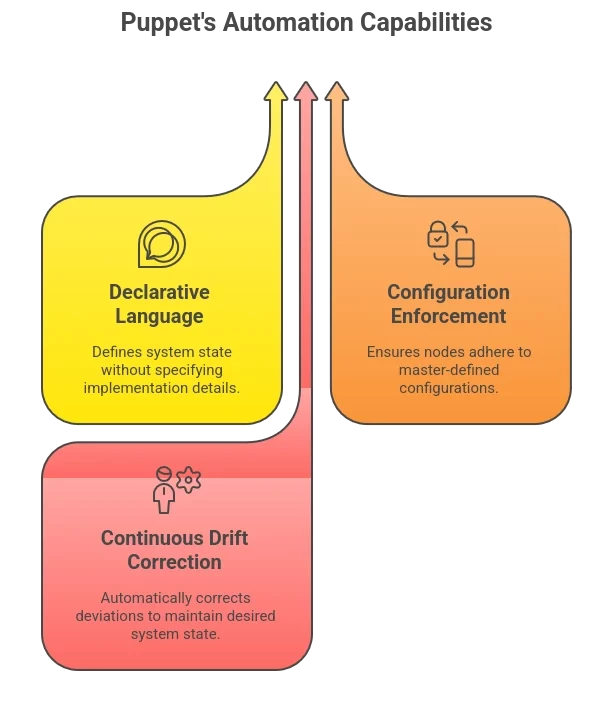
Key features include:
- Declarative Language: Define what the system should look like, not how to get there.
- Configuration Enforcement: Agents pull configurations from the master to align with the desired state.
- Continuous Drift Correction: Puppet constantly monitors systems and corrects deviations automatically.
Benefits for businesses:
- Consistent system configurations across servers and applications
- Scalability for managing thousands of nodes effortlessly
- Faster deployments and higher operational efficiency
- Enhanced security and compliance through automated enforcement
- Seamless integration with DevOps pipelines
Integrating monitoring tools such as the DigitalOcean metrics agent can further enhance visibility into Puppet-managed environments, helping teams analyze node performance and resource utilization efficiently.
Preparing Ubuntu Servers for Puppet Setup
Before installation, ensure your servers are ready for Puppet Master and Agent configuration.
Essential preparation steps:
- Update System Packages
Run updates on both master and agent nodes:
sudo apt update && sudo apt upgrade -y- Configure Hostname Resolution
Edit /etc/hosts to ensure master and agents can communicate:
sudo nano /etc/hosts

<puppet_master_ip> puppetmaster

<puppet_agent_ip> puppetagent- Install Puppet Repository
Add the official Puppet repository suitable for your Ubuntu version:
wget https://apt.puppet.com/puppet8-release-noble.deb

sudo dpkg -i puppet8-release-noble.deb

sudo apt update
With these steps, your servers are ready for Puppet installation and secure communication.
Installing and Configuring Puppet Server on Ubuntu
The Puppet Master server manages all configuration tasks for agents. Follow these steps for a
- Install Puppet Server
sudo apt install puppetserver -y- Configure Memory Allocation
Adjust JVM settings in /etc/default/puppetserver to optimize performance:
JAVA_ARGS="-Xms2g -Xmx2g"- Start and Enable the Service
sudo systemctl start puppetserver

sudo systemctl enable puppetserver

sudo systemctl status puppetserver- Manage Certificates
Sign agent certificate requests to enable secure communication:
sudo puppetserver ca list

sudo puppetserver ca sign --certname <agent_hostname>
Setting Up Puppet Agents and Secure Communication
Agents pull configurations from the master and require secure certificate-based authentication.
Steps to set up agents:
- Install Puppet Agent
sudo apt install puppet-agent -y- Configure the Agent
Edit /etc/puppetlabs/puppet/puppet.conf:
[main]

server = puppetmaster.example.com

certname = puppetagent.example.com

environment = production- Start and Enable the Service
sudo systemctl enable --now puppet

sudo systemctl start puppet

sudo puppet agent -t- Verify Communication
Ensure the agent retrieves the configuration catalog successfully.
Creating and Testing Your First Puppet Manifest
Manifests define the desired state of your systems. Begin with a simple example:
- Create site.pp in the manifests directory
/etc/puppetlabs/code/environments/production/manifests/site.pp- Define Resources
package { 'nginx':

ensure => 'installed',

}

file { '/etc/nginx/nginx.conf':

ensure  => 'present',

content => "...",

owner   => 'root',

group   => 'root',

mode => '0644',

}
Test the Manifest
- Validate syntax:
puppet parser validate site.pp- Dry run:
puppet apply --noop site.pp- Apply changes:
puppet apply site.pp
Optimizing, Troubleshooting, and Scaling Puppet
For large infrastructures, efficiency and reliability are crucial.
Optimizations:
- Implement roles and profiles for code reuse
- Use Hiera for configuration data management
- Adjust JVM heap and JRuby instances for Puppet Server
- Stagger agent check-ins to avoid peak load
Troubleshooting Tips:
- Ensure network connectivity and correct hostname resolution
- Sign pending agent certificates
- Monitor logs for slow runs or memory errors
Scaling Strategies:
- Horizontal scaling with compile masters and load balancers
- Vertical scaling by increasing hardware resources
- Hybrid cloud scaling using autoscaling agents and ENCs
When expanding infrastructure, administrators can migrate Redis data to a DigitalOcean instance to enhance data caching and coordination across Puppet environments, ensuring consistent performance during scaling operations.
[Need assistance with a different issue? Our team is available 24/7.]
Conclusion
Installing Puppet on a DigitalOcean VPS empowers you to automate server tasks, maintain consistency, and scale efficiently. Take control of your infrastructure today and simplify management like a pro.
In brief, our Support Experts demonstrated how to fix the “554 5.7.1 : Relay access denied” error.

